EasyManua.ls Logo

Kyocera 255b - Size Entry

Kyocera 255b
366 pages
Print Icon
To Next Page IconTo Next Page
To Previous Page IconTo Previous Page
Loading...
3-33
Common Operations > Using Various Functions
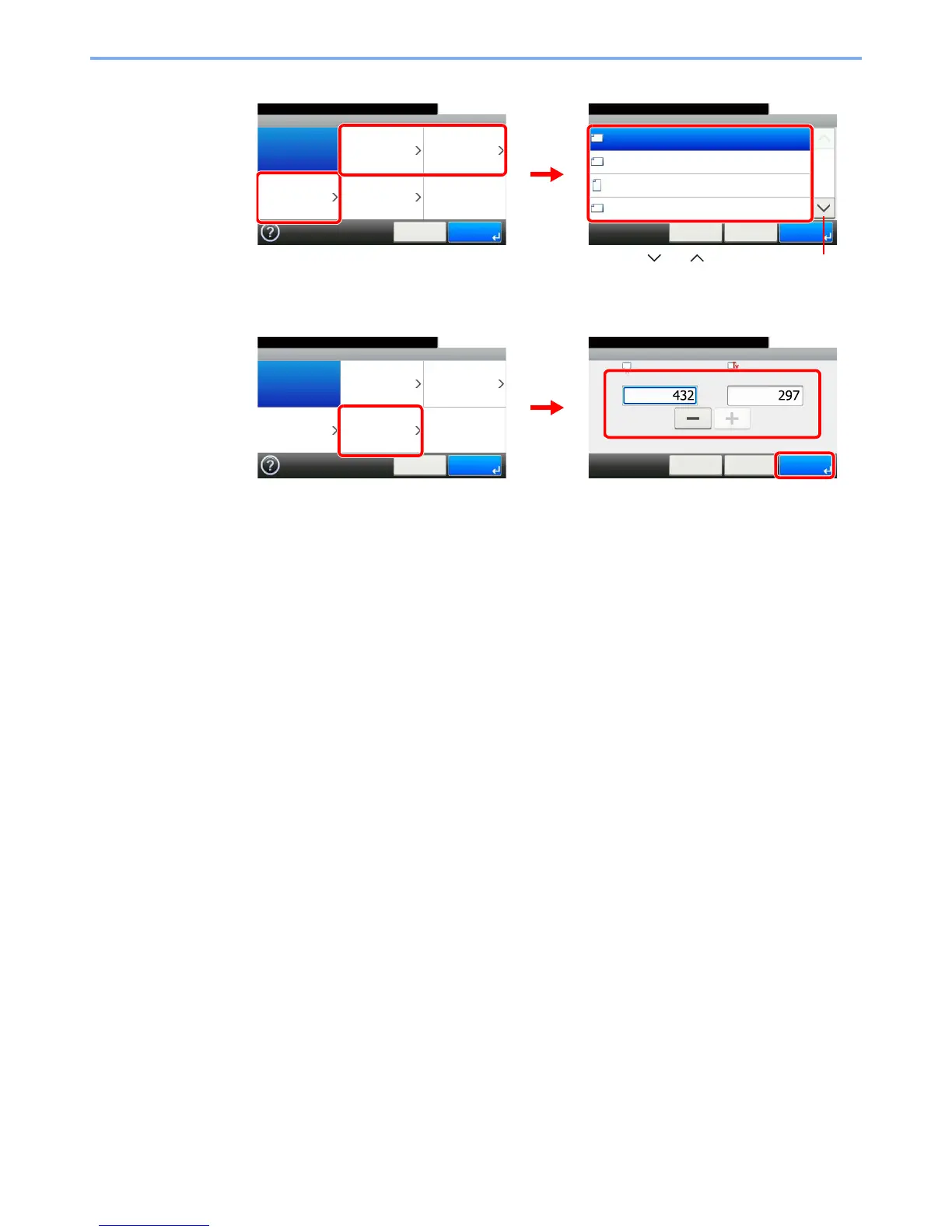
[Metric], [inch], or [Others]
Select the original size.
[Size Entry]
Press the text box displaying the numbers and use [-]/[+] or the numeric keypad to enter a
value.
Original Size - Metric
A3
10:10
A4
A4
A5
1/4
OK
OK< BackCancel
Ready to copy.
Ready to copy.
Original Size
Auto Metric Inch
Others
10:10
Cancel OK
Size Entry
GB0025_00
GB0026_00
1
2
Use [ ] or [ ] to scroll up and down.
Original Size - Size Entry
10:10Ready to copy.
mm
X (50 - 432)
< BackCancel
Y (50 - 297)
mm
OK
Ready to copy.
Original Size
Auto Metric Inch
Others
10:10
Cancel OK
Size Entry
1
GB0025_00
GB0029_00
3
2

Table of Contents

Other manuals for Kyocera 255b

Related product manuals