EasyManua.ls Logo

Kyocera 255b - Function Type

Kyocera 255b
366 pages
Print Icon
To Next Page IconTo Next Page
To Previous Page IconTo Previous Page
Loading...
3-16
Common Operations > Favorites
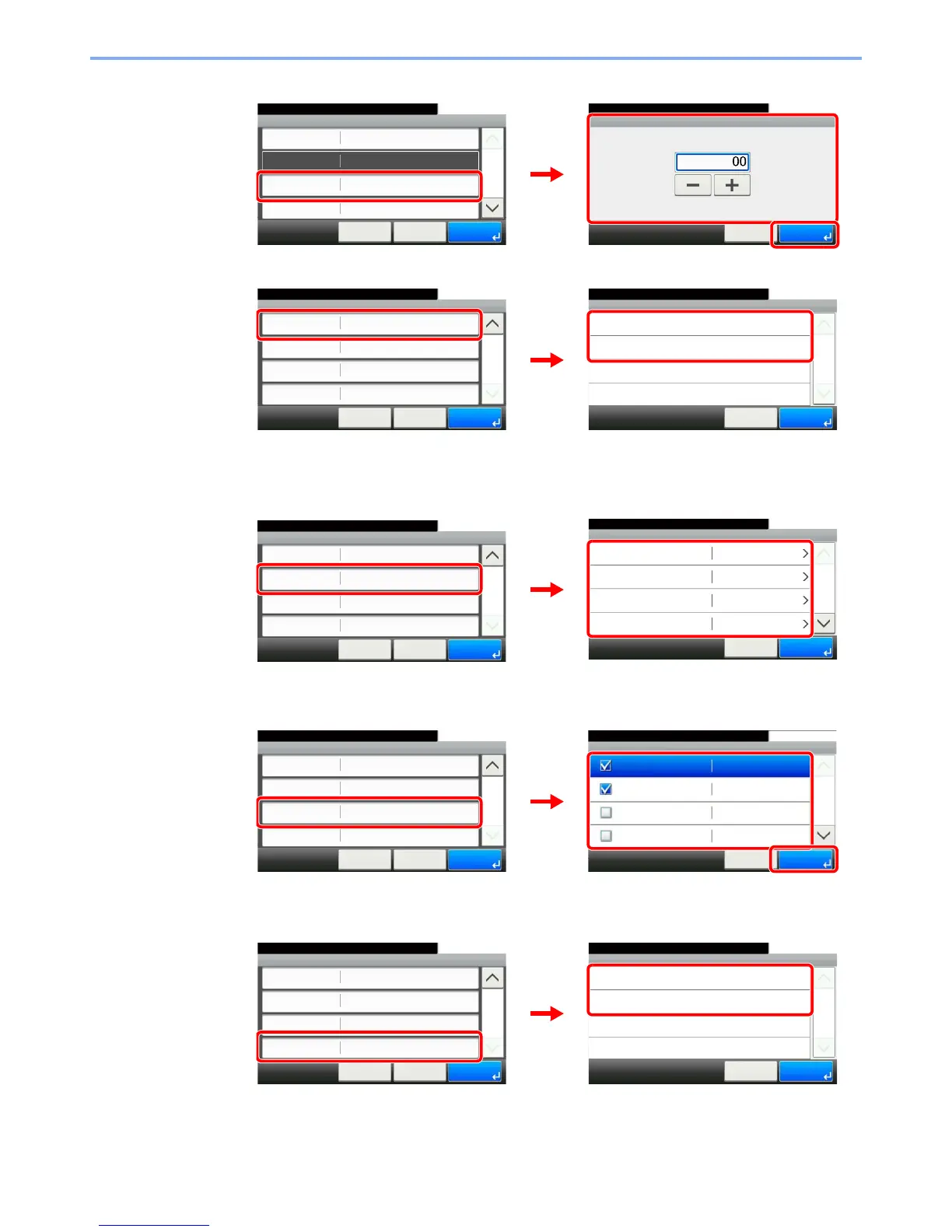
[Number]
[Permission]
Configures permission settings for favorites to determine how they are shared with other
users.
[Destination]
When the job type is [Send] or [FAX], selects the Destination Recall Method.
[Functions]
If you selected wizard mode, check the function and make changes as necessary.
[Function Type]
Add - Confirmation
Sending Job - E-mail
10:10
Cancel
Select the item that you want to change.
Job Type
Number
Owner
Name
Multi Sending
Admin
< Back
1/2
Save
Auto
GB0760_00
Number
10:10
(00 - 20)
Cancel
OK
3
GB0766_00
1
2
Permission
10:10
Shared
Private
Cancel
1/1
OK
GB0305_00
Add - Confirmation
Private
10:10
Cancel
Select the item that you want to change.
Destination
Functions
Function Type
Permission
Address Book
Wizard
< Back
2/2
Save
2
GB0766_02
1
2
Destination
10:10
Address Book
1/2
OKCancel
Ext. Address Book
One Touch Key
Address Entry (E-mail)
Add - Confirmation
Private
10:10
Cancel
Select the item that you want to change.
Destination
Functions
Function Type
Permission
Address Book
Wizard
< Back
2/2
Save
2
GB0771_00
GB0766_02
1
2
Functions
10:10
File Format
Cancel
1/6
OK
Original Size
Original Orientation
Mixed Size Originals
PDF
Auto
Top Edge on Top
Off
GB0773_00
Add - Confirmation
Private
10:10
Cancel
Select the item that you want to change.
Destination
Functions
Function Type
Permission
Address Book
Wizard
< Back
2/2
Save
2
GB0766_02
1
2
3
Function Type
10:10
Wizard
Program
< Back
1/1
OK
GB0775_00
Add - Confirmation
Private
10:10
Cancel
Select the item that you want to change.
Destination
Functions
Function Type
Permission
Address Book
Wizard
< Back
2/2
Save
2
GB0766_02
1
2

Table of Contents

Other manuals for Kyocera 255b

Related product manuals