3-15
Common Operations > Favorites
3
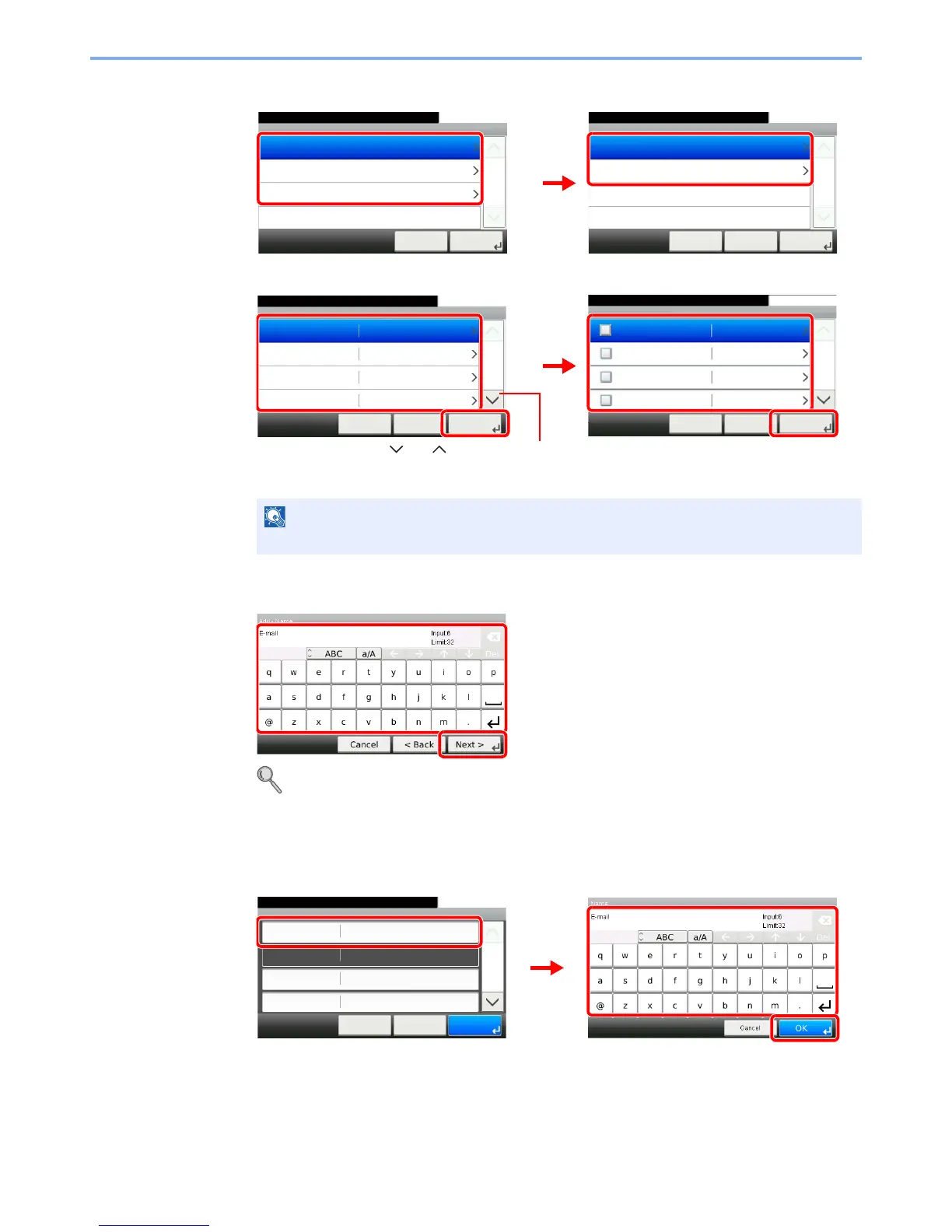
Select the job type.
When you select the wizard mode
Select the function. Checked items will be shown as part of the wizard.
4
Enter a name.
Refer to Character Entry Method on page 11-7 for details on entering characters.
5
Check the settings.
Check the settings and change or add information as needed.
[Name]
When the job type is Copy, the Destination Recall Method screen will not be displayed.
Add - Job Type
10:10Select the job type.
Send
FAX
Copy
Cancel
1/1
Next >
Add - Function Type
10:10Select how to recall the function.
Wizard
Program
< BackCancel
1/1
Next >
Add - Functions
10:10
File Format
Cancel
1/6
Next >< Back
Original Size
Original Orientation
Mixed Size Originals
PDF
Auto
Top Edge on Top
Off
Add - Destination Recall Method
10:10
Address Book
Cancel
1/2
Next >< Back
Ext. Address Book
One Touch Key
Address Entry (E-mail)
GB0767_00
Use [ ] or [ ] to scroll up and down.
GB0769_00
24
13
Add - Confirmation
Sending Job - E-mail
10:10
Cancel
Select the item that you want to change.
Job Type
Number
Owner
Name
Multi Sending
Admin
< Back
1/2
Save
Auto









 To Next Page