6-33
Sending > Adding a Destination on One Touch Key
Adding a Destination on One Touch Key
Add a new destination (contact or group) on One Touch Key.
Adding a Destination
Add a new destination (contact or group). A maximum of 100 destinations can be registered.
To register a destination to a One Touch Key, it must first be registered in the Address Book. Register one or more
destinations as needed before proceeding.
1
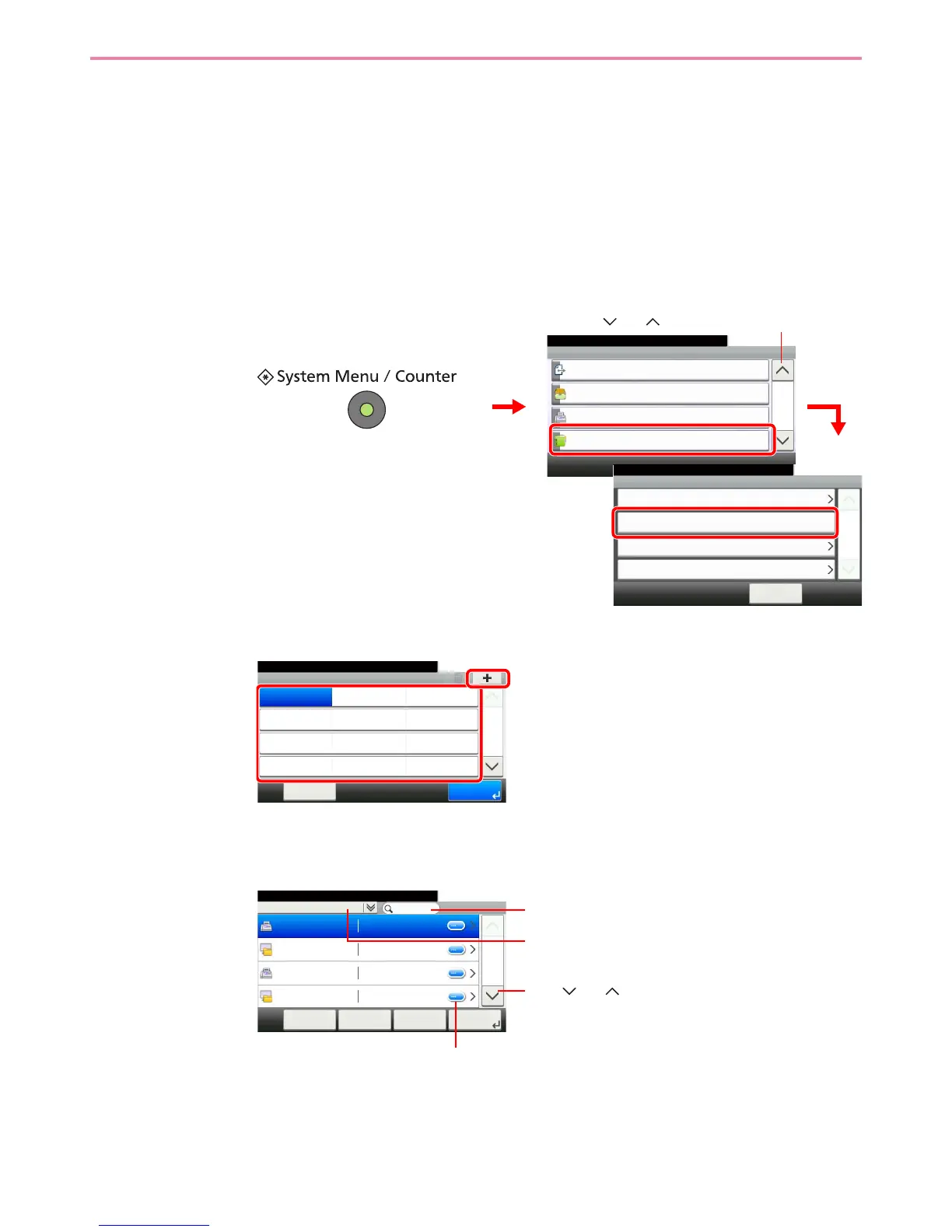
Display the screen.
2
Add a One-Touch Key.
Select a One Touch Key with no registered destination, and press [+].
3
Select the destinations.
Select one destination (contact or group) from the Address Book.
You can specify a destination by address number by pressing the Quick No. Search key.
GB0429_00
Displays details for individual destinations.
Searches by destination name.
Advanced search by type of registered destination (E-
mail, Folder (SMB/FTP), FAX or Group).
Use [ ] or [ ] to scroll up and down.











 To Next Page