3-26
Common Operations > Quick Setup Wizard
Quick Setup Wizard
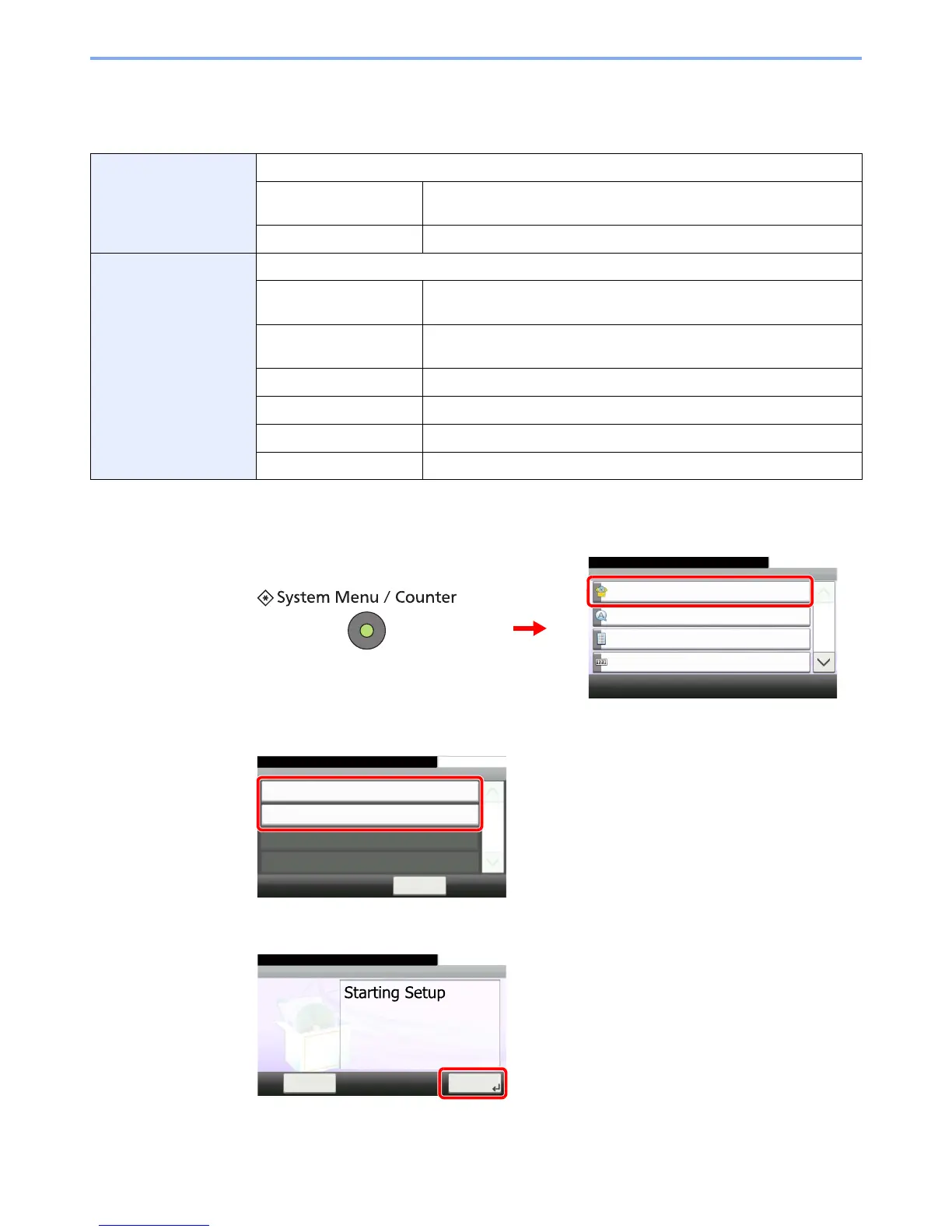
Make the following basic settings as instructed by the Wizard:
1
Display the screen.
2
Select a function.
3
Configure the function.
Energy Saver Setup Configures sleep mode and low-power mode.
1. Sleep Mode Sleep Mode - Auto Sleep, Sleep Mode - Sleep Timer,
Sleep Mode - Sleep Level
2. Low Power Mode Low Power Mode - Low Power Timer
FAX Setup*
* This function is displayed when the optional fax is installed.
Configures basic fax settings.
1. Dialing/RX Mode Dialing/RX Mode - Dialing Mode, Dialing/RX Mode - Reception Mode,
Dialing/RX Mode - Auto (DRD)
2. Local FAX Info. Local FAX Info. - Local FAX Number, Local FAX Info. - Local FAX ID,
Local FAX Info. - Print Position
3. Sound Volume Sound Volume - Confirmation, Speaker Volume, Monitor Volume
4. Rings Rings - Confirmation, Answering Machine, FAX/TEL Switch
5. Output Output - Paper Output, Output - Reduced RX Size
6. Redial Redial - Retry Times











 To Next Page