3-14
Common Operations > Favorites
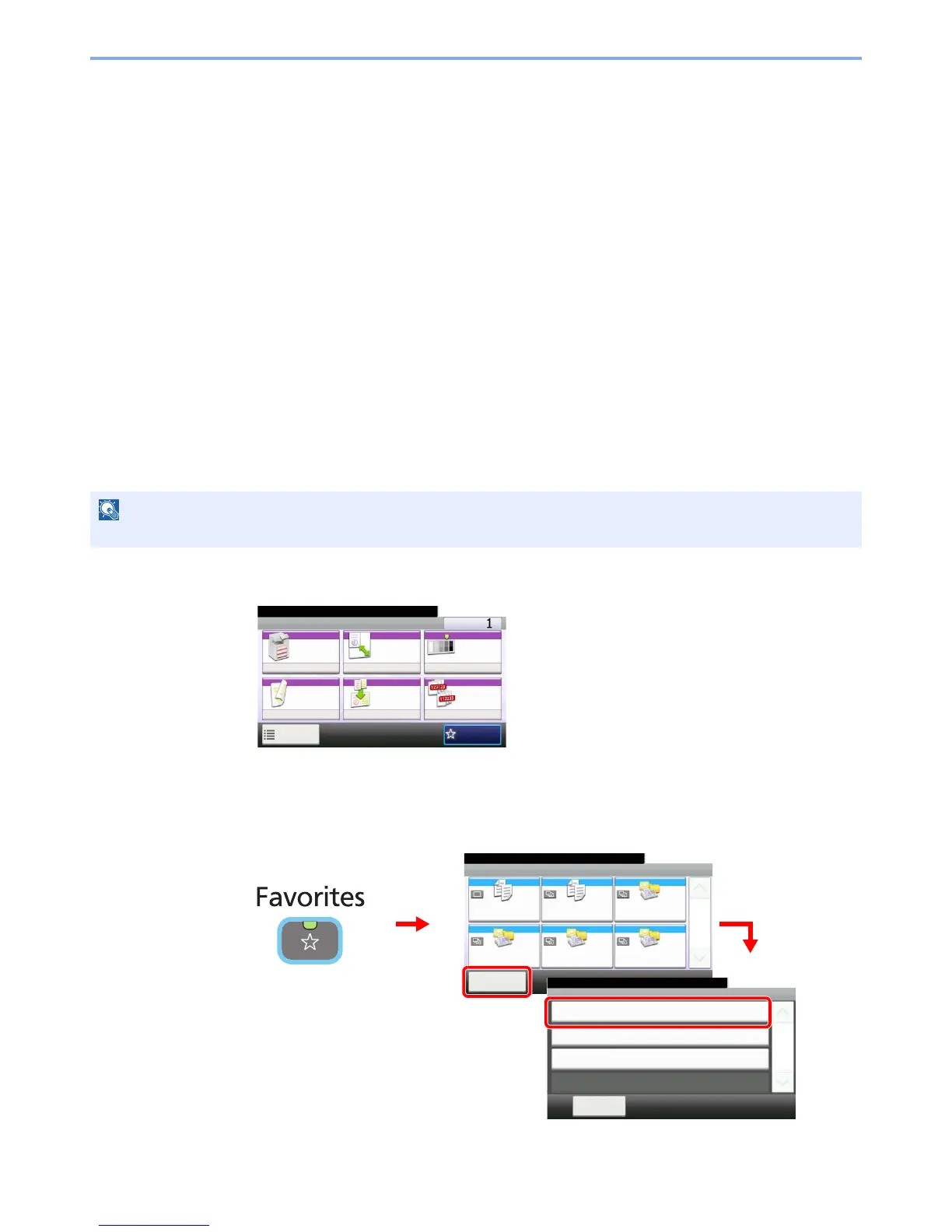
Favorites
Frequently used functions can be registered as favorites so that they can be called up easily.
The following functions are pre-registered on this machine. You can delete these functions as well as register new
functions. The functions created by the external software, such as File Management Utility, are also displayed here.
• ID Card Copy
• Paper Saving Copy
• Scan to PC (Address Entry)
• Scan to PC (Address Book)
• Scan to E-mail (Address Entry)
• Scan to E-mail (Address Book)
Registering Favorites
When registering a favorite, you can choose from two methods for calling it up:
• Wizard mode: Registered settings are called up in order and configured as you check or change each one.
• Program mode: Settings are called up immediately when you press the key to which they are registered.
1
Configure the function.
When registering favorites in program mode, configure the copy function, send function, fax
function (option), destination, or other setting to register.
2
Display the screen.











 To Next Page