EasyManua.ls Logo

Kyocera 255b - Page 336

Kyocera 255b
366 pages
Print Icon
To Next Page IconTo Next Page
To Previous Page IconTo Previous Page
Loading...
11-6
Appendix > Optional Equipment
2
Start using an application.
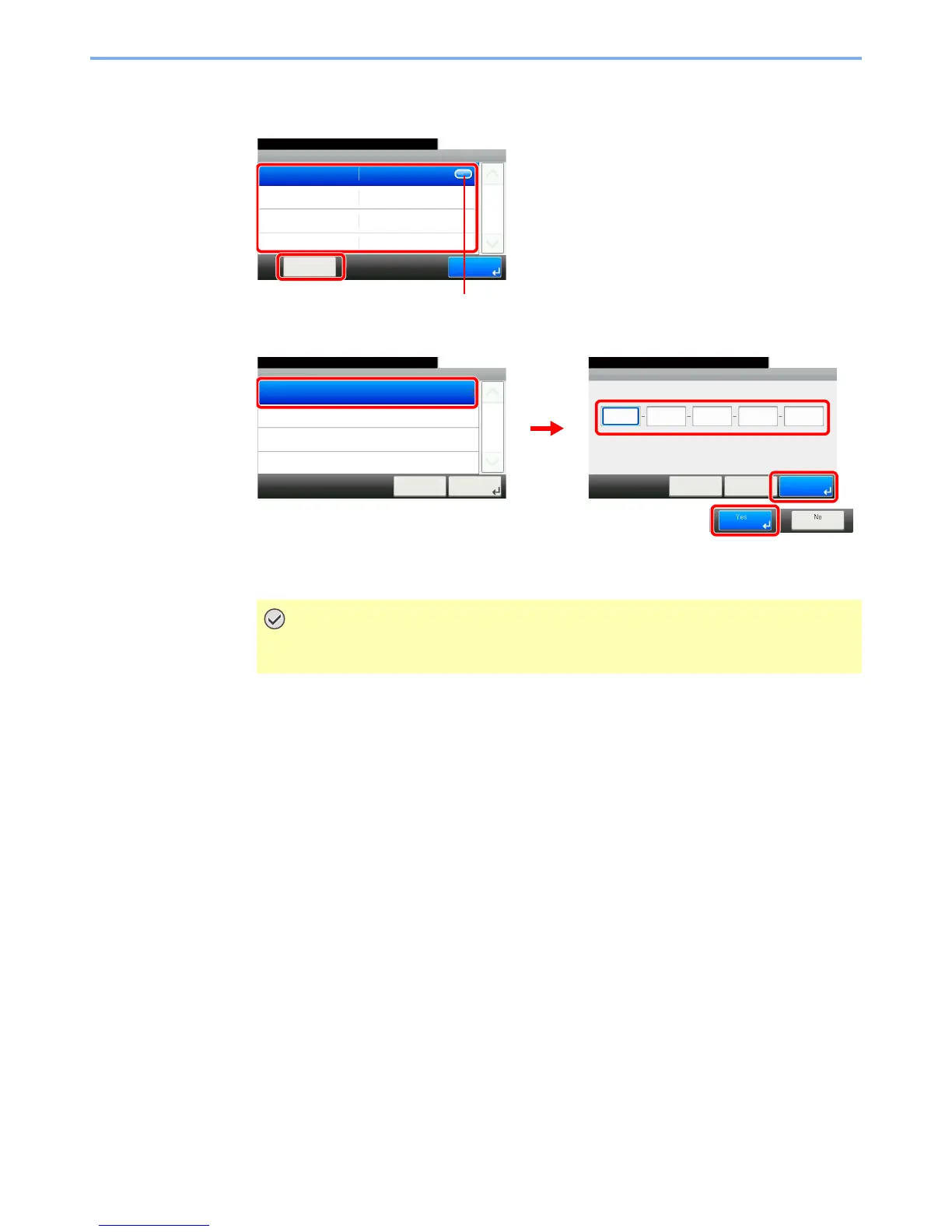
1 Select the desired application and press [Activate].
2 Select [Official] and enter the license key using the numeric keys.
Some applications do not require you to enter a license key.
To use the application as a trial, select [Trial].
IMPORTANT
If you change the date/time while using an application, you will no longer be able to
use the application
System - Optional Function
10:10System Menu/Counter.
IC CARD AUTHENTI...
Activate
1/1
End
GB0557_00
1
2
Displays details for individual applications.
Activate
10:10System Menu/Counter.
Trial
Official
Cancel
1/1
Next >
GB0608_00
Activate - License Key
10:10System Menu/Counter.
< Back OKCancel
GB0609_00
1
2
3
4

Table of Contents