Phone Basics 16
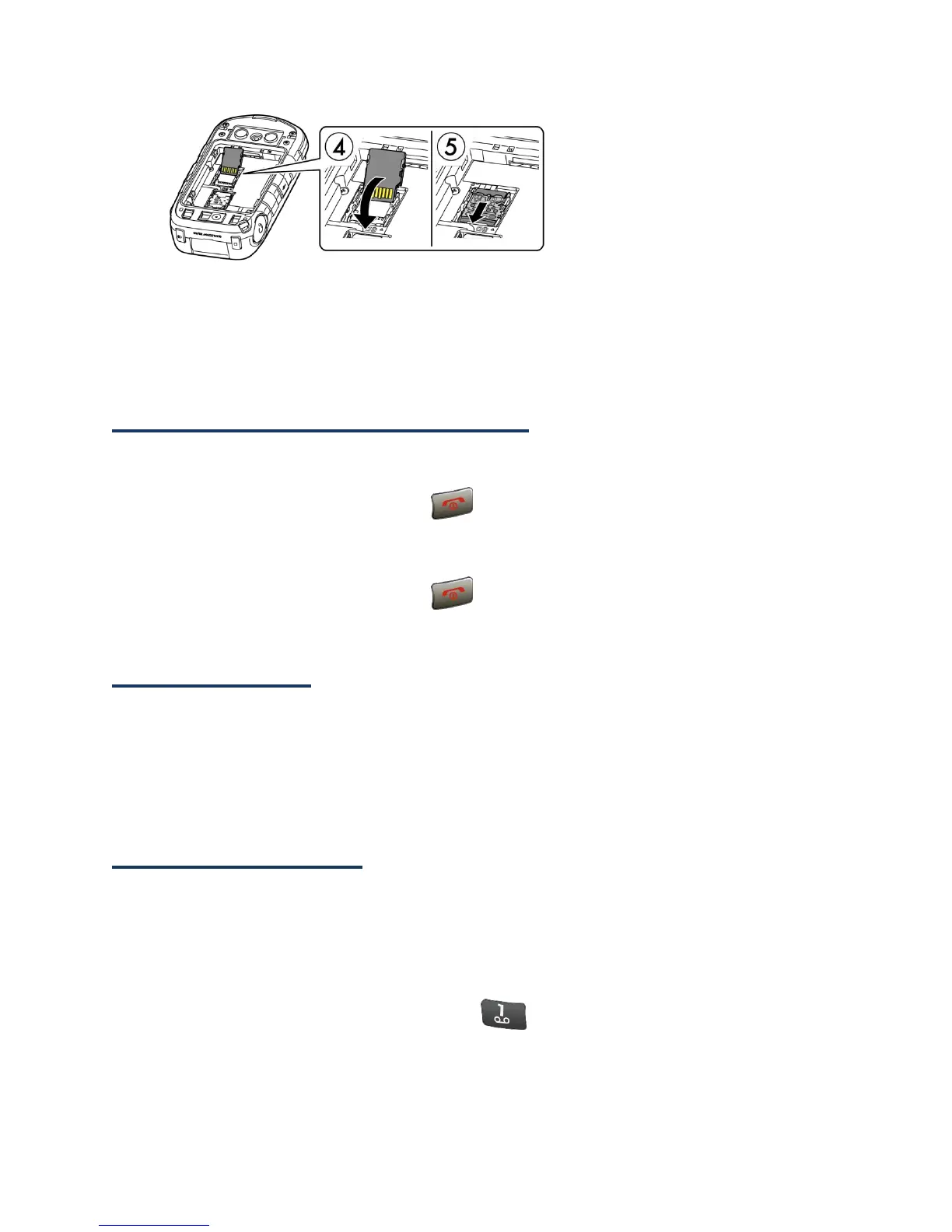
6. Place the battery back into its compartment and replace the battery door.
Warning: Press all around the edges of the battery door ensuring it is properly sealed
to maintain the phone's waterproof capability.
Turn Your Phone On and Off
Turn Your Phone On
► Open the flip and press and hold until the screen lights up.
Turn Your Phone Off
►
Open the flip and press and hold until you see the powering-down animation
on the main screen.
Setup Wizard
Your phone has a Setup Wizard to set up your phone quickly and easily. When you turn on
your phone for the first time, the Setup Wizard starts automatically and helps you to set up
a Wi-Fi connection, an Email account, etc.
Follow the onscreen instructions to quickly set up your phone.
Set Up Voicemail
You should set up your Voicemail and personal greeting as soon as your phone is activated.
Always use a password to protect against unauthorized access. Your phone automatically
transfers all unanswered calls to your Voicemail, even if your phone is in use or turned off.
See Voicemail for more information.
1.
From the Home screen, press and hold to dial your voicemail number.
2.
Follow the system prompts to:
Create your password.















 To Next Page