Web and Data 66
WPS Pin Entry to set up a Wi-Fi Protected Setup connection by entering
the PIN on your router.
MAC address to display the Media Access Control (MAC) address of your
phone when connected to a Wi-Fi network.
IP address to display the Internet Protocol (IP) address assigned to your
phone by the Wi-Fi network you are connected to (unless you used the IP
settings to assign it a static IP address).
Data Services
Data Connection Status and Indicators
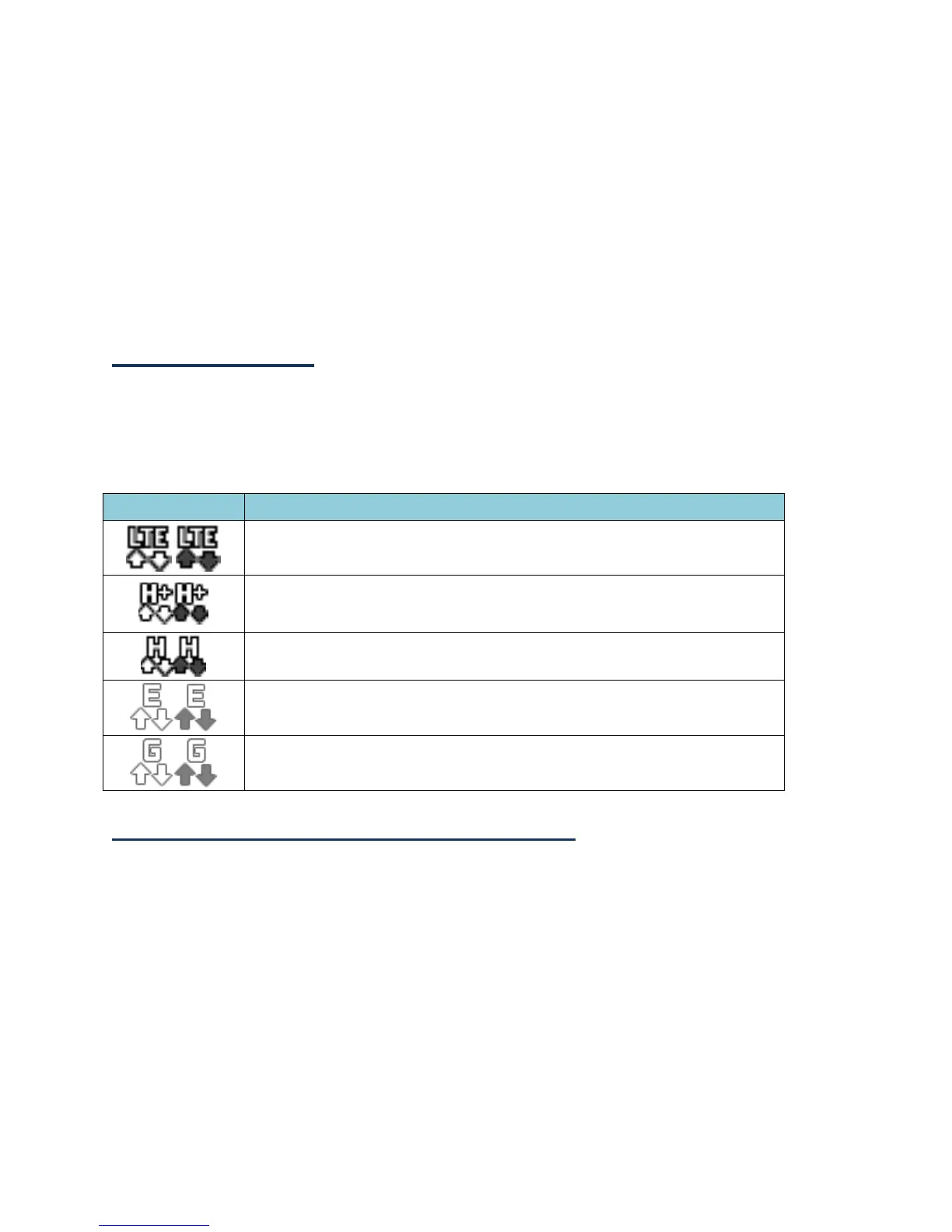
Your phone displays the current status of your data connection through indicators at the
top of the screen. The following symbols are used:
Your phone is connected to the high-speed 4G LTE network.
Your phone is connected to the H+ (UMTS) network.
Your phone is connected to the HSPA network.
Your phone is connected to the EDGE network.
Your phone is connected to the GPRS network.
Virtual Private Networks (VPN)
From your phone, you can add, set up, and manage virtual private networks (VPNs) that
allow you to connect and access resources inside a secured local network, such as your
corporate network.
Prepare Your Phone for VPN Connection
Depending on the type of VPN you are using at work, you may be required to enter your
login credentials or install security certificates before you can connect to your company’s
local network. You can get this information from your network administrator.















 To Next Page