Operation
The parameters of the currently loaded preset can be set individually for each output channel or channel set.
Channel set
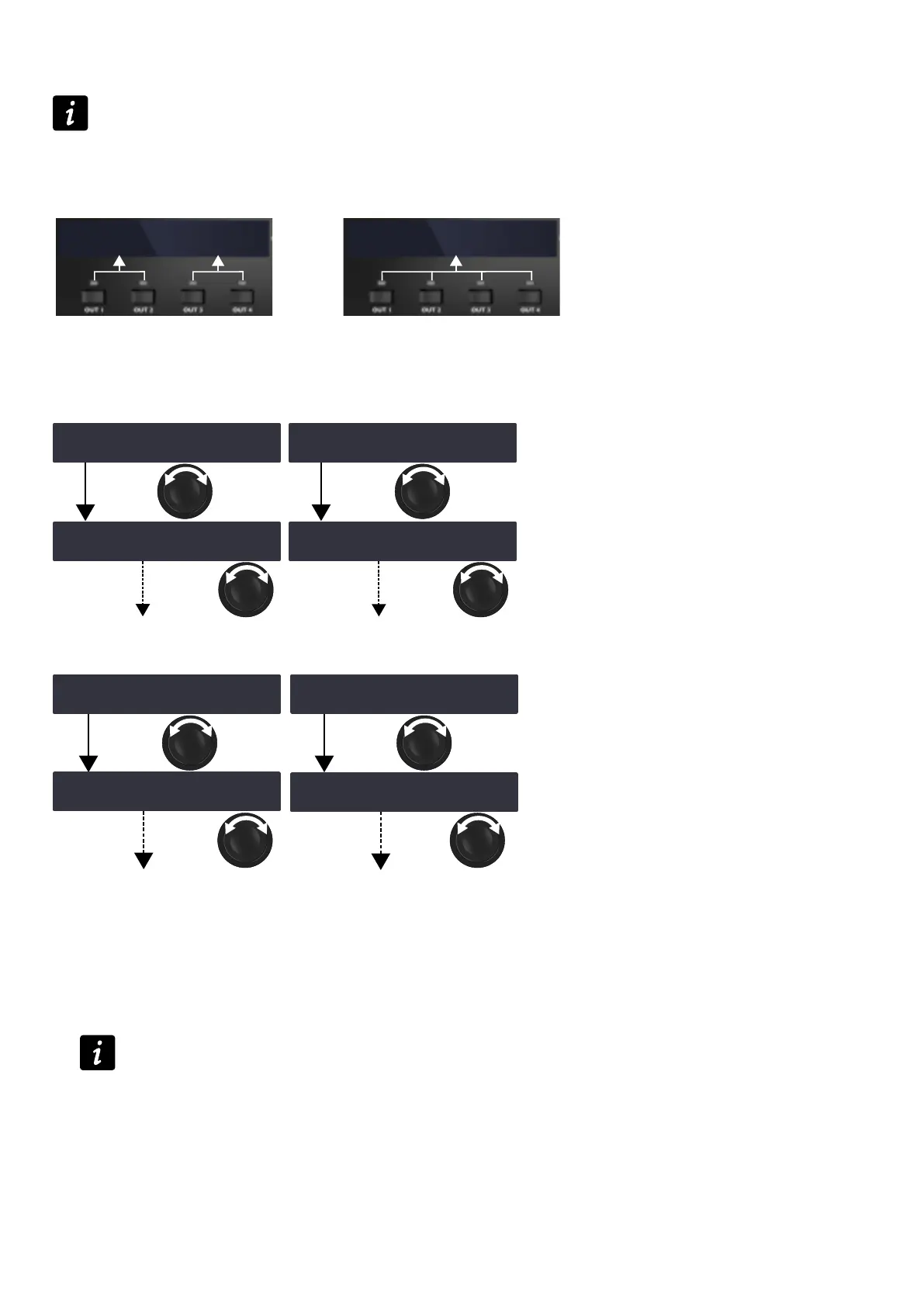
In certain presets, some channels are interdependent and form a channel set.
Within a channel set the preset parameters are common to all channels.
On the amplied controller's screen, channel sets are indicated by brackets above the corresponding output
channel keys.
‾GAIN(dB) ‼※
[ 0.0 ][ 1.5 ]
‾GAIN(dB) ‼※
[ 0.0 ]
Two 2-channel sets (LF/HF - LF/HF) One 4-channel sets (LF/LF/MF/HF)
Setting the preset parameters
for gain and delay
OUT1+ OUT1+
OUT2+
‾GAIN (dB) ‼※
0.0 0.0 0.0 0.0
‾GAIN (dB) ‼※
0.1 0.0 0.0 0.0
‽DELAY (ms) ‼※
0.00 0.00 0.00 0.00
‽DELAY (ms) ‼※
0.01 0.00 0.00 0.00
OUT2+
for polarity and input
OUT1+ OUT1+
‽POLARITY ‼※
+ + + +
‽POLARITY ‼※
- + + +
‽INPUT SELECTION ‼※
A A B B
‽INPUT SELECTION ‼※
C A B B
OUT2+ OUT2+
Procedure
1. From the main menu, select PRESET PARAMETERS.
2. Turn the encoder wheel to select a preset parameter (GAIN (dB), DELAY (ms), POLARITY or INPUT
SELECTION).
3. Press and hold the output key of an output channel or one of the output keys of a channel set to select it.
4. Turn the encoder wheel to select the value.
Gain and delay value setting
Turn the encoder wheel for ne resolution (last digit).
Press and turn the encoder wheel for coarse resolution (second to last digit).
5. Release the output key.
6. Repeat steps 3 to 5 for each output channel or channel set.
7. Repeat steps 2 to 5 for each preset parameters.
Preset parameter modications apply immediately.
LA4X owner's manual (EN) version 14.1 39



 To Next Page