ESI-2000
Pilot’s Guide 2-7
Basic Operation
Take the following into consideration before performing the
battery capacity meter calibration:
The battery SOC must be ≥ 90% before the calibration of
the capacity meter can be accomplished. Refer to charging
instructions in step 6.
The ambient temperature of the ESI-2000 must remain
between 10°C and 25°C (50°F and 77°F) for at least 2 hrs.
The battery must not have been in operation (charging or
discharging) for at least 2 hrs.
Apply power to the ESI-2000.
Remove external power from the ESI-2000 by placing the aircraft
battery switch(s) OFF.
The ESI-2000 automatically switches over to battery power. Press
any button as stated by the message.
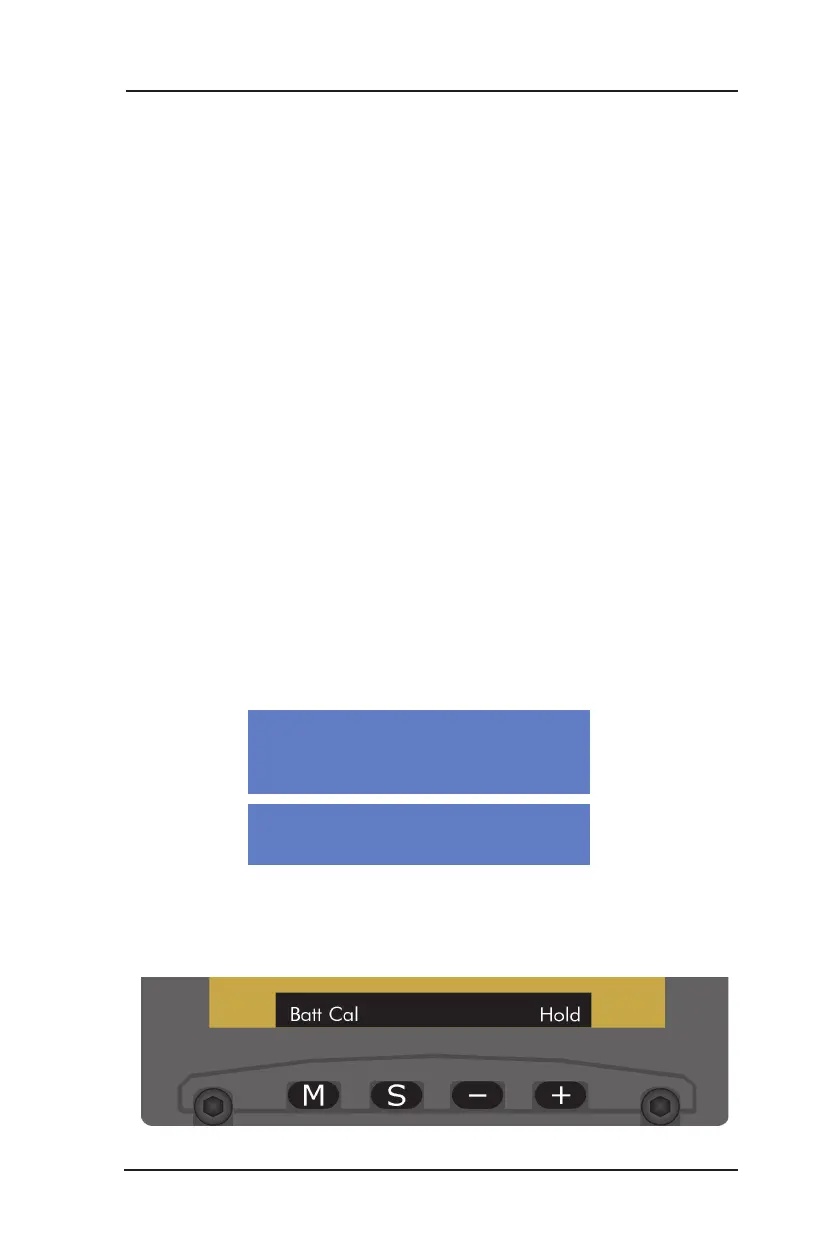
Press the M (menu) button and cycle through the menu options
until Batt Cal (see Figure 2-9) is located.
Press and hold the + (Hold) button until the Battery Calibration
screen is shown with the following message:
1.
•
•
•
2.
3.
4.
5.
6.
Figure 2-9: Battery Calibration Menu
BATTERY CAPACITY METER CALIBRATION PROCEDURE
(Continued)
Battery Calibration In Progress...
Auto-Off When Done
The “CAL DUE” battery indicator continues to be observed
during normal operation if the calibration procedure is aborted.
•
Press Any Key to Abort


 To Next Page