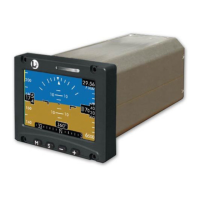
ESI-2000
Pilot’s Guide 3-1
Operating Instructions
CHAPTER 3
OPERATING INSTRUCTIONS
Introduction
This chapter describes the operation of the ESI-2000 indicator. Refer
to Chap 1 for detailed information on display elements.
Power On
There is no power on/off switch on the ESI-2000. Depending on the
aircraft use either the battery switches or avionics master switch to
apply power. The indicator will transition through the following startup
sequence:
Self Test
System Identication
Alignment
Normal Operation
•
•
•
•
SELF TEST
Application of power begins the indicators diagnostic of sensors,
circuitry, memory, and battery. The self test lasts for approximately 15
seconds and during this time the display remains blank. If no faults are
detected the system identication splash screen is displayed.
CYCLE POWER INSTRUCTIONS
Remove input power from the ESI-2000.
Shut down the backup power by pressing the M button and
cycling through the menu options until the Shutdown menu is
located.
Press and hold the + button until the “SHUTTING DN” message
is shown in the upper left corner of the screen.
Reapply input power to the unit.
1.
2.
3.
4.


 To Next Page