ESI-2000
Pilot’s Guide3-2
Operating Instructions
NOTE
Manually shutting down the ESI-2000 conserves battery
energy and is recommended in hot climate conditions.
Depending on the aircraft, remove power to the ESI-2000 using either the
avionics master switch, the battery switch, or dedicated ESI-2000 Power
switch (as applicable).
T
he ESI-2000 automatically switches over to battery power. A countdown
timer and a ashing message is displayed on the screen as shown below:
The ESI-2000 automatically shuts down in 5 minutes if no
key (button)
is
pressed. The battery continues to discharge for the entire 5 minutes. When
time is less than 30 seconds, the messages change as shown below:
At the end of the 5 minutes the timer and “press any key” message are
removed and the following message is shown as the ESI-2000 enters its
shutdown mode:
The ESI-2000 can be manually shutdown (only when in discharge mode)
using the following procedure:
Press any key (button) as stated by the message.
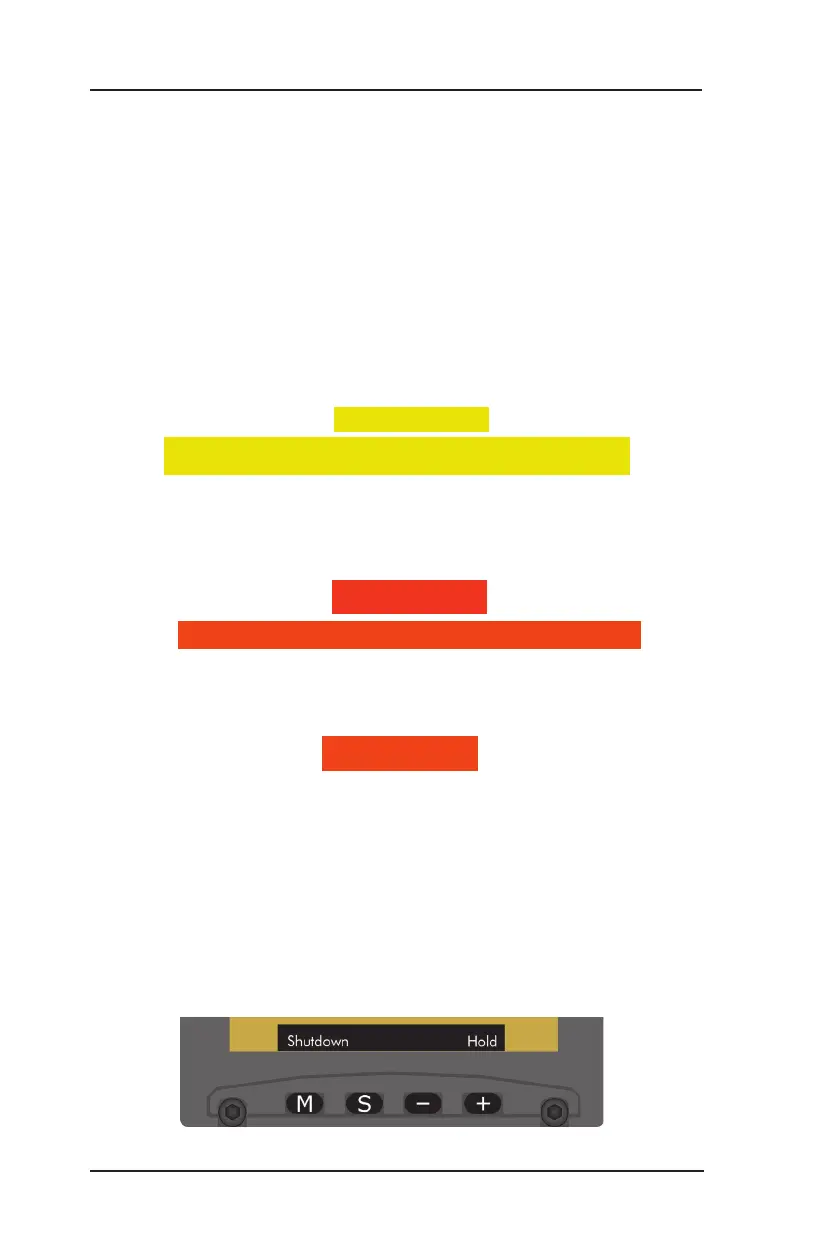
Press the M (Menu) button repeatedly until the Shutdown menu is
shown. See Figure 3-1.
Press and hold the + (Hold) button until the ‘SHUTTING DN’
message is shown in the upper left corner of the screen.
1.
2.
3.
Figure 3-1: Shutdown Menu
POWER OFF
(Refer to Figure 3-1)
Shut Dn 5.0m
PRESS ANY KEY FOR BATTERY POWER
Shut Dn 29s
PRESS ANY KEY FOR BATTERY POWER
SHUTTING DN


 To Next Page