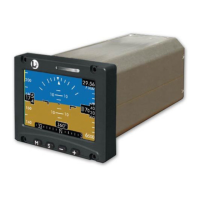
ESI-2000
Pilot’s Guide 3-5
Operating Instructions
INSTRUMENT CHECK
Check that no battery indicator symbol is shown on the display.
If a battery indicator symbol is shown aircraft take-off is not
recommended until situation is resolved. Refer to the Battery
details on page 1-16.
Compare the information displayed on the ESI-2000 with the
primary display.
Attitude data is within +/- 1.0°.
Altitude data is within +/- 20 feet (with correct baro setting).
Magnetic heading data is within +/- 4.0° (if available).
Release 1.2. External digital heading data is within +/- 1.0° (if
available).
NOTE
Airspeed readout shows a white dash until aircraft exceeds
40 knots (Part 23/25 Aircraft) or 20 knots (Part 27/29).
1.
•
2.
•
•
•
•
MENU SETTINGS
Set brightness level.
Set barometric units displayed on Baro window.
Set barometric pressure.
NOTE
Press the Menu M button to open the menu window.
Repeated pressing cycles the menu options. Refer to
Chap. 2 - Basic Operation for specic details.
•
•
•
Pre-Flight Instructions
Prior to take off, it’s recommended the pilot do the following:
In-Flight Instructions
The ESI-2000 does not require constant attention. When required the pilot
may need to do one of the following:
Set the barometric pressure
Re-align attitude and heading
NOTE
The aircraft must be in straight and level, non-accelerated
ight during re-alignment.
•
•


 To Next Page