LaCie 12big Rack Storage Server
User Manual page 28
The Management GUI
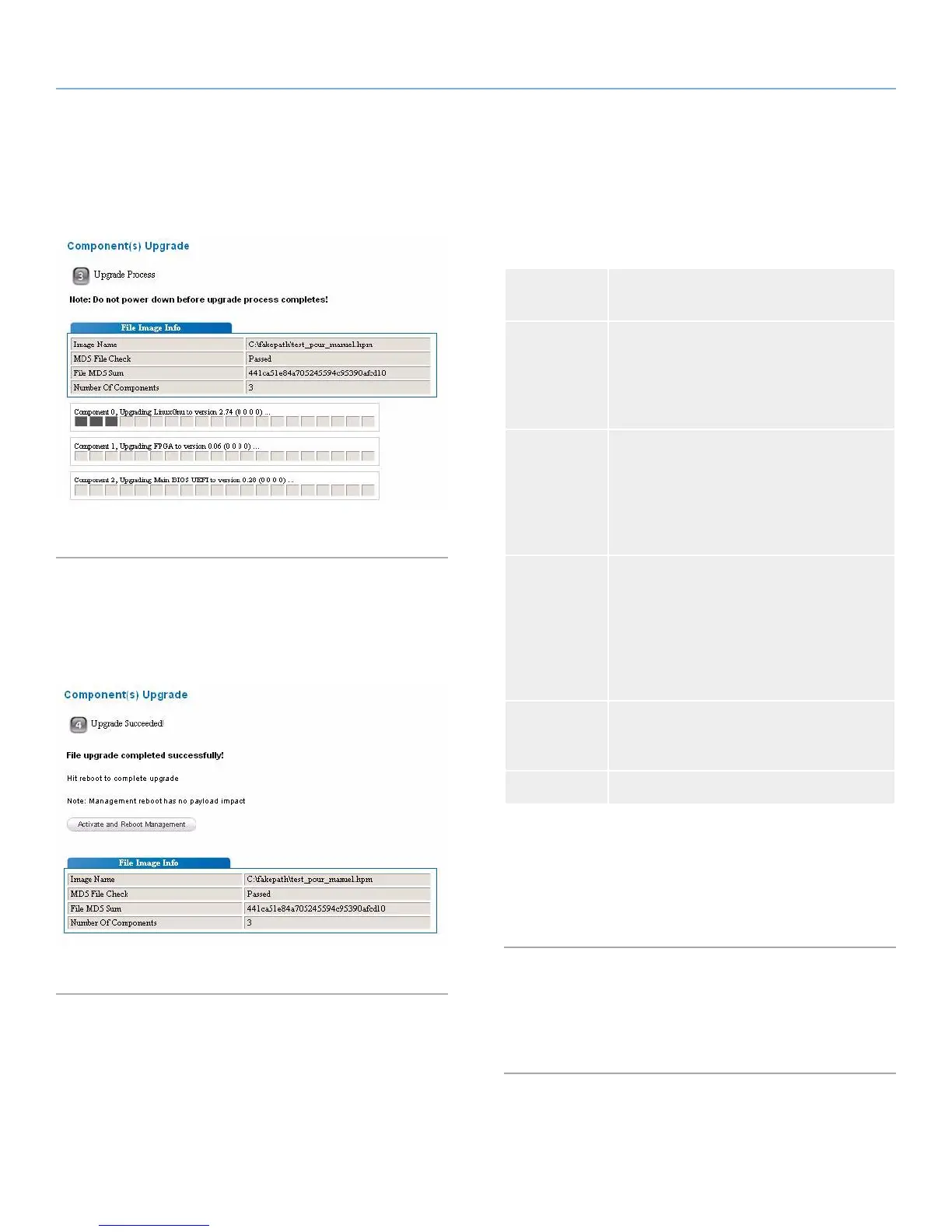
3. Start the firmware upgrade by clicking “Start Upgrade
Component(s)”. The progress bars will display the upgrade sta-
tus of the components.
Fig. 28 - Firmware Upgrade Step 3
4. If the upgrade is successful, the “Activate and Reboot Manage-
ment” button will appear. Click it to restart the management
interface. An automatic page reload will be done after 60 sec-
onds. This step only reboots the BMC, not the whole enclosure.
Fig. 29 - Firmware Upgrade Step 4
5.6.2. Users
This section allows the management of authorized users. A maxi-
mum of five (5) users can be set, each of which can be enabled or
disabled. Privilege levels are defined in the table below.
Privilege
Level
Description
Administrator All BMC commands are allowed, including
configuration settings. An Administrator can
even execute configuration commands that
will disable the channel that the Administrator
is working on.
Operator All BMC commands are allowed, except for
configuration settings which can change the
behavior of the out-of-band interfaces. For
example, Operator privilege does not allow
the capability to disable individual channels
or change user access privileges.
User Only “basic” commands are allowed. These
are primarily commands that read data and
retrieve status. Forbidden commands include
those that can be used to alter BMC configu-
ration, write data to the management control-
lers, or perform system actions such as resets,
power on/off, and watchdog activation.
Callback This is the lowest privilege level. Only com-
mands necessary to support initiating a call-
back are allowed.
No Access No access is given to this user.
User ID 1 is a user without a name or password. This user can be en-
abled or disabled and has a privilege level set to “User” by default.
User ID2 is the admin user with “Administrator” privileges.
User ID3 to User ID5 are configurable. By default they are disabled.
5.7. Logout
This button logs out of the management interface. Users are auto-
matically logged out after 300 seconds of inactivity.


 To Next Page