LaCie 12big Rack Storage Server
User Manual page 63
Module Removal and Replacement
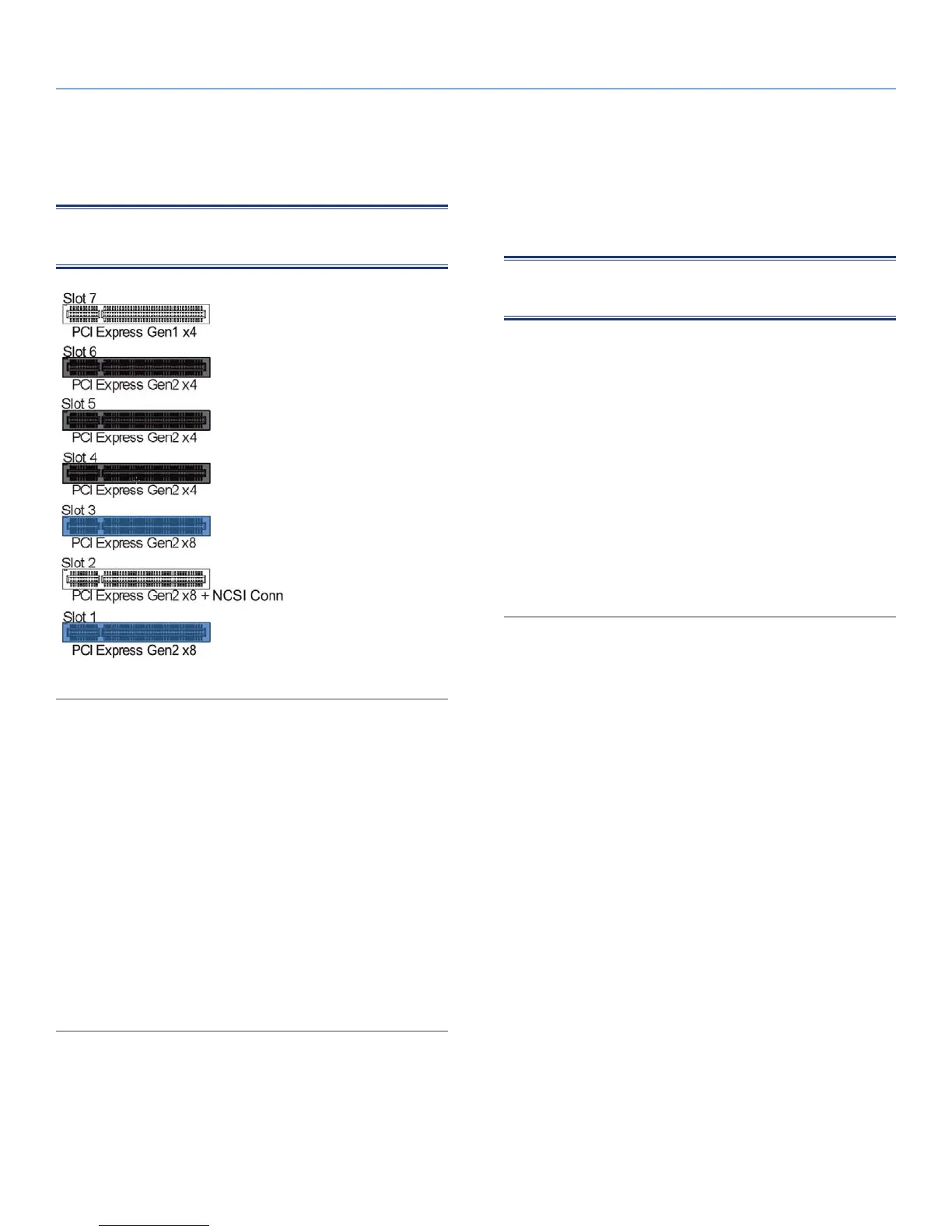
8.5. Replacing PCI Cards
NOTE: This procedure is only for authorized customers using au-
thorized parts.
Fig. 46 - Motherboard PCI Slots
1. To access a PCI card, release the enclosure top cover by turn-
ing the lock mechanism to the “unlocked” position and slide the
cover back until it stops (see Fig. 35).
2. Slide the cover forward, lifting at the same time to completely
remove the cover.
3. To remove a PCI card, release the screw in the retaining bracket
at the back of the enclosure, disconnect all cables and lift the
card upwards and out of the enclosure.
4. Replace the card.
5. Reconnect the cables.
6. Close the enclosure cover and secure it by turning the lock
mechanism to the “locked” position.
8.6. Spare Parts and Ancillary Items
The following list shows the replaceable parts available for the 12big
Rack Storage Server.
NOTE: Items marked with a * must only be replaced by trained
service personnel.
✦ Chassis (including backplane and motherboard).
✦ *AC Power Supply Unit.
✦ *Cooling Fan Module.
✦ Drive Carrier Module.
✦ Dummy Drive Carrier Module.
✦ *PCI PCBs.
✦ 19 inch Rack Mounting Rail Kit.
✦ Blanking Plate (PCI slot).
✦ Power cords (country specific).
✦ Documentation.



 To Next Page