2. In some cases, the update process can fail.
In this case turn SLC-220 power off and then on, and run the batch file again.
The indication of update failure is a line “RX Password: FAIL(xx)#n” repeating 5 times after the
lines “RX Password: DONE”.
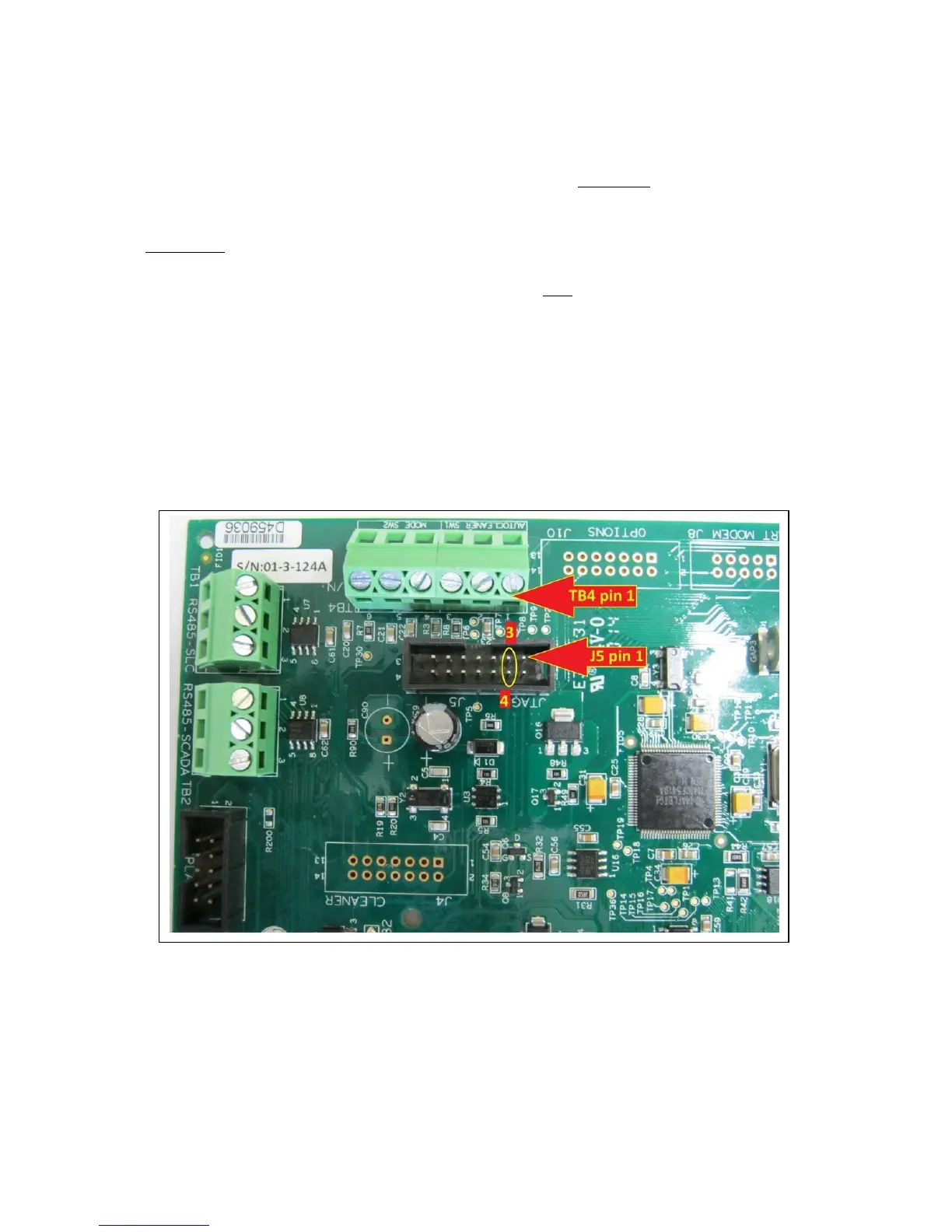
If this happens, the update can be forced by first installing a temporary jumper between pins 3 and
4 of connector J5 (JTAG, located below pin 1 of TB4).
Procedure:
a. Turn power off.
b. Install the jumper. Make sure to short only pins 3 and 4 of J5. It is possible to
borrow a two-point jumper from an Outputs board.
c. Turn power on.
d. Run the batch file on the PC. It should succeed now.
e. Turn power off.
f. Remove the jumper from J5 (If taken from an Outputs board, return the jumper to
the Outputs board).
g. Turn power on.
h. Verify the firmware version with SLC-Manager.
A picture showing where to install the jumper:



 To Next Page