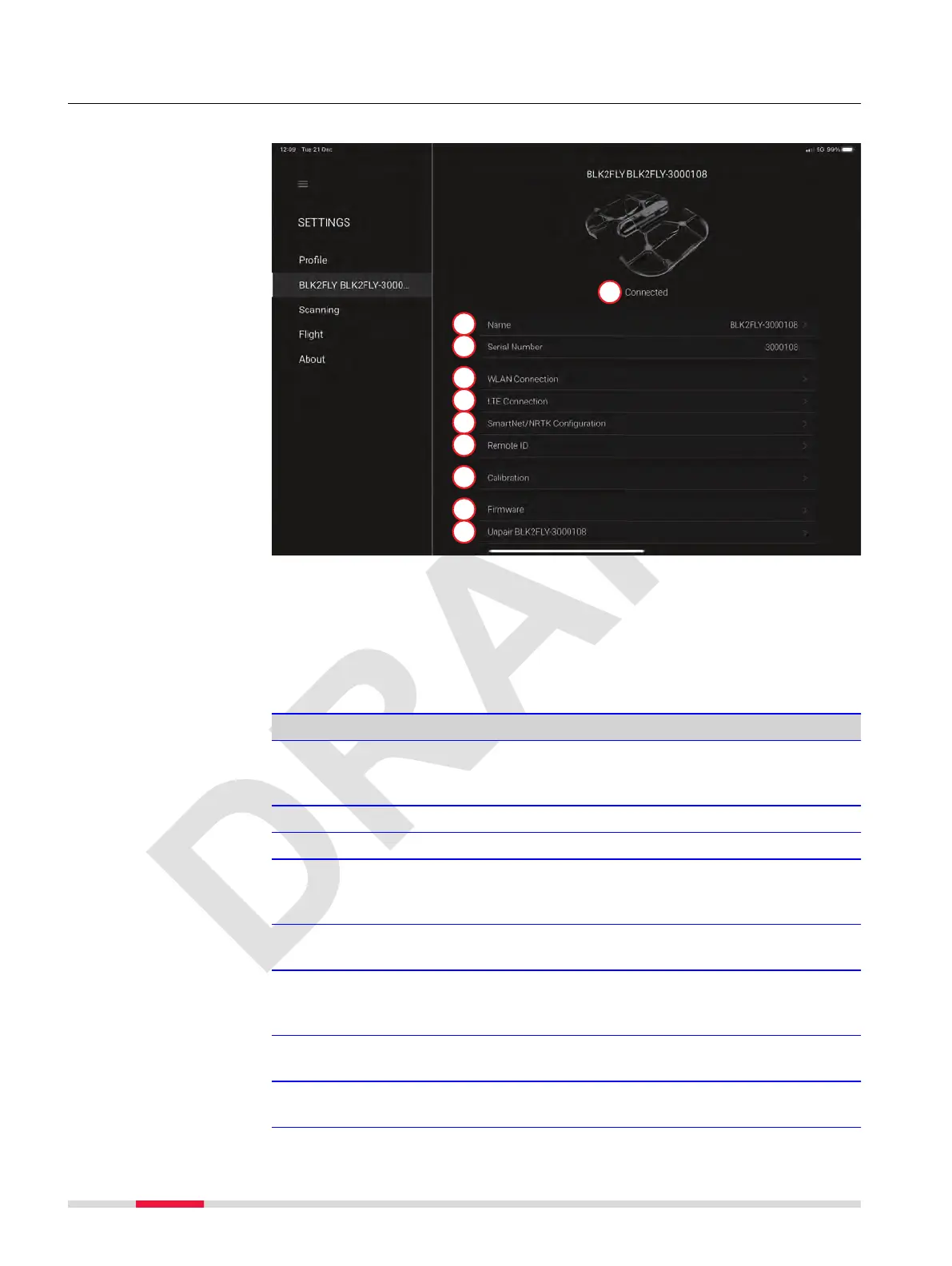
7.6.7.2 BLK2FLY Screen
Use this screen to congure, calibrate and update the BLK2FLY.
a BLK2FLY connection status
b Name
c serial number
d WLAN Connection
e LTE Connection
f SmartNet/NRTK Conguration
g Remote ID
h Calibration
i Firmware
j Unpair
Detailed description
Type Description
BLK2FLY connection
status
•
Connected
•
Not connected
•
Searching
Name Menu to edit the name of the BLK2FLY.
serial number Displays the serial number of the BLK2FLY.
WLAN Connection Tap to congure WLAN connection for data trans-
fer. Refer to BLK2FLY WLAN Connection screen
for details.
LTE Connection Tap to congure LTE connection. Refer to
BLK2FLY LTE Connection screen for details.
SmartNet/NRTK Con-
guration
Tap to congure access for the NRTK provider.
Refer to SmartNet/NRTK Conguration screen for
details.
Remote ID Tap to edit the operator number. Refer to
Remote ID screen for details.
Calibration Tap to calibrate the compass. Refert to 10.4 Com-
pass Calibration for details.
Description
58 Description of the Application, Mission Planning



 To Next Page