Leica DM2000, Setup
18
3 Setup
Procedure for
setting up the
DS2000
The setup procedure of the DS2000 consists of the following steps:
• Unfolding and adjusting the handle (refer to "3.1 Unfolding and Adjusting the
Handle")
• Preparing the antenna (refer to "3.2 Preparing the Antenna")
• Attaching and connecting the laptop or tablet (refer to "3.3 Attaching and
Connecting the Laptop or Tablet")
• Inserting the battery (refer to "3.3 Attaching and Connecting the Laptop or Tablet")
• Mounting the spray support (optional; refer to "3.4 Inserting the Battery")
• Mounting the GPS support (optional; refer to "3.6 Mounting the GPS Support")
• Calibrating the encoders (refer to "3.7 Calibrating the Encoders")
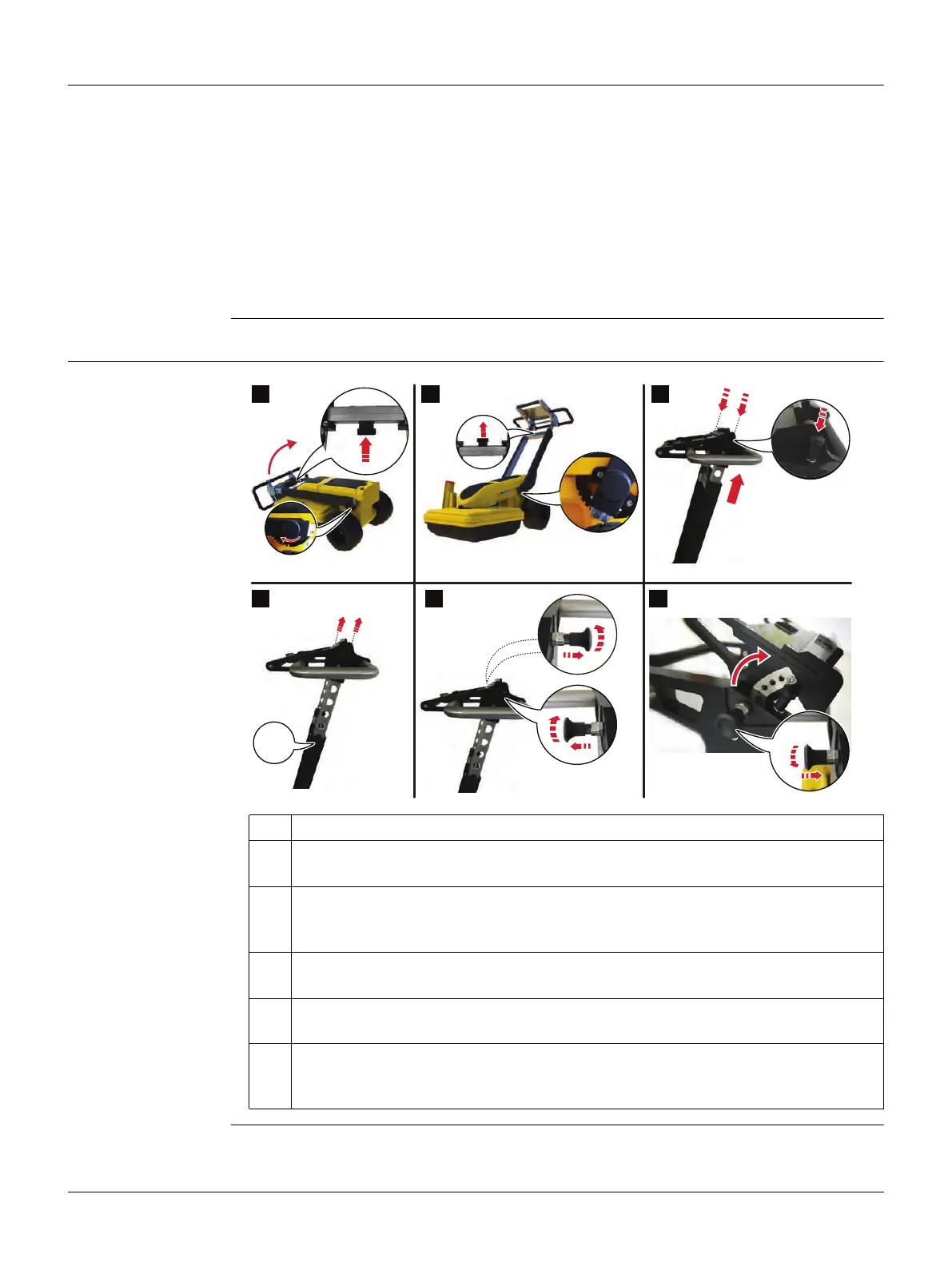
3.1 Unfolding and Adjusting the Handle
Unfold and adjust
the handle
1. Press and hold the central button on the handle and raise the handle.
2. When the handle is at the desired angle, release the central button.
The handle clicks into place.
3. To adjust the height of the handle, press and hold the vertical buttons at the
top of the handle.
Pull up the upper part of the handle.
4. When the handle is at the desired height, release the two vertical buttons.
Slightly shift the handle until it clicks into place.
5. At both sides of the laptop/tablet support, pull out the two horizontal locks and
turn them slightly to keep them open.
6. Incline the support to the desired angle and hold it in place.
To fix the support and to close the horizontal locks, turn and release the locks
until they click back into place.
click!
click!
click!
click!
click!
click!
012316_001
1 2 3
4 5 6



 To Next Page