EN
200
Basic photo settings
Manual setting by metering
The Leica SL offers you a choice between two such modes that
allow operation matched to different situations/subjects.
Graycard is suited best for subjects in which you can clearly
identify a neutral grey or pure white area. If not, or if you want to
base your metering on an off-center detail, you can utilize
Graycard Live View.
Setting the function
1. In the menu’s
IMAGE section, select White Balance,
2. in the submenu, the desired
Graycard setting.
These two steps can also be performed using gesture control,
exactly as described for automatic and fixed presets on p. 199.
The following steps differ, depending on the selected
Graycard
setting.
When Graycard is selected:
3. Call up the respective screen by pressing the click wheel or
the joystick.
• The screen contains an area in the center outlined in yellow
– this indicates the metering zone.
If you wish to exit this screen again without the metering
function, press the
TR button briefly
4. Aim the metering zone at a neutrally grey or pure white area,
making sure it completely fills the frame.
5. Press the shutter release button, or the
BR, or FN button to
save the metered setting.
When
Graycard Live View is selected:
3. Call up the respective screen by pressing the click wheel or
the joystick inwards.
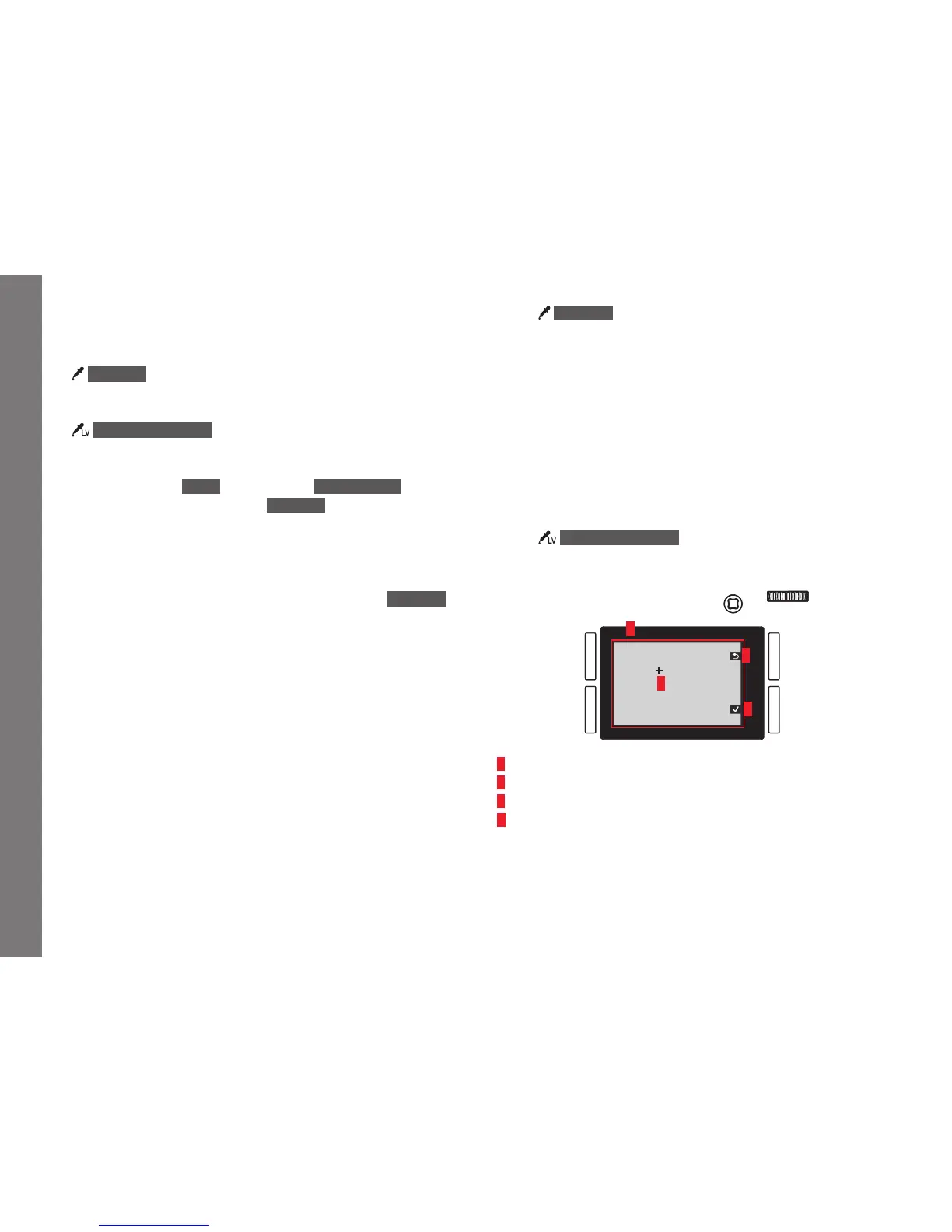
A
B
C
D
A
Image based on an automatic white balance setting
B Cross hairs indicating the metering area
C Button function indication, Return to previous display
D Button function indication, Save metered value
SL_EN.indd 200 16.09.2015 15:04:29


 To Next Page