EN
205
Recording mode
Locking the shutter release and video recording buttons
To prevent taking photos during video preview and recording, or to
prevent starting a video during photo mode accidentally, both
button functions can be deactivated during the above described
modes.
Setting the function
1. In the menu’s
SETUP section, select Customize Control,
2. in the submenu, select
Mode Lock, and
3. switch the function
On or Off.
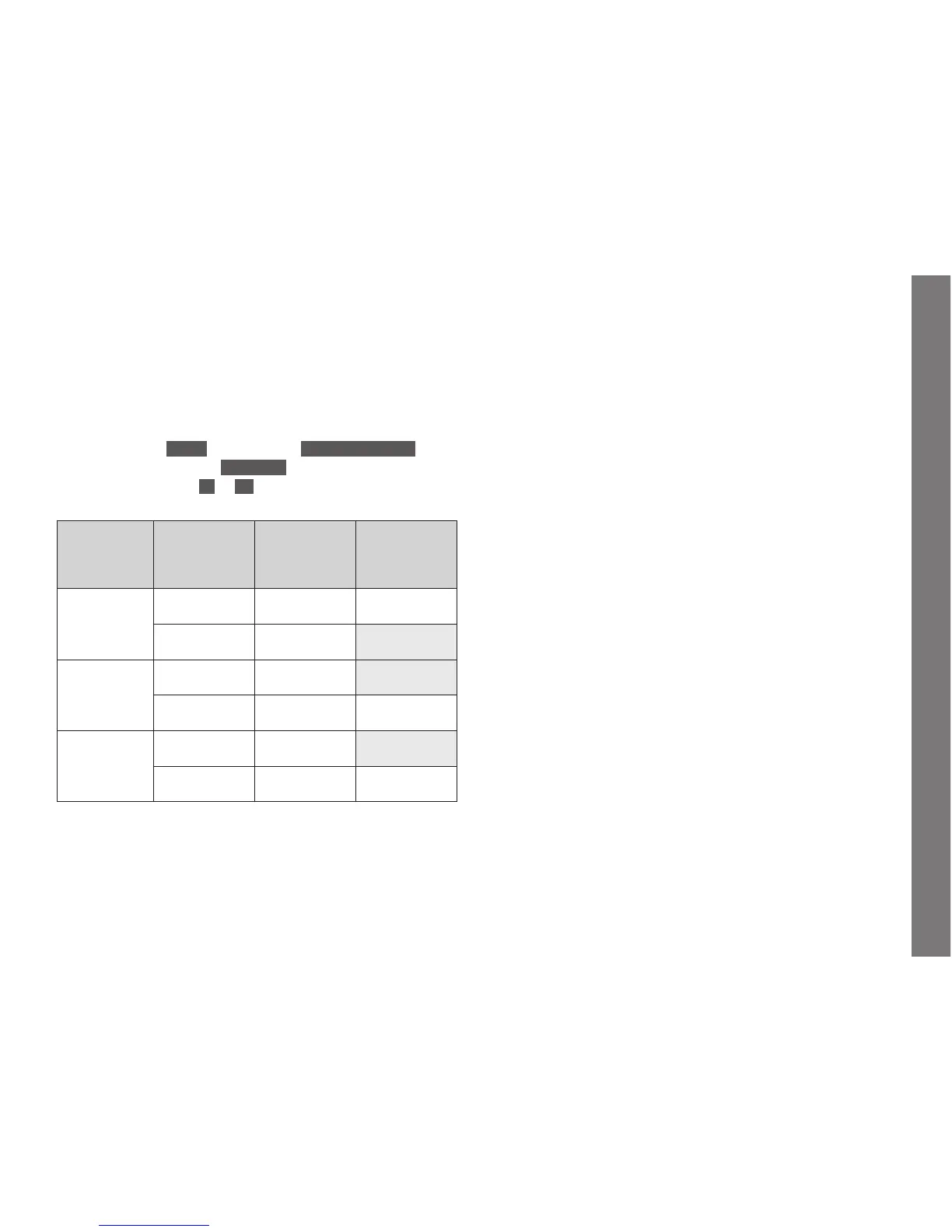
Recording
mode
Button pressed
(shutter release
button pressed all
the way)
Function
(When set to OFF)
Function
(When set to ON)
Photo mode Shutter release
button
Takes a picture Takes a picture
Video button Starts video
recording
no function
Video preview
mode
Shutter release
button
Takes a picture no function
Video button Starts video
recording
Starts video
recording
During video
recording
Shutter release
button
Takes a picture*
no function
Video button Stops video
recording
Stops video
recording
* not available for some video resolutions:
– 4K video (4096 x 2160, 3840 x 2160)
– high speed recording (100fps, 120fps)
– 24p recording
Notes:
• This setting does not deactivate the shutter release button’s
function when briefly tapping / lightly pressing it (see previous
section).
• This setting does not affect the buttons’ functions when pressed
during menu control.
• This menu item can be assigned to one of the soft keys for direct
access.
SL_EN.indd 205 16.09.2015 15:04:30


 To Next Page