6
Parts & Functions
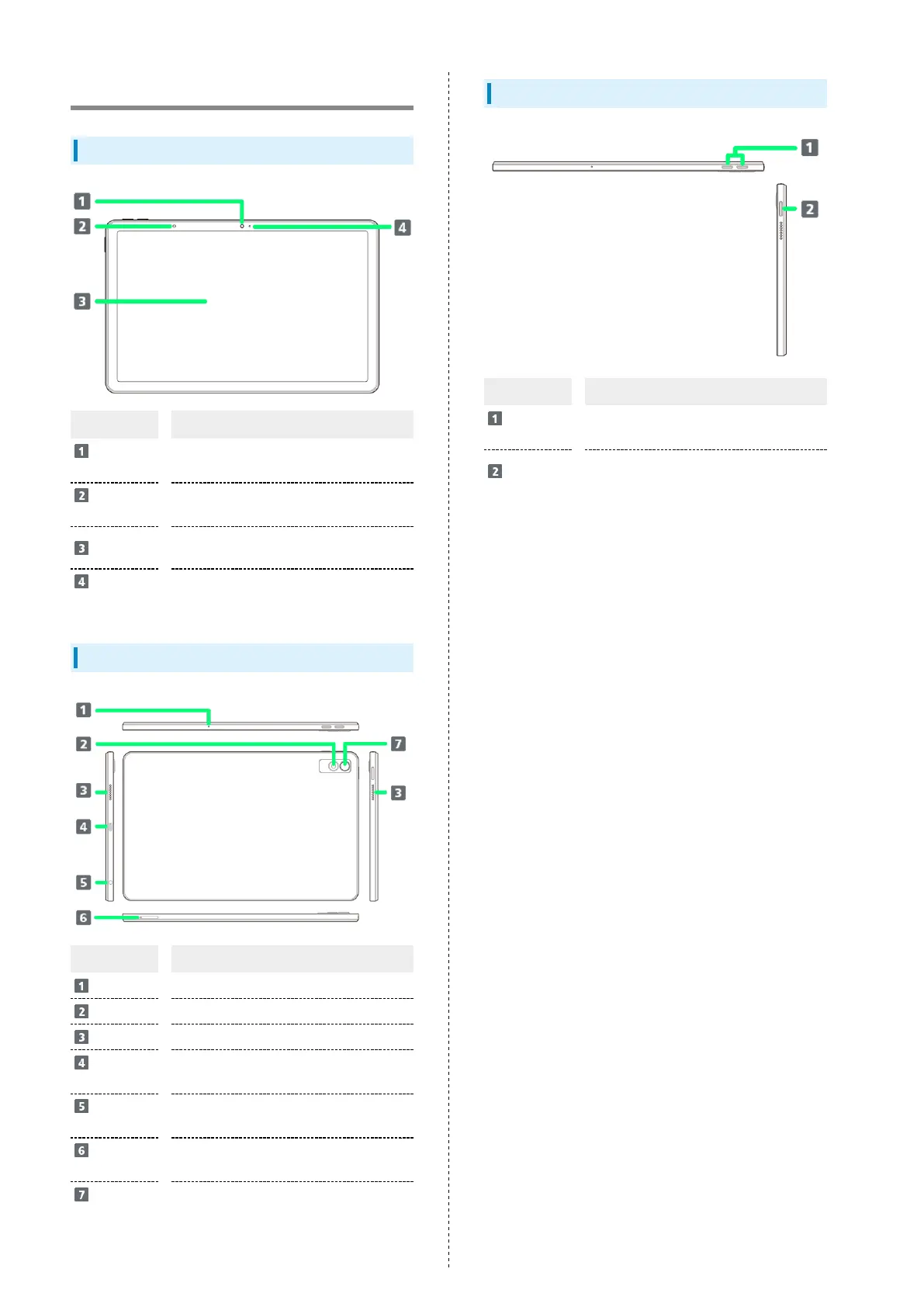
Tablet (Front)
Part Description
Front
Camera
Use to shoot photos or videos of yourself.
Brightness
Sensor
Detects ambient light level, etc.
Display
Touchscreen-type display, operate with
your fingers on Display.
Charging
Lamp
Lights/flashes while charging or for
arriving mail.
Tablet (Back and Sides)
Part Description
Mic
Use such as when recording video.
Light
Use to shoot photos or videos of yourself.
Speaker
Listen to music, video sound, etc.
USB Type-
C™ Port
Connect Micro USB Cable.
Headphone
Port
Connect headphones, etc.
USIM/SD
Card Tray
Install/remove USIM Card and SD Card.
Camera
Capture photos and videos.
Keys
Part Description
Volume Up/
Down Key
Adjust Volume.
Power Key
Toggle Display on/off.
Long Press for power on/off.



 To Next Page