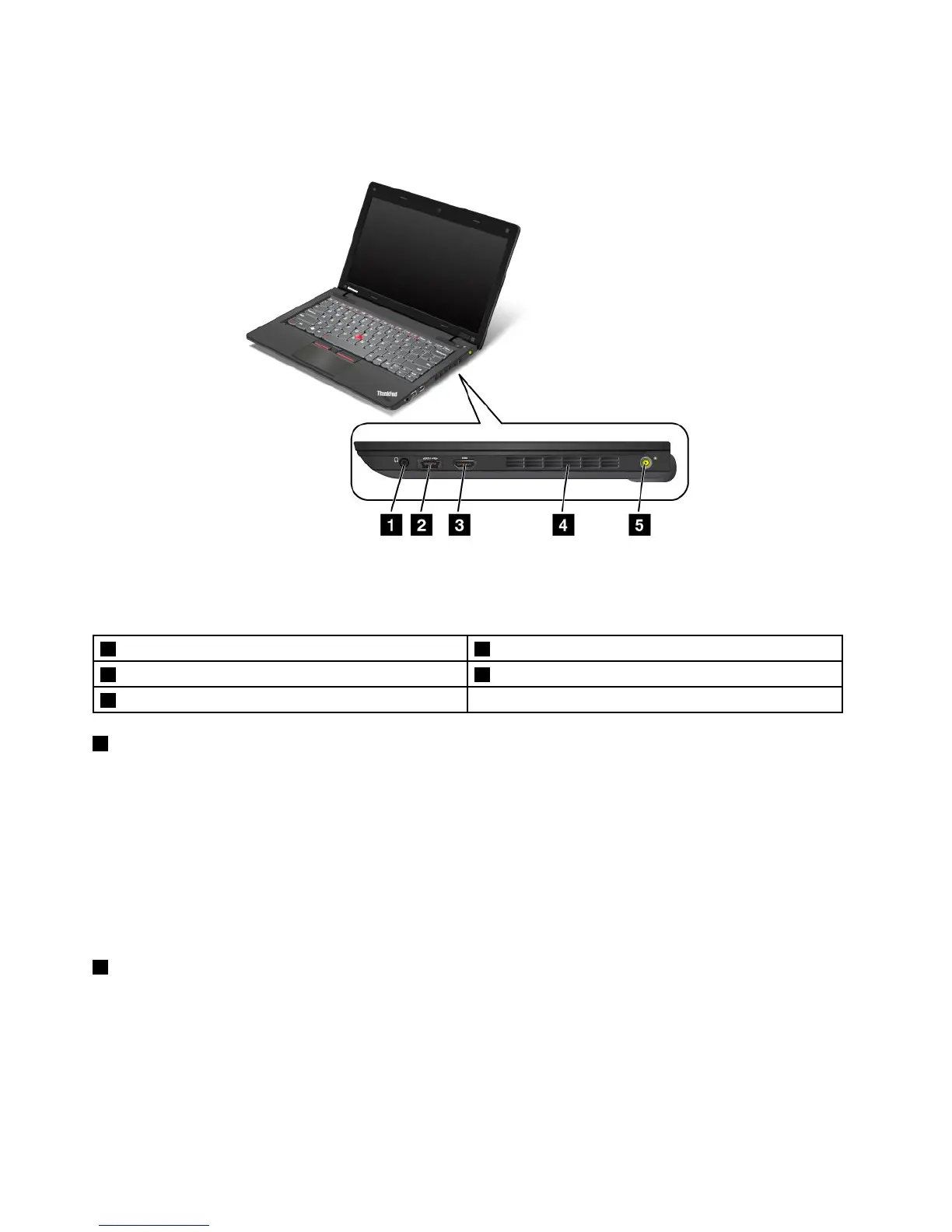
Right-sideview
Figure2.Right-sideview
Note:Yourcomputerkeyboardmightlookdifferentfromtheillustrationabove.
1Comboaudiojack2eSATA/USBcomboconnector
3HDMIport
4Fanlouvers(left)
5Powerjack
1Comboaudiojack
Tolistentothesoundfromyourcomputer,connectaheadphoneoraheadsetthathasa3.5mm4-pole
plugtothecomboaudiojack.
Notes:
•Ifyouareusingaheadsetwithafunctionswitch,forexample,aheadsetforaniPhone
®
mobiledigital
device,donotpressthisswitchwhileusingtheheadset.Ifyoupressit,theheadsetmicrophonewill
bedisabled,andtheinternalmicrophonewillbeenabledinstead.
•Thecomboaudiojackdoesnotsupportaconventionalmicrophone.Formoreinformationaboutthe
audiodevicessupportedbythecomboaudiojack,see“Usingaudiofeatures”onpage43.
2eSATA/USBcomboconnector
TheeSATA/USBconnectorisusedforconnectingdevicescompatiblewithaUSBinterface,suchasa
printeroradigitalcamera.YoucanalsoconnectanexternalSATAdevice,suchasanexternalharddisk
drive,tothisconnectoronsomemodels.
Note:YourcomputeriscompatiblewithUSB1.1and2.0.
4UserGuide













 To Next Page