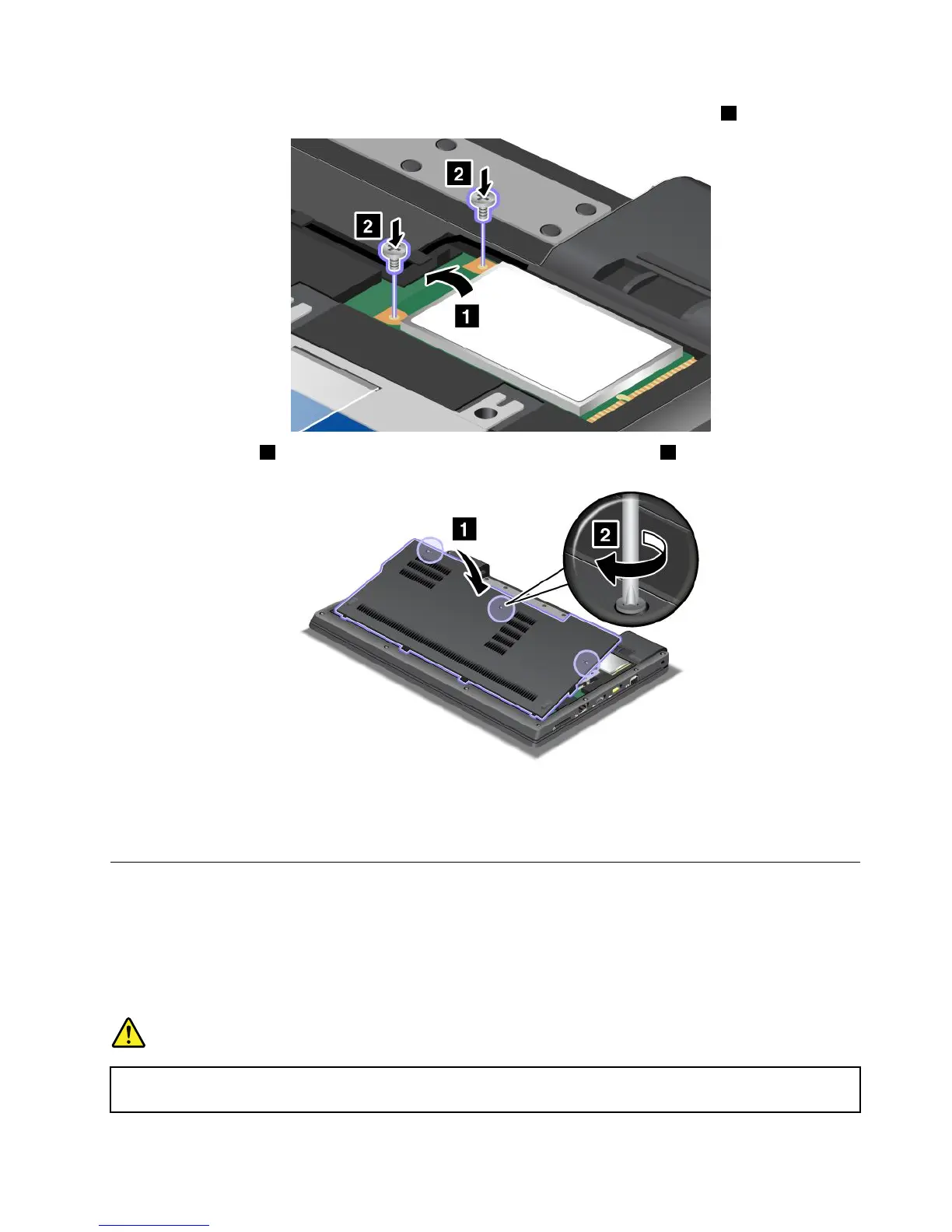
8.Pivotthecarduntilyoucansnapitintoplace.Securethecardwiththetwoscrews2.
9.Attachthecover1,pivotitdownwards,andthentightenthethreescrews2.
10.Reinstallthebattery.Formoreinformationabouthowtoreinstallthebattery,referto“Replacingthe
battery”onpage67.
11.Turnthecomputeroveragain.Connecttheacpoweradapterandcablestothecomputer;thenturniton.
InstallingandreplacingthePCIExpressMiniCardforwirelessWAN
Beforeyoustart,printtheseinstructions.
SomeThinkPadmodelshaveaPCIExpressMiniCardslotforconnectiontoawirelessWAN.Toreplacethe
PCIExpressMiniCardwithanewone,readthefollowingprerequisites.
Prerequisitesfortheprocedure
DANGER
Duringelectricalstorms,donotconnectthecabletoordisconnectitfromthetelephoneoutlet
onthewall.
Chapter6.Replacingdevices75











 To Next Page