3HDMIport
Yourcomputersupportsthehigh-denitionmultimediainterface(HDMI)port,adigitalaudioandvideo
interfacethatcanconnectacompatibledigitalaudiodeviceorvideomonitorsuchasanHDTV.
4Fanlouvers(left)
TheinternalfanandlouversenableairtocirculateinthecomputerandcooltheCPU.
Note:Toavoidimpedingairow,donotplaceanyobstacleinfrontofthefan.
5Powerjack
Theacpoweradaptercableconnectstothecomputerpowerjacktoprovidepowertothecomputerand
chargethebattery.
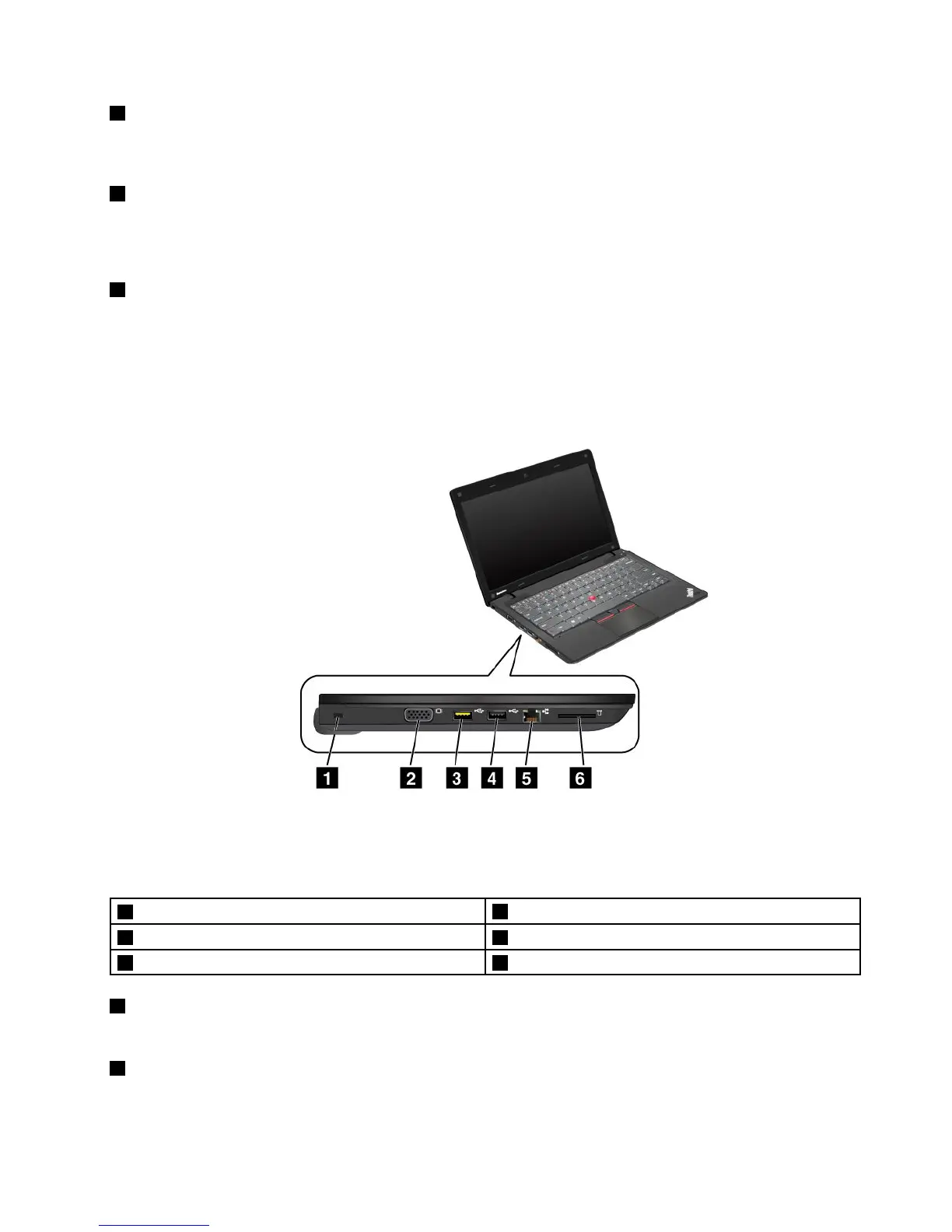
Left-sideview
Figure3.Left-sideview
Note:Yourcomputerkeyboardmightlookdifferentfromtheillustrationabove.
1Securitykeyhole
2Monitorconnector
3AlwaysOnUSBconnector4USBconnector
5Ethernetconnector6Mediacardreaderslot
1Securitykeyhole
Yourcomputercomeswithasecuritykeyhole.Youcanpurchaseasecuritycableandlocktotthiskeyhole.
2Monitorconnector
Themonitorconnectorisusedtoconnectanexternalmonitororaprojectortoyourcomputer.
Chapter1.ProductOverview5













 To Next Page