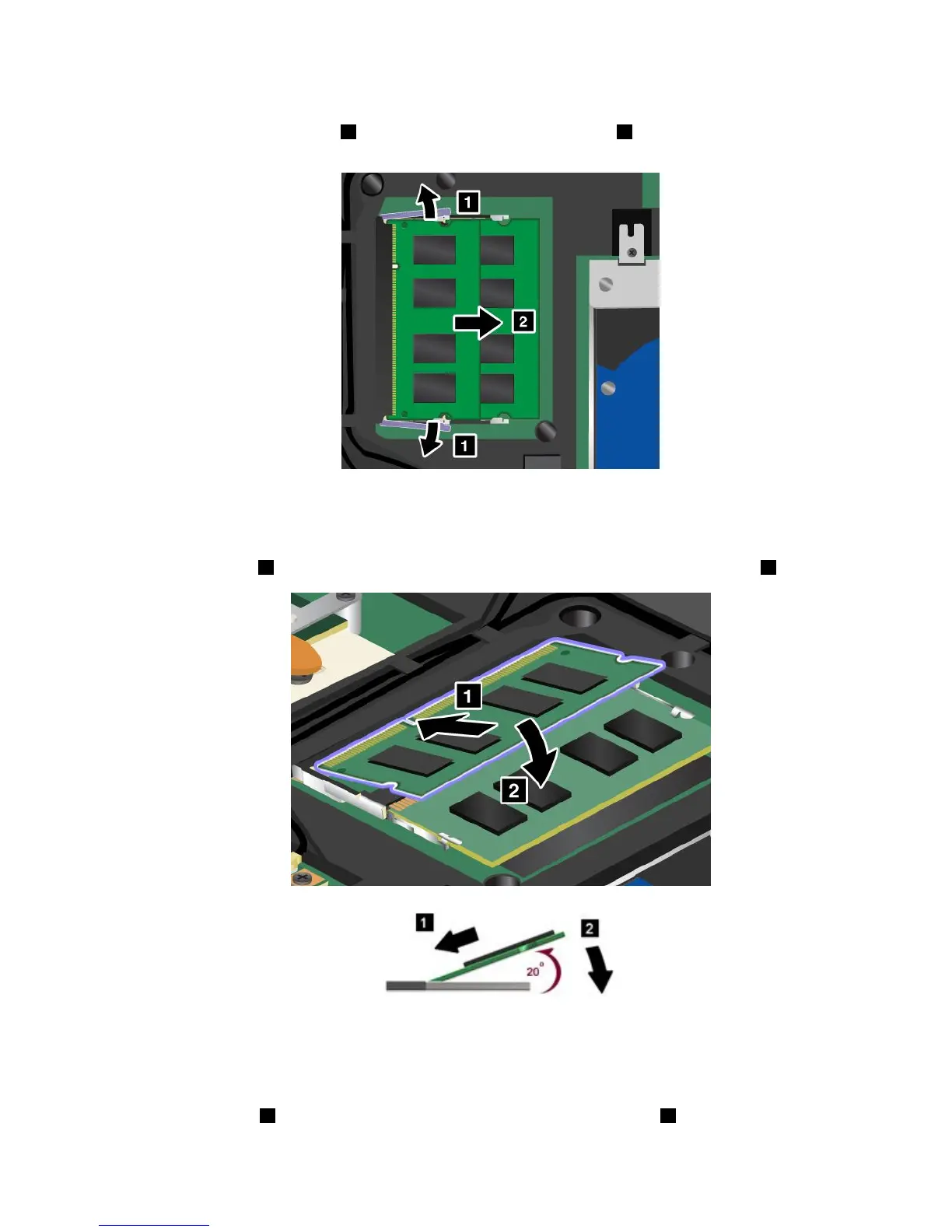
5.Iftwomemorymodulesarealreadyinthememoryslots,pressoutonthelatchesonbothedgesof
thesocketatthesametime1,andthenremoveamemorymodule2tomakeroomforthenew
one.Besuretosaveitforfutureuse.
6.Findthenotchonthecontactedgesideofthememorymoduleyouareinstalling.
Attention:Toavoiddamagingthememorymodule,donottouchitscontactedge.
7.Withthenotchedendofthememorymoduletowardthecontactedgesideofthesocket,insertthe
memorymodule
1intothesocketatanangleofabout20degrees;thenpressitinrmly2.
Note:Ifyouinstallamemorymoduleinonlyoneofthetwomemoryslots,installitintheunderslot.
8.Pivotthememorymoduledownwarduntilitsnapsintoplace.
9.Makesurethatthememorymoduleisrmlyxedintheslotandcannotbemovedeasily.
10.Attachthecover1,pivotitdownwards,andthentightenthethreescrews2.
Chapter6.Replacingdevices83













 To Next Page