EasyManua.ls Logo

Lenovo ThinkServer TD230 - User Manual

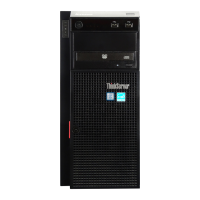
Lenovo ThinkServer TD230
154 pages
Print Icon
To Next Page IconTo Next Page
Loading...
ThinkServerTD230
InstallationandUserGuide
MachineTypes:1027,1029,1039,and1040

Table of Contents

Other manuals for Lenovo ThinkServer TD230

Questions and Answers

  • E
    Eric GregoryNov 25, 2025
    What to do if Lenovo ThinkServer TD230 Server power-control button does not work?
    • R
      Rebecca ReillyNov 25, 2025
      If the Lenovo Server power-control button isn't working, first, disconnect and reconnect the server power cords. If that doesn't work, a trained service technician should reseat the operator information panel cables and repeat the power cord steps. If the server then starts, reseat the operator information panel; if the problem persists, replace it. Also, verify the power cords are correctly connected to both the server and a working outlet, the installed memory type is correct and fully seated, the power supply LEDs don't indicate a problem, and the microprocessors are installed in the correct sequence. Reseat the DIMMs, power switch connector, and power backplane. If the issue continues, replace the DIMMs, power switch connector, power backplane, and finally, the system board one at a ti...
  • M
    Mary ShafferAug 25, 2025
    How to fix Lenovo ThinkServer TD230 keyboard when all or some keys do not work?
    • J
      Jennifer HoweAug 25, 2025
      If all or some keys on the Lenovo Server keyboard do not work, ensure the keyboard cable is securely connected and that both the server and monitor are turned on. Verify the keyboard's compatibility with the server, referring to the Lenovo website. If using a USB keyboard connected to a USB hub, disconnect it and connect it directly to the server. If the issue persists, try replacing the keyboard or consult a trained service technician to replace the system board.
  • A
    angela52Aug 25, 2025
    What to do if Lenovo ThinkServer TD230 mouse or pointing device does not work?
    • V
      Vincent SparksAug 26, 2025
      If the Lenovo Server mouse or pointing device is not working, ensure it's compatible with the server by checking the Lenovo website. Verify that the device cable is securely connected, the device drivers are correctly installed, and both the server and monitor are on. Also, confirm the mouse is enabled in the Setup Utility program. If using a USB device connected to a USB hub, disconnect it and connect it directly to the server. If problems persist, replace the mouse or pointing device or consult a trained service technician to replace the system board.
  • D
    David HaleAug 27, 2025
    How to fix a newly installed Lenovo Server optional device that does not work?
    • T
      Tamara PrestonAug 27, 2025
      If a Lenovo optional device that was just installed does not work, ensure the device is designed for the server by checking the Lenovo website for supported options. Verify that you followed the installation instructions and that the device is correctly installed, without loosening any other devices or cables. Update the configuration information in the Setup Utility program. If issues persist, try reseating the newly installed device.
  • J
    James BrownAug 28, 2025
    What to do if Lenovo Server DVD drive is not recognized?
    • P
      Philip AllenAug 28, 2025
      If the Lenovo Server DVD drive is not recognized, ensure the SATA channel (primary or secondary) to which the DVD drive is attached is enabled in the Setup Utility program. Also, verify that all cables and jumpers are installed correctly, the signal cable and connector are not damaged, and the correct device driver is installed for the DVD drive. Reseat the DVD drive and its cables. If the problem persists, replace the DVD drive, its cables, or, as a last resort by a trained service technician, the system board.
  • K
    Kenneth SwansonSep 17, 2025
    What to do if not all drives are recognized by Lenovo ThinkServer TD230 Server diagnostic tests?
    • J
      Jimmy ClarkSep 18, 2025
      If not all drives are recognized by the hard disk drive diagnostic tests on Lenovo Server, remove the drive that is indicated by the diagnostic tests; then, run the hard disk drive diagnostic tests again. If the remaining drives are recognized, replace the drive that you removed with a new one.
  • J
    James DavisSep 15, 2025
    Why does Lenovo Server unexpectedly shut down with no LEDs lit?
    • F
      Fernando EllisSep 15, 2025
      If the Lenovo Server is unexpectedly shutting down, and the LEDs on the operator information panel are not lit, consult the section on solving undetermined problems.
  • I
    Ian LopezSep 16, 2025
    How to fix wrong characters appearing on Lenovo ThinkServer TD230 screen?
    • J
      John MitchellSep 16, 2025
      If the Lenovo Server is displaying wrong characters on the screen, update the server firmware with the correct language. Reseat the monitor. If the problem persists, replace the monitor, or have a trained service technician replace the system board.
  • K
    kimberlyhartmanSep 5, 2025
    How to troubleshoot blank screen on Lenovo Server?
    • T
      Troy JordanSep 5, 2025
      If the Lenovo Server screen is blank, and the server is attached to a KVM switch, bypass the switch by connecting the monitor cable directly to the server. Ensure the server is powered on. Check that the monitor cables are correctly connected, the monitor is turned on, and the brightness and contrast are properly adjusted. Confirm that no POST errors are generated during startup and that the correct server is controlling the monitor, if applicable. For further assistance, consult the section on solving undetermined problems.
  • A
    Alyssa YoungSep 3, 2025
    How to troubleshoot a Lenovo ThinkServer TD230 serial device that does not work?
    • G
      Gregory WilliamsSep 3, 2025
      If a Lenovo Server serial device does not work, ensure the device is compatible with the server, the serial port is enabled and assigned a unique address, and the device is connected to the correct connector. Reseat the failing serial device and serial cable. If the issue persists, replace the failing serial device, serial cable, or have a trained service technician replace the system board.

Lenovo ThinkServer TD230 Specifications

General IconGeneral
Form FactorTower
MemoryUp to 192GB DDR3
RAID SupportRAID 0, 1, 10
NetworkingIntegrated Gigabit Ethernet
Operating System SupportMicrosoft Windows Server, Red Hat Enterprise Linux, SUSE Linux Enterprise Server, VMware ESXi

Related product manuals