EasyManua.ls Logo

Lenovo ThinkStation E32 - Page 67

Lenovo ThinkStation E32
172 pages
Print Icon
To Next Page IconTo Next Page
To Previous Page IconTo Previous Page
Loading...
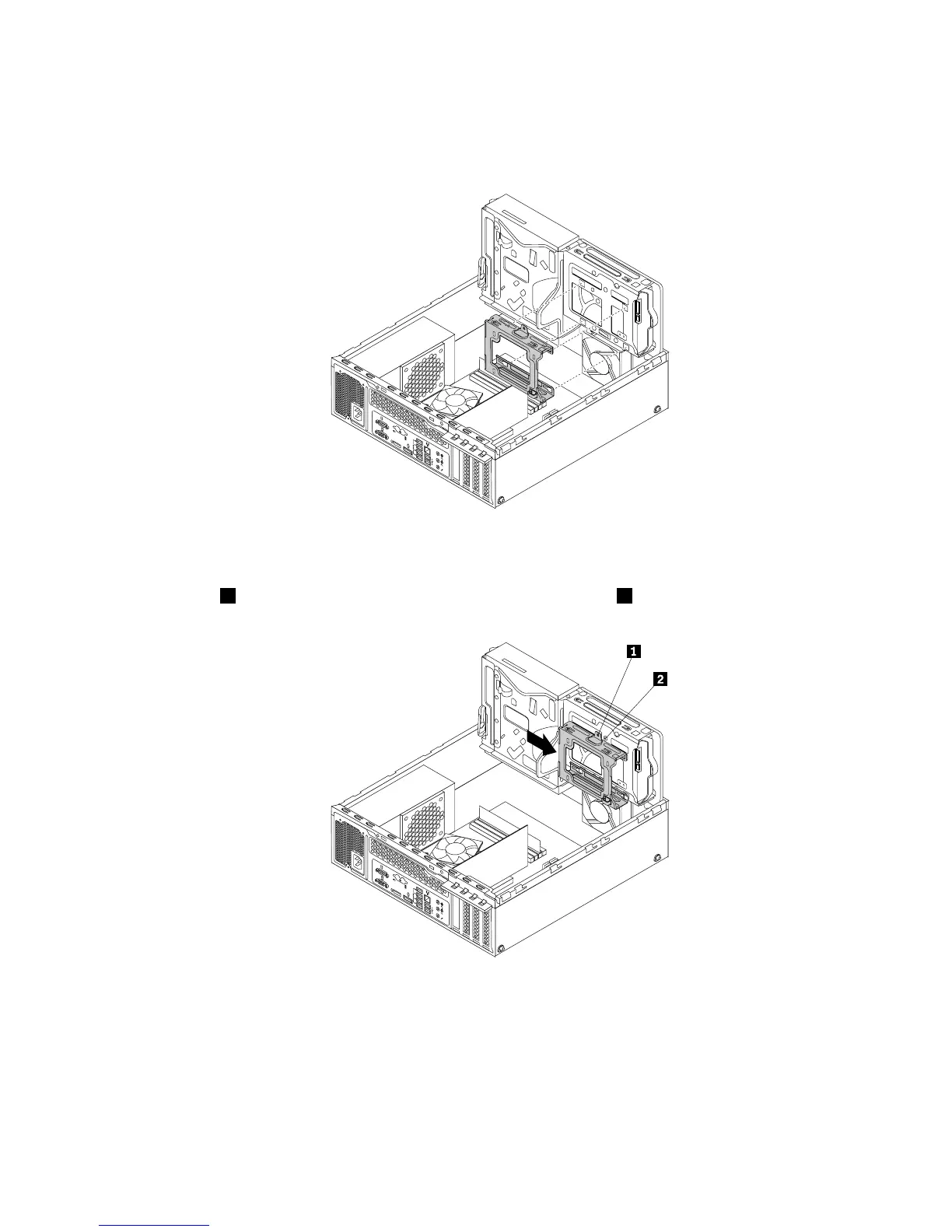
6.Alignthefourholesinthesecondaryharddiskdrivebracketwiththecorrespondingfourtabsonthe
bottomoftheprimaryharddiskdrivebayasshown.Then,positionthebracketontothebottomofthe
primaryharddiskdrivebaysothatthetabsonthebaypassthroughtheholesinthebracket.
3
4
5
6 7
8
Figure47.Positioningthebracketontothebottomoftheprimaryharddiskdrivebay
7.Slidethesecondaryharddiskdrivebrackettotheleftofthechassisuntilitsnapsintopositionandthe
screwhole1inthebracketisalignedwiththescrewholeinthebay2.
3
4
5
6 7
8
Figure48.Installingthesecondaryharddiskdrivebracket
Chapter5.Installingorreplacinghardware55

Table of Contents

Other manuals for Lenovo ThinkStation E32

Related product manuals