Diagnostics and troubleshooting
Leuze electronic BPS 34 93
TNT 35/7-24V
9 Diagnostics and troubleshooting
9.1 General causes of errors
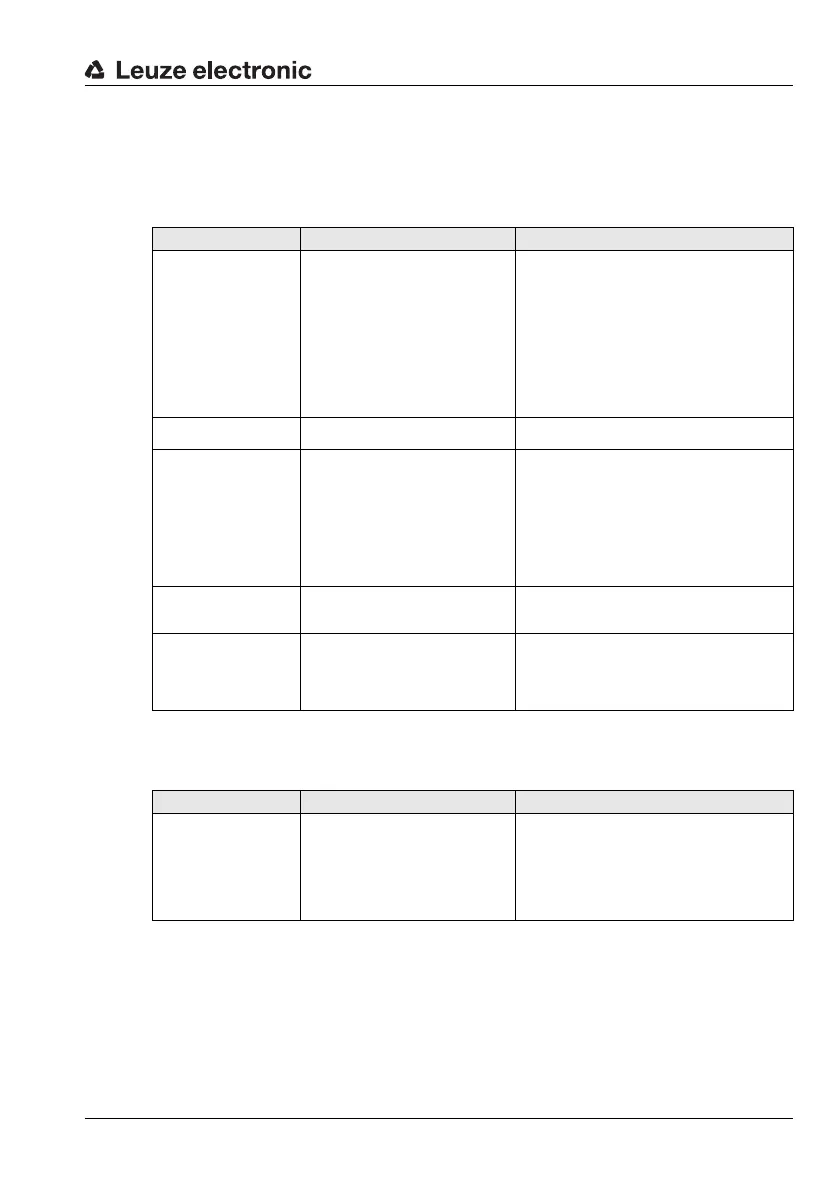
9.2 Error on the PROFIBUS
Error Possible error causes Measures
LED MS 34 10x =
"off"
• No supply voltage connected to
the device.
• Device not yet recognized by the
PROFIBUS.
Note: The LED remains off until
the BPS 34 is recognized by the
PROFIBUS. Only after the
PROFIBUS has addressed the
BPS 34 for the first time, the
following state descriptions apply.
Check supply voltage.
Check PROFIBUS settings.
LED MS 34 10x =
"flashes red"
• Error on the PROFIBUS.
Reset device
(switch voltage on/off).
LED MS 34 10x =
"Red, continuous light"
(no communication via
PROFIBUS)
• Incorrect wiring.
• Wrong termination.
• Incorrect PROFIBUS address set.
• PROFIBUS deactivated.
• Incorrect configuration.
• Parameter memory overflow in
the control.
Check wiring.
Check termination.
Check PROFIBUS address.
Activate PROFIBUS interface.
Check configuration of the device in the con-
figuration tool.
Reduce number of modules.
LED MS 34 10x =
"Orange, continuous
light"
• Service operation active.
Set the service switch in MSD 1 101 to
"Operation".
Position error
• No bar code tape exists.
• Scanner positioned in total reflec-
tion
• Scanner not properly mounted
Check positioning of bar code tape.
Change the angle of the scanning beam by
tilting the BPS 34.
Check mounting.
Error Possible error causes Measures
Sporadic errors
on the PROFIBUS
• Incorrect wiring
• Wrong termination
• Electromagnetic influences
• Overall network expansion
exceeded
Check wiring.
Check termination.
Check shielding.
Check grounding concept and connection to
FE.
Check max. network expansion as a func-
tion of the set baud rate.



 To Next Page