SOUND & LANGUAGE CONTROL
118
SOUND &LANGUAGE CONTROL
MODE
LIVE TV
INPUT
DAY -
DAY +
S
IMPL
IN
K
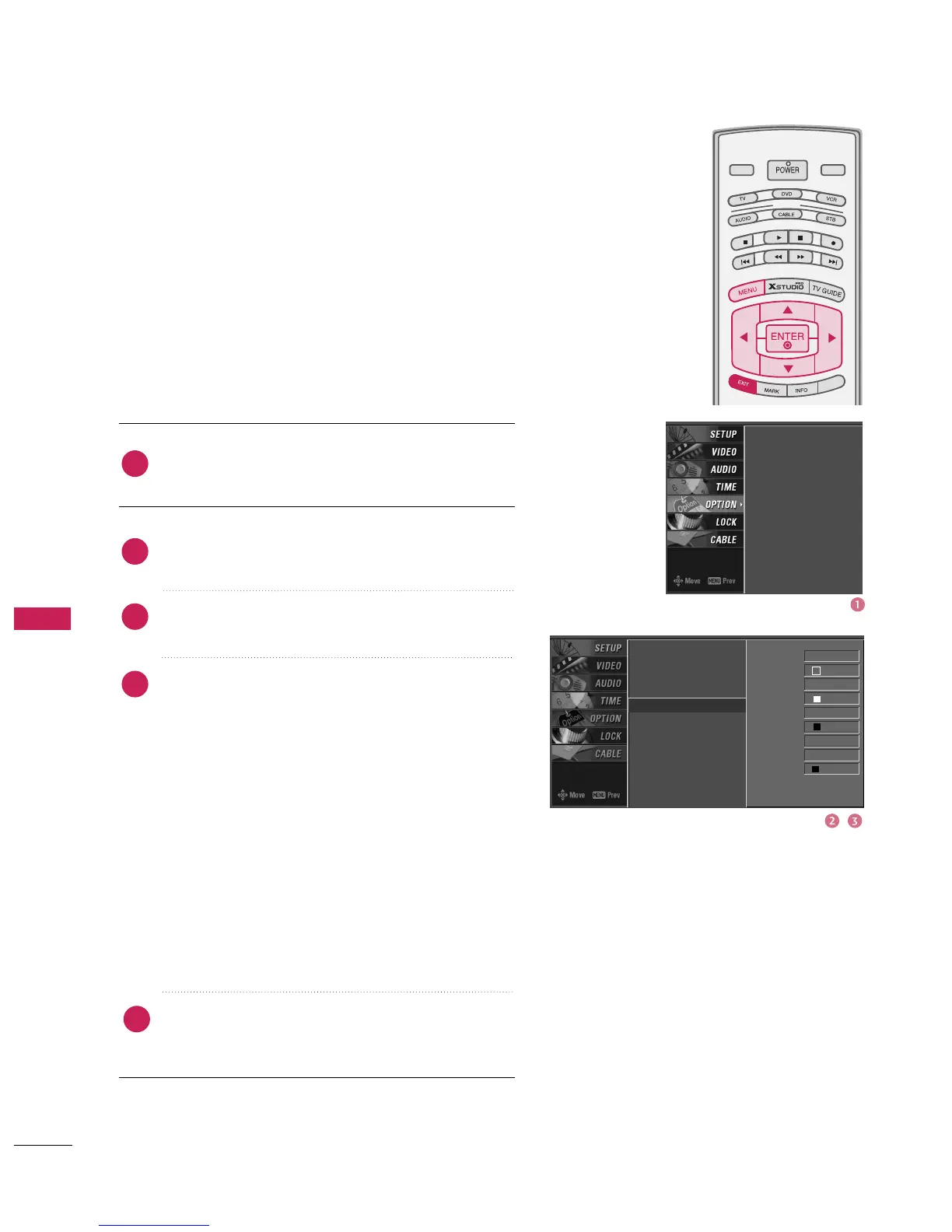
CAPTION OPTION
Customize the DTV/CADTV captions that appear on your screen.
Press the
button to customize the Style, Font,
etc., to your preference.
A preview icon is provided at the bottom of the
screen, use it to see the caption language.
■
Set the size the words will appear in.
■
Select a typeface for the words.
■
Choose a color for the text.
■
Specify the opacity for the text color.
■
Select a background color.
■
Select the opacity for
the background color.
■
Select a color for the edges.
Press
button to return to TV viewing or press
button to return to the previous menu.
2
3
4
1
5
Timeshift Mode
Aspect Ratio
Caption/Text
Caption Option
G
Language
ISM Method
Low Power
HDD Format
SimpLink
Timeshift Mode
Aspect Ratio
Caption/Text
Caption Option
Language
ISM Method
Low Power
HDD Format
SimpLink
Style Custom
Size A Sta ndard
Font Font 0
Text Color White
Text Opacity
Solid
Bg Color Black
Bg Opacity Solid
Edge Type None
Edge Color Black



 To Next Page