WATCHING TV / CHANNEL CONTROL
42
WATCHING TV /CHANNEL CONTROL
EZ Scan
Manual Scan
G
Channel Edit
DTV Signal
Main Input
Sub Input
Input Label
Set ID
EZ Scan
Manual Scan
Channel Edit
DTV Signal
Main Input
Sub Input
Input Label
Set ID
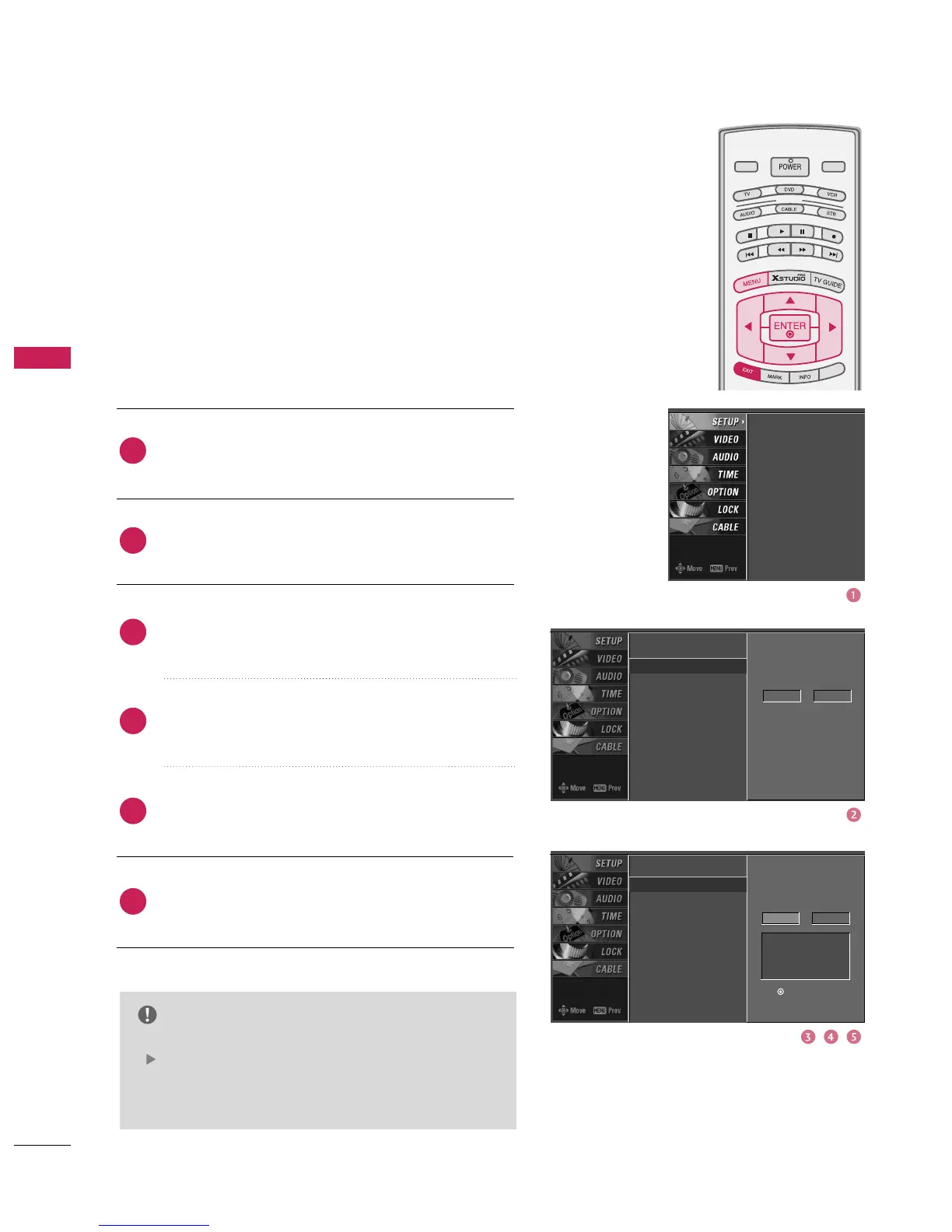
ADD/DELETE CHANNEL (MANUAL SCAN
)
A password is required to gain access to Manual Scan
menu if the Lock System is turned on.
While using the CableCARD
TM
, CATV, CADTV is not work-
ing in Manual Scan.
Press the
button to
select TV, DTV, CATV, and CADTV.
Press the
button to
select channel number you want to add or delete.
Press the
button to add or delete for the
channel number.
Press
button to return to TV viewing or press
button to return to the previous menu.
MODE
LIVE TV
INPUT
DAY -
DAY +
SIMPLINK
NOTE
This digital channel number is a physical channel
number, which is different from the normal channel
number shown in Channel Edit.
Select channel type and
RF-channel number.
TV 2
EZ Scan
Manual Scan
Channel Edit
DTV Signal
Main Input
Sub Input
Input Label
Set ID
Select channel type and
RF-channel number.
TV
2
Press to delete the
channel
TV 2-0



 To Next Page