EXTERNAL EQUIPMENT SETUP
28
EXTERNAL EQUIPMENT SETUP
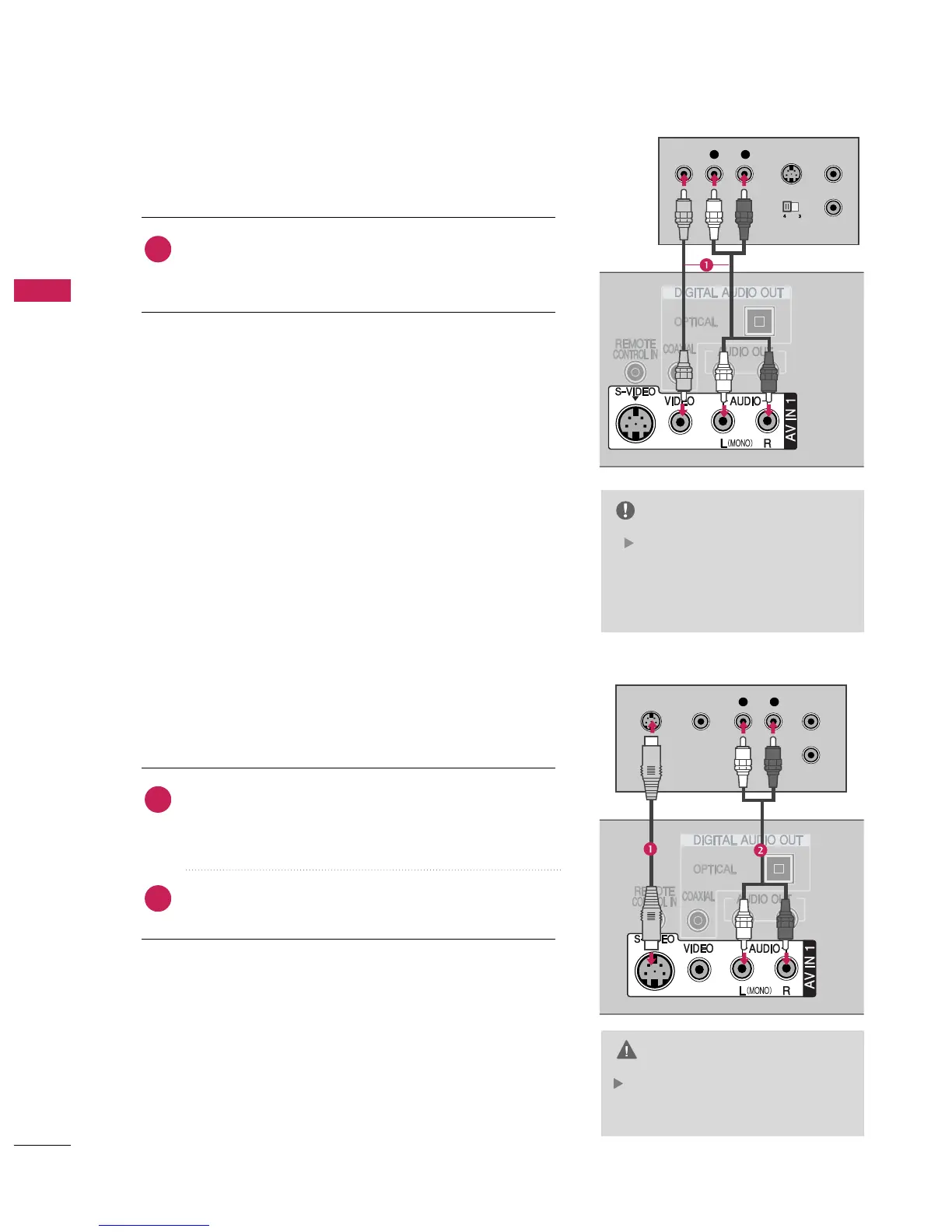
When connecting with a RCA cable
In the event that you connect both
Video and the S-Video cables, only
the S-Video will work.
CAUTION
L R
S-VIDEOVIDEO
OUTPUT
SWITCH
ANT IN
ANT OUT
L R
S-VIDEO VIDEO
OUTPUT
SWITCH
ANT IN
ANT OUT
jacks between TV and
VCR. Match the jack colors(Video = yellow, Audio Left =
white,and Audio Right = red)
1. How to connect
2. How to use
■
Insert a video tape into the VCR and press PLAY on the
VCR.
(
Refer to the VCR owner’s manual.
)
■
Select
input source with using the
button on
the remote control.
■
If connected to
input source.
If you have a mono VCR, con-
nect the audio cable from the
VCR to the
jack of the set.
NOTE
When connecting with an S-Video
Connect the S-VIDEO output of the VCR to the
input on the set. The picture quality is
improved; compared to normal composite
(
RCA cable
)
input.
Connect the audio outputs of the VCR to the
input jacks on the set.
1. How to connect
2. How to use
■
Insert a video tape into the VCR and press PLAY on the VCR.
(
Refer to the VCR owner’s manual.
)
■
Select
input source with using the
button on the
remote control.
■
If connected to


 To Next Page
 Loading...