TV GUIDE ON SCREEN
TM
SYSTEM
54
TV GUIDE ON SCREEN
TM
SYSTEM
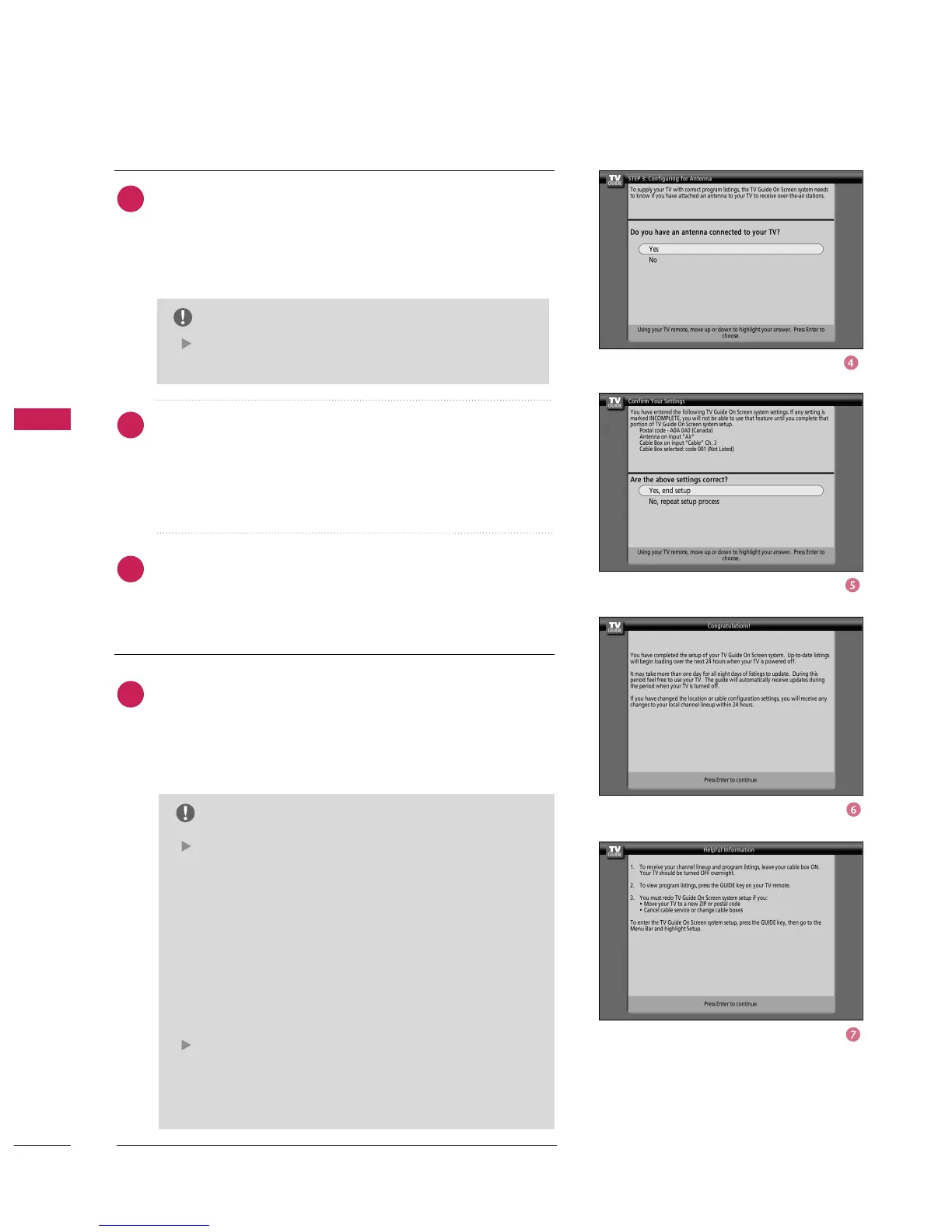
Screen 4: Do you have an antenna connected?
■
If you select Yes, you see Screen 5.
■
If you select No, you see Screen 5.
Screen 5: Are your basic settings correct?
■
If you select Yes, you see Screen 6.
■
If you select No, you see Screen 1.
Screen 6: Congratulations
■
Press
button to display Screen 7.
Screen 7: Helpful Information
■
This screen tells you valuable information on using your
Guide.
■
Press
button to watch TV.
NOTE
If you selected No in Screen 3 then you must select Yes
in this screen to receive a channel lineup and listings.
NOTE
The TV Guide On Screen system receives program
listings data through your cable or over-the-air
video signal. In order to receive regular program list-
ings, please remember to do the following:
1. Turn OFF your TV when it is not in use.
(
Do not
unplug the power cord.
)
2. If you have more than one Cable system in your
area, you may be prompted to select which Cable
system’s program data to download. If so prompt-
ed, please follow the on-screen instructions.
Program listings are updated several times a day. It
may take up to 24 hours to begin to receive any TV
program listings. It may take up to one week to
receive all eight days of TV program listings.
4
5
6
7



 To Next Page