TV GUIDE ON SCREEN
TM
SYSTEM
75
‘
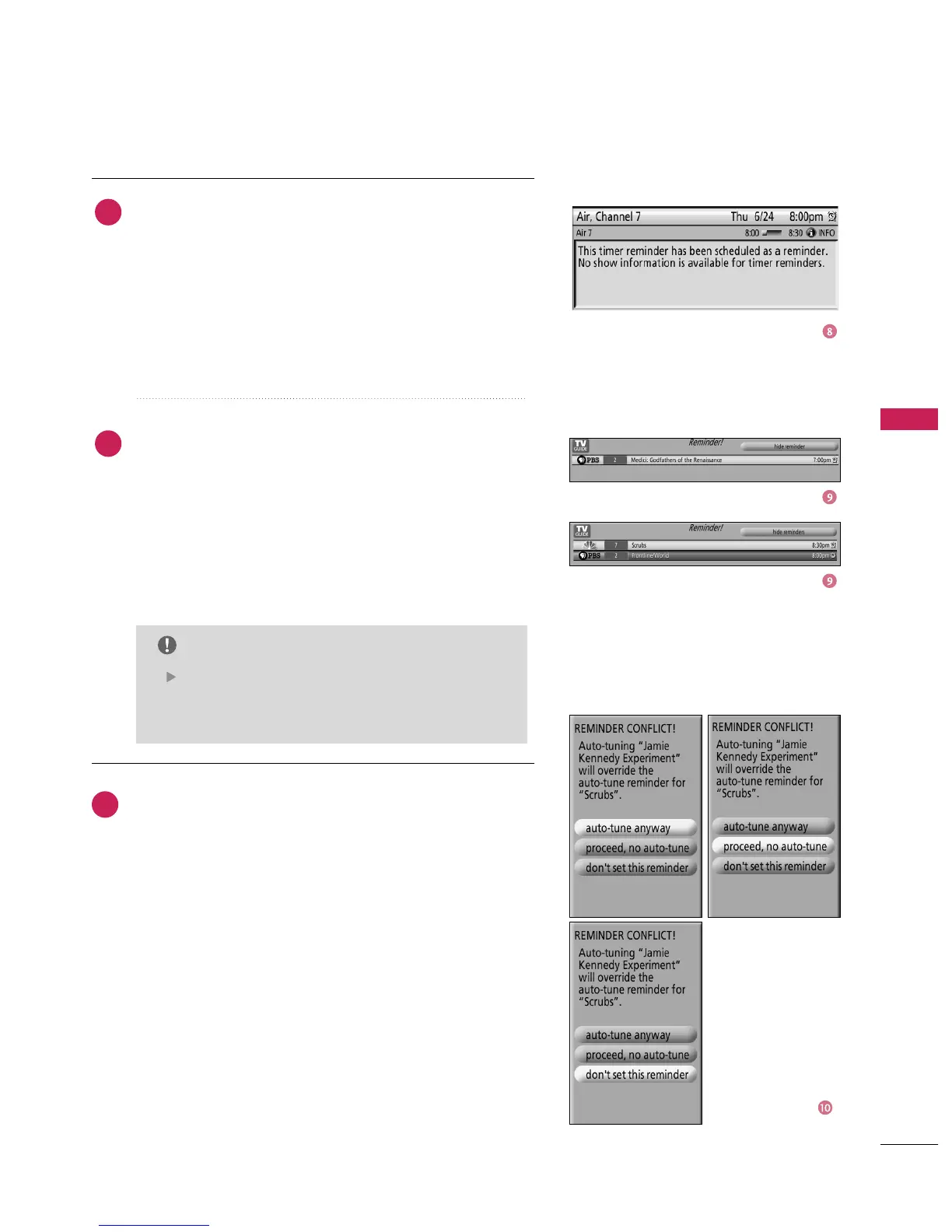
Remind Conflict
A conflict message appears for the following reasons:
■
A show set with an Auto-Tune Reminder has the same start
time as an existing Auto-Tune Reminder.
■
A show set with an Auto-Tune Reminder overlaps with a
Recording already scheduled.
Select one of these options:
■
Auto-tune anyway - This show will override an existing
show set to auto-tune.
■
Proceed, no auto-tune - Set the show as a Reminder but
do not auto-tune.
■
Don't set this reminder - Cancel the Reminder.
When finished, press
button to highlight Schedule
Reminder. Press
button again to close the menu.
You can see a Remind icon for the selected frequency next
to the input and channel number.
Highlight Cancel to close the menu, change no information,
and return to the highlighted show.
If more than 2 reminders are set for the same
time, arrows appear on the Reminder screen. Use
the
button to view the shows.
NOTE
Based on your option settings, a notification screen will
appear, if your TV is On at the reminder time. Then you can
choose to hide the reminder, or highlight the show, and
press
button to tune to the show. If there is no
activity for 3 minutes, the notification screen automatically
closes and completes the highlighted item (hide reminders).
If you choose Hide Reminders, the window closes for the
show or shows, but does not affect other Reminders you set.
8
9
10



 To Next Page