Getting Started
12
Getting Started
1
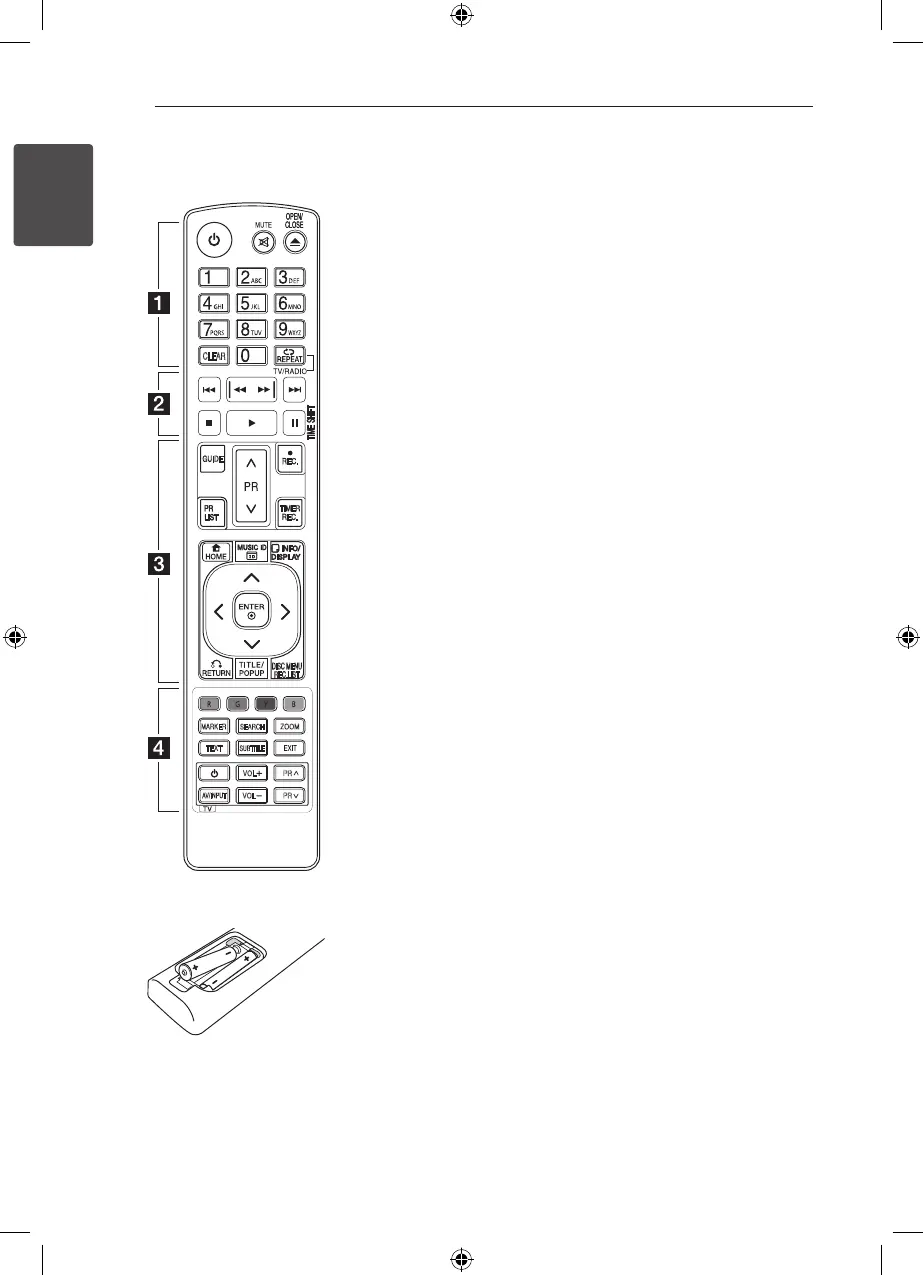
Remote control
DISC MENU
REC.LIST
MARKER
SEARCH
ZOOM
TEXT
SUBTITLE
VOL
PR
AV/INPUT
VOL
PR
CLEAR
GUIDE
TIMER
REC.
REC.
Battery Installation
Remove the battery cover on
the rear of the Remote Control,
and insert two R03 (size AAA)
batteries with
4
and
5
matched correctly.
•• • • • • •
a
•• • • • •
1
(Power): Switches the unit
ON or OFF.
MUTE (
@
): Mutes the sound.
OPEN/CLOSE (
B
): Opens and
closes the disc tray.
0-9 numerical buttons: Selects
numbered options in a menu.
CLEAR: Removes a mark on
the search menu or a number
when setting the password.
REPEAT: Repeats a desired
section or sequence.
TV/RADIO: Switches between
TV and radio modes.
•• • • • • •
b
•• • • • •
C/V
: Goes to next or
previous chapter/track/le.
c/v
: Searches backward
or forward.
Z
: Stops playback.
d
: Starts playback.
M
: Pauses playback or
recording.
TIME SHIFT: Activates pause
live TV/playback (timeshift) for a
live TV programme.
•• • • • • •
c
•• • • • •
GUIDE: Displays the EPG menu.
PR (
W/S
): Scans up or
down through memorized
programmes.
REC. (
X
): Starts recording.
PR LIST: Displays the Channel
list.
TIMER REC.: Displays [Timer
Recording] menu.
HOME (
n
)
: Accesses or
removes the HOME menu.
MUSIC ID
:
When the player
is connected to the network, it
can provide information about
the song played during movie
playback..
INFO/DISPLAY (
m
)
: Displays or
exits On-Screen Display.
W/S/A/D
(left/right/up/
down): Navigates on-screen
displays.
ENTER (
b
)
: Acknowledges
menu selection or displays the
TV info.
RETURN (
x
): Exits the menu
or back to previous step.
TITLE/POPUP: Displays the
DVD title menu or BD-ROM’s
popup menu, if available.
DISC MENU/REC.LIST:
Accesses menu on a disc or
switches between recording list
menu.
•• • • • • •
d
•• • • • •
Coloured (R, G, Y, B) buttons:
Use to navigate BD-ROM menus.
They are also used for [MOVIE],
[PHOTO], [MUSIC], [Home Link],
[DTV] and [Netcast] menu
.
MARKER: Marks any point
during playback.
SEARCH: Displays or exits the
search menu.
ZOOM: Displays or exits the
[Zoom] menu.
TEXT: Switches between
teletext mode and normal TV
viewing.
SUBTITLE: Selects a subtitle
language.
EXIT: Exits a menu or hides on-
screen information.
TV Control Buttons: See page
79
.



 To Next Page