System Setting
28
System Setting
3
Settings for Digital TV
To use DTV functions, this recorder needs some
settings in advance.
Scanning programmes
automatically (Auto Tuning)
All available digital TV or radio programmes are
searched for and stored automatically based on the
selected country.
1. Press HOME.
2. Use
A/D
to select [Setup], and press ENTER
(
b
).
3. Use
W/S
to select [DTV], and press ENTER
(
b
).
4. Use
W/S
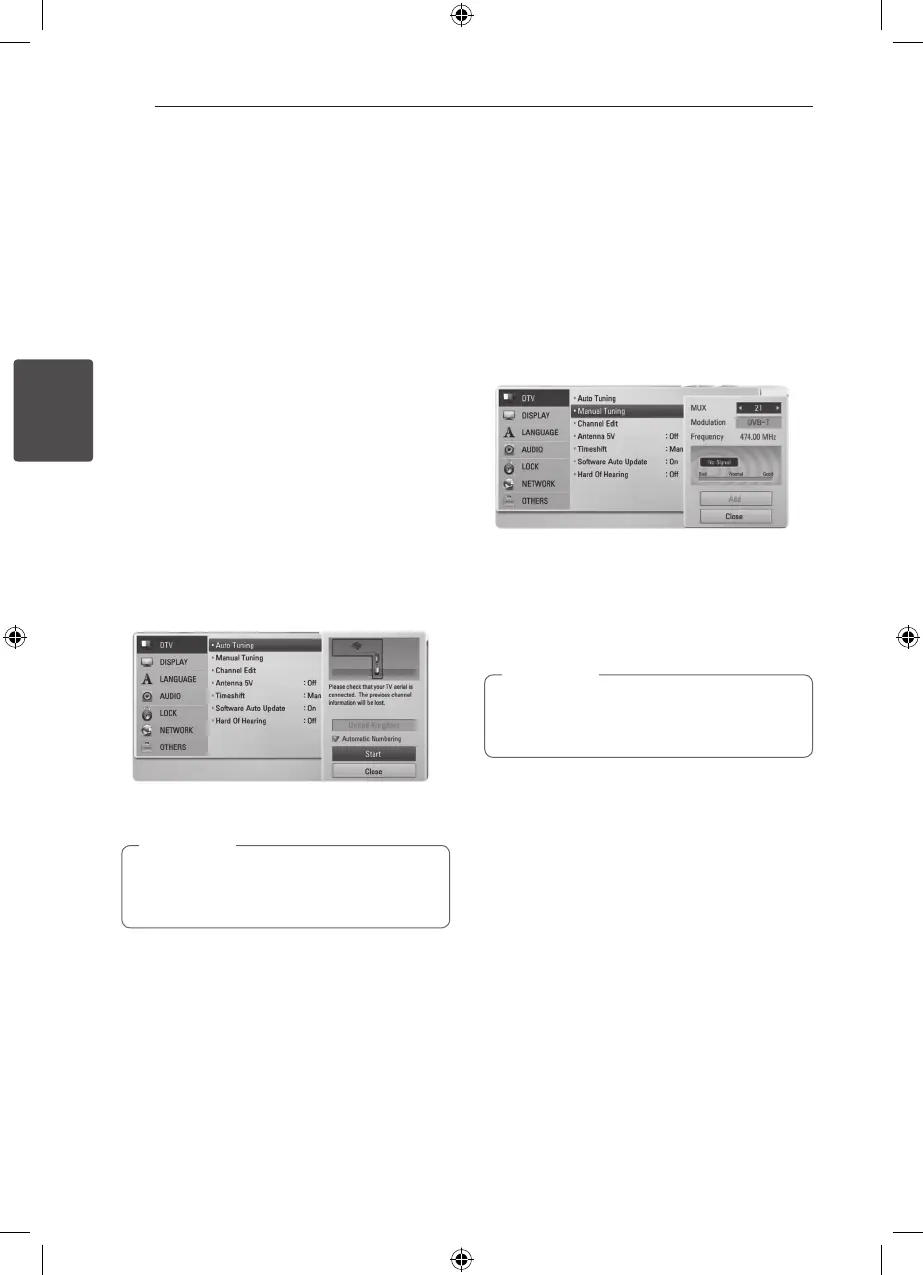
to select [Auto Tuning] and press
ENTER (
b
).
If you do not want to search the channel in
order of number. Please uncheck [Automatic
Numbering] by using ENTER (
b
).
5. Use
S
to select [Start], and press ENTER (
b
) to
begin the channel search.
Select [Stop] and press ENTER (
b
) to stop the
scanning programmes.
If the [DTV Lock] option is set to [Lock], this
function is available when you enter the
password correctly. (see page 29.)
,
Note
Scanning programmes
manually (Manual Tuning)
Scans digital TV or radio programmes and adds the
detected programmes to the programme list.
1. Display [Setup] menu.
2. Use
W/S
to select [DTV], and press ENTER
(
b
).
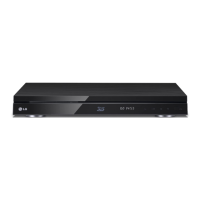
3. Use
W/S
to select [Manual Tuning] and press
ENTER (
b
) to display the [Manual Tuning]
menu.
4. Use
W/S/A/D
to select the desired
multiplexer (MUX), Modulation option, and the
unit starts scanning automatically.
5. Use
S
to select the [Add] and press ENTER
(
b
) to add the programme the unit scans
automatically.
If the [DTV Lock] option is set to [Lock], this
function is available when you enter the
password correctly. (see page 29.)
,
Note



 To Next Page