Operating
63
Operating
4
To play a slide show
Press
d
(PLAY) to start the slide show.
To stop a slide show
Press
Z
(STOP) during slide show.
To pause a slide show
Press
M
(PAUSE) during slide show.
Press
d
(PLAY) to re-start the slide show.
To skip to the next/previous photo
While viewing a photo in full screen, press
A
or
D
to go to the previous or next photo.
The le requirements are described on page
10.
,
Note
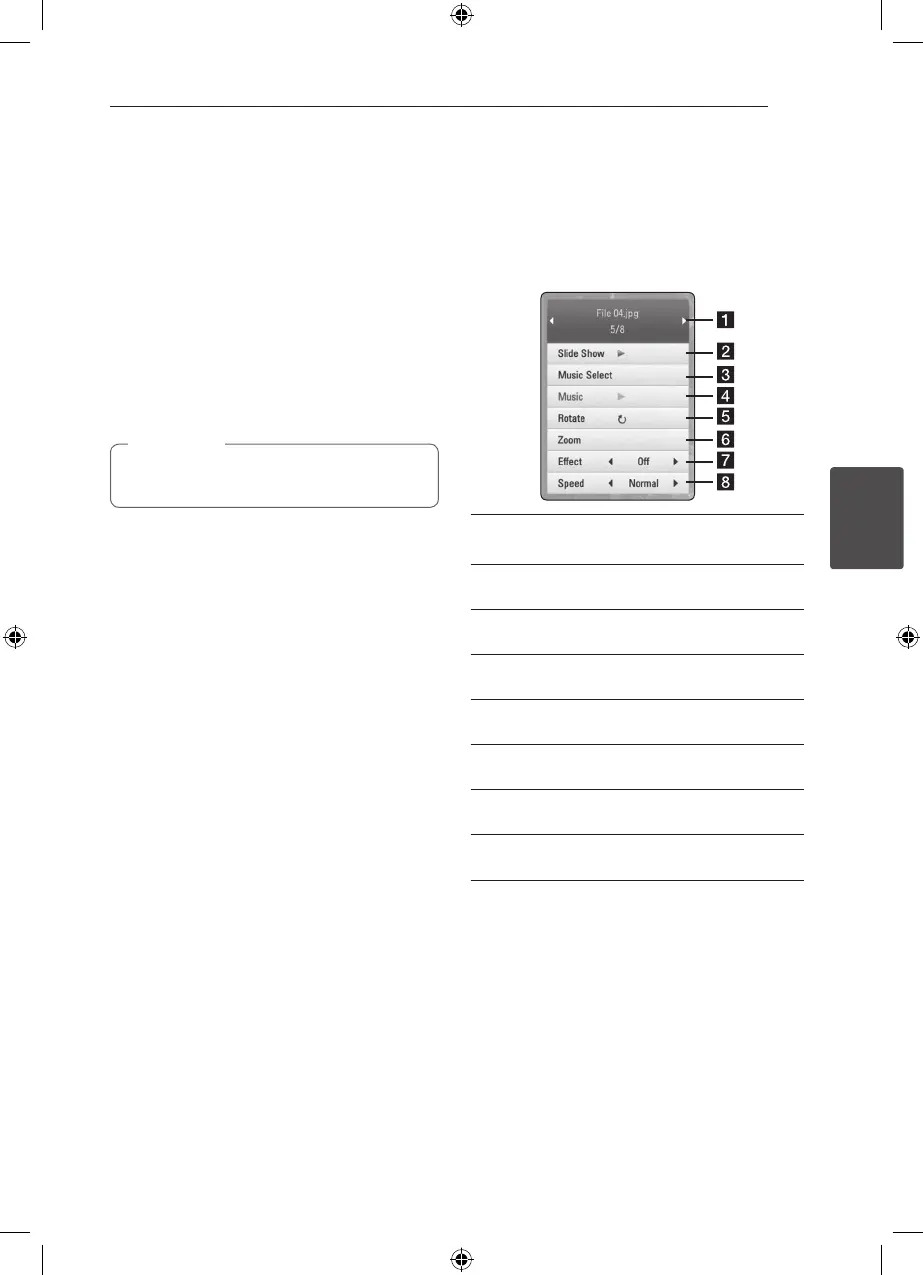
Options while viewing a photo
You can use various options while viewing a photo
in full screen.
1. While viewing a photo in full screen, press INFO/
DISPLAY (
m
) to display the option menu.
2. Select an option using
W/S
.
a Current photo/Total number of photos –
Use
A/D
to view previous/next photo.
b Slide Show – Press ENTER (
b
) to start or
pause slide show.
c Music Select – Select the background music
for the slide show (page 64).
d Music –Press ENTER (
b
) to start or pause
background music.
e Rotate – Press ENTER (
b
) to rotate the photo
clockwise.
f Zoom – Press ENTER (
b
) to display the [Zoom]
menu.
g Eect – Use
A/D
to select a transition eect
between photos in a slide show.
h Speed – Use
A/D
to select a delaying speed
between photos in a slide show.
3. Press RETURN (
x
) to exit the option menu.



 To Next Page