EasyManua.ls Logo

LG N2A2DD2 - Page 40

LG N2A2DD2
110 pages
Print Icon
To Next Page IconTo Next Page
To Previous Page IconTo Previous Page
Loading...
40
7
-
4.
System set-up
Hard drive set-up
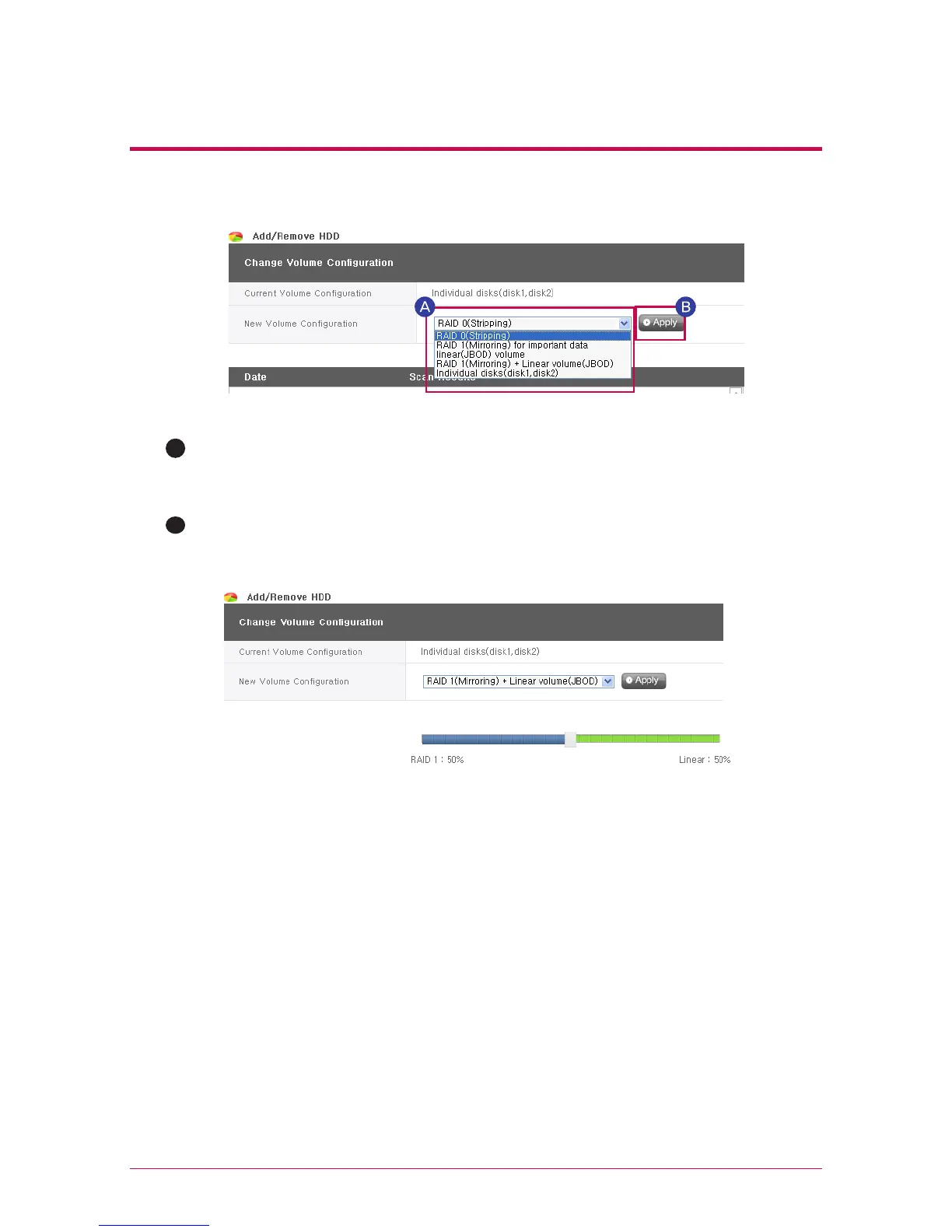
A
There are 5 menus for new volume configuration, including “RAID 0(stripping)”, “RAID
1(Mirroring) for important data”, “Linear Volume(JBOB)” and “Individual disk(Disk 1, Disk
2)”.
Select desired configuration and click “Apply.
B
RAID 1 (mirroring) + linear (JBOD) selection activates the slide bar below for size
selection. Move the slide bar to determine the size and press the “apply” button.
If either “RAID 1 (mirroring)” or “RAID 1 (mirroring) + linear (JBOD)” is selected, the
synchronization progress for the RAID 1 portion may be viewed on the web screen.

Table of Contents

Other manuals for LG N2A2DD2

Related product manuals