88
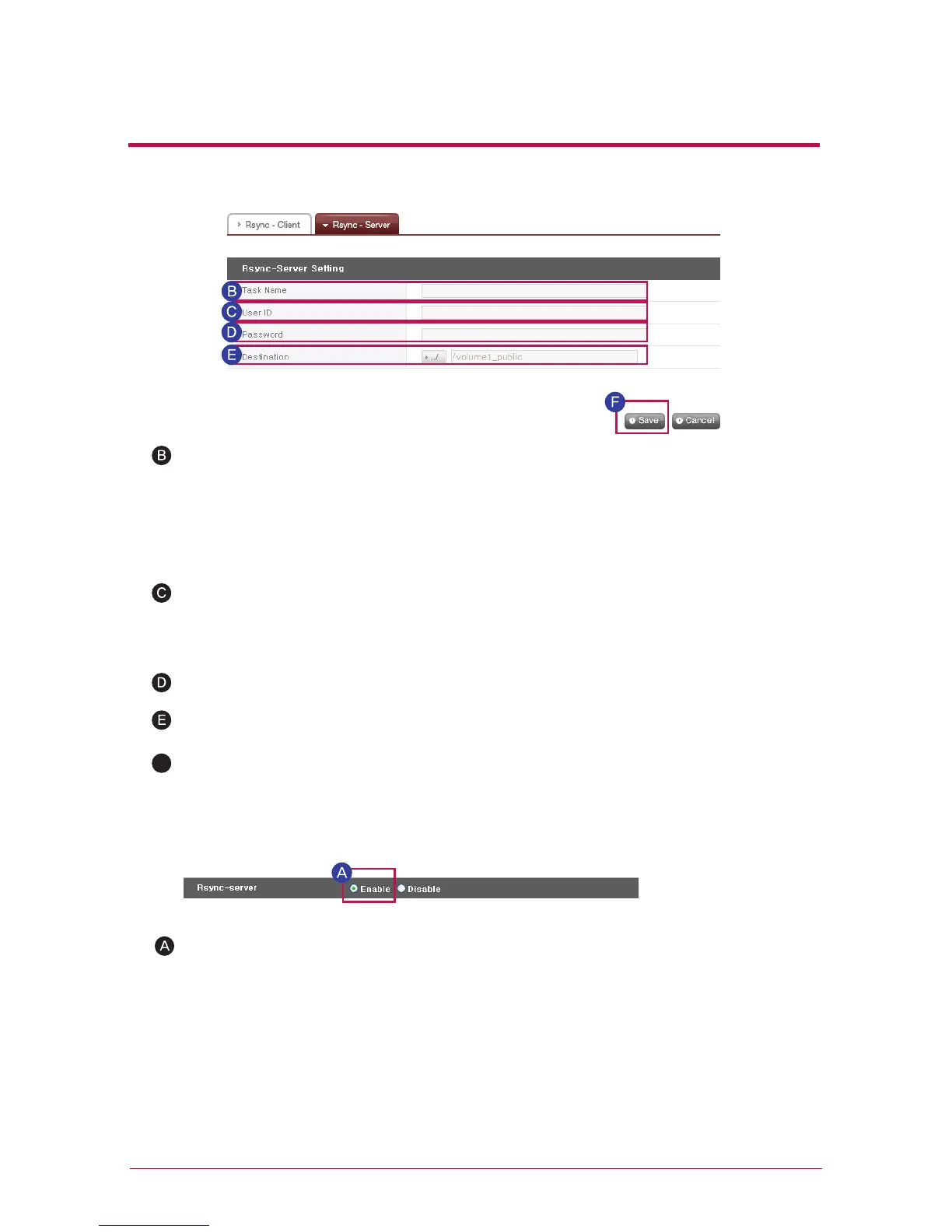
Check ‘Enable’ for the Rsync server to activate a remote data backup service as a server.
Configure task name.
This is an identifier to distinguish remote data backup service. The source LG NET-
WORK STORAGE and target LG NETWORK STORAGE must have a common task
name. The name can be 15 characters or less, beginning with a letter, and the remaining
characters may be alphanumeric characters, with the exceptions of ‘_’.
Input the User ID of the data manager.
Input user password.
Configure target directory to save backed up data.
※
※
※
※
Users not registered to the LG NETWORK STORAGE for data backup must refer to
[Section8. Add User] to generate a new user account.
Select ‘Edit’ to alter a configured Rsync server task.
Select ‘Delete’ to delete a configured Rsync server task.
Deletion of a configured Rsync server task will not affect user information or data
already backed up
Select ‘Save’ to save.
F
10
-
5.
File sharing service
RSYNC (Remote Data Backup Service)



 To Next Page