89
10
-
5.
File sharing service
RSYNC (Remote Data Backup Service)
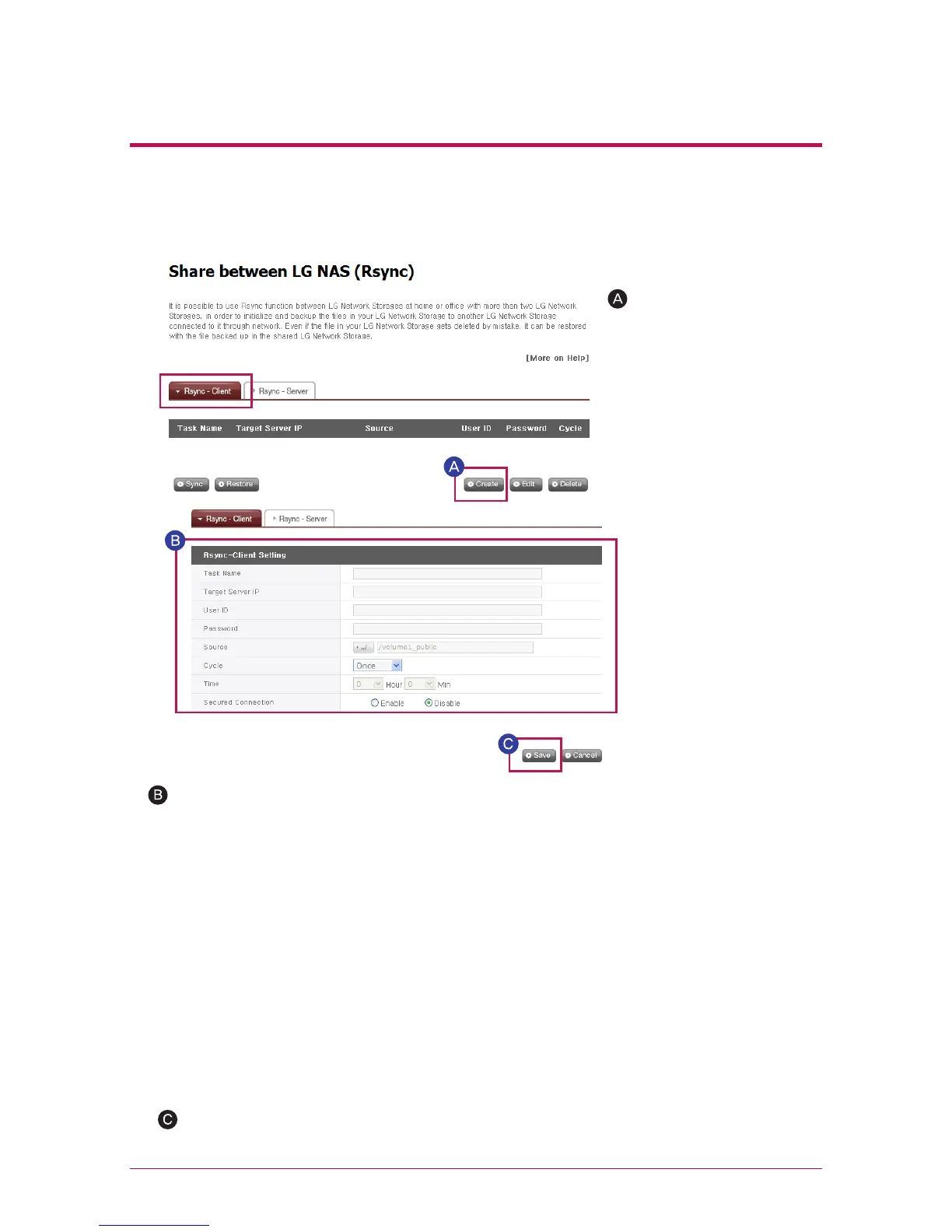
Select ‘Create’.
- Task Name : Enter the same task name as configured for the Rsync-server.
- Target Server IP : Enter IP address of the target LG NETWORK STORAGE (Rsync-server).
- User ID : Enter the same ID as configured for the Rsync-server.
- Password : Enter the same password as configured for the Rsync-server.
- Click on the ‘Choose Directory’ button to choose the directory containing the data to be
backed up. (Choose one of the directories in Rsync-client.)
- Configure data backup frequency.
Data backup frequency can be selected from the options Once, Daily, Weekly or Monthly.
Once: For a one-time backup only.
Daily: Backup is performed daily at the scheduled time.
Weekly: Back up once every week on a designated day.
Monthly: Back up once every month on a designated date.
- Set time for data backup.
- Send files more safely through an encoded transmission
Click ‘Save’ to save.
※
Clicking ‘Save’ is insufficient to run the Rsync client.
2. RSYNC-client Configuration
Users can configure functions for data backup to another LG NETWORK STORAGE
within the same network.



 To Next Page