Refueling and Cost Adjustment
Improving the Accuracy of Your ScanGauge
The accuracy of your ScanGauge can be improved by following the Refueling and Cost Adjustment
procedures outlined in this section. These functions directly effect the fuel based trip computers – TANK
and TANK TO EMPTY. See page 32.
The Fill up Function
The FILLUP function allows you to adjust and enter the fuel level and cost values to help ScanGauge
maintain accurate TO EMPTY and FUEL COST computations. During initial setup, if you are not filling
the tank to capacity, you will need to estimate the amount of fuel in the tank.
Initial Setup
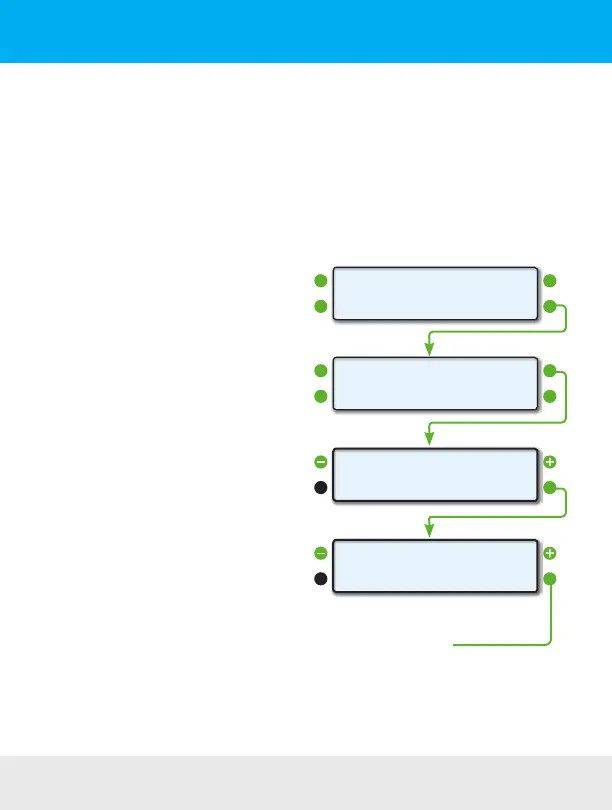
To set the tank level initially, access the FILLUP
screen and use the upper left and right function
buttons to adjust the “TANK=” value to what you
estimate is in the tank.
For instance, if your vehicle’s fuel gauge indicates
there is a half a tank of fuel, then adjust the
“TANK=” value to match 1/2 of the tank capacity.
Using the FILLUP Screen
Use the FILLUP screen each time you put fuel in
the tank. Adjust the number shown in the top line
using the upper left and right function buttons until
the number matches the amount of fuel you put
in the tank.
You can increase the number in 10 gallon/liter
steps and decrease in 1 gallon/liter steps.
If you’re tank is full, press the function button next
to “+10” until the “TANK=” value is the same as
the tank capacity.
Fuel Cost Screen
When you’re done adjusting the fuel, press the
NEXT button to access the Fuel Cost Screen. Use
the upper left and right function buttons to adjust the fuel cost, then press SAVE.
<SCAN
<TRIP
GAUGE>
MORE>
<SETUP
<DISPLAY
MORE>
FILLUP>
0
NEXT>Tank= 85
<-1 +10>
Fuel Cost
<
SAVE>
>$4.10
Push the SAVE button to complete the
FILLUP process and reset the TRIP
parameters related to fuel.
FILLUP Screen
Fuel Cost Screen
22 — www.ScanGauge.com


 To Next Page