Set a Gauge for Performance Monitoring
In addition to the three key performance data parameters; distance, speed and time, the Performance
Monitor also allows you to set an additional data parameter for recording. The MONITOR function allows
you to select and “turn on” any one of the built-in digital gauges (see page 25).
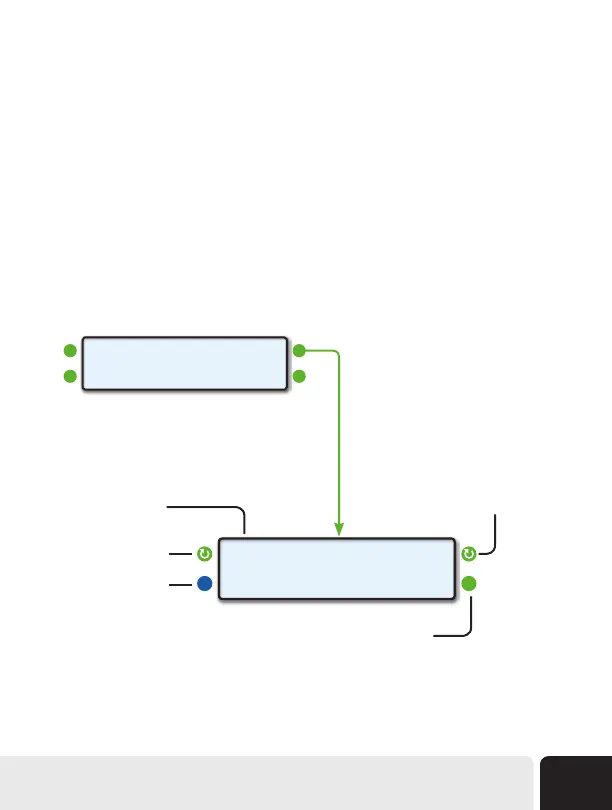
To access the MONITOR function and set a digital gauge to be monitored, start by pressing the upper
right function button next to MONITOR on the Performance Monitor Home Screen. Next, use the upper
left function button to cycle through the available gauges. Once you have the gauge you want to monitor
selected, press the upper right function button to toggle MONITOR to ON.
When you’re ready, you can arm ScanGauge for a Performance Run by pressing the lower right function
button next to ARM. With a digital gauge selected, and the Monitor set to ON, the Performance Monitor
will now record data for the selected gauge.
Displays the currently
selected gauge
Push to arm ScanGauge for
a Performance Run
Push to toggle MONITOR
ON and OFF
Push to cycle through the
available gauges
Push to return the
previous screen
RPM MONITOR ON>
<BACK ARM>
Performance Monitor Home Screen
<DATA MONITOR>
<MEMORY ARM>
Advanced Features
53


 To Next Page