If No Codes Are Found
If no codes where found and your Check Engine
light is still on, you may need to use the CLEAR
function.
If this does not turn off the check engine light,
you may need to adjust the setting of CLR DTC
parameter to ALT in the Advanced Setup (see
page 19). Then, use the CLEAR function again.
What to Do if DTCs Are Found
If your vehicle’s Check Engine light is on, that’s a good
indication that your vehicle may be storing Trouble
Codes (DTCs). If ScanGauge indicated it has detected
DTCs, you can access the specific Error Code ID (ID)
and related Failure Mode ID (FM) by pressing the
function button next to CODES. If more then one code
is stored, you can use the lower left and right function
buttons to step through the stored codes.
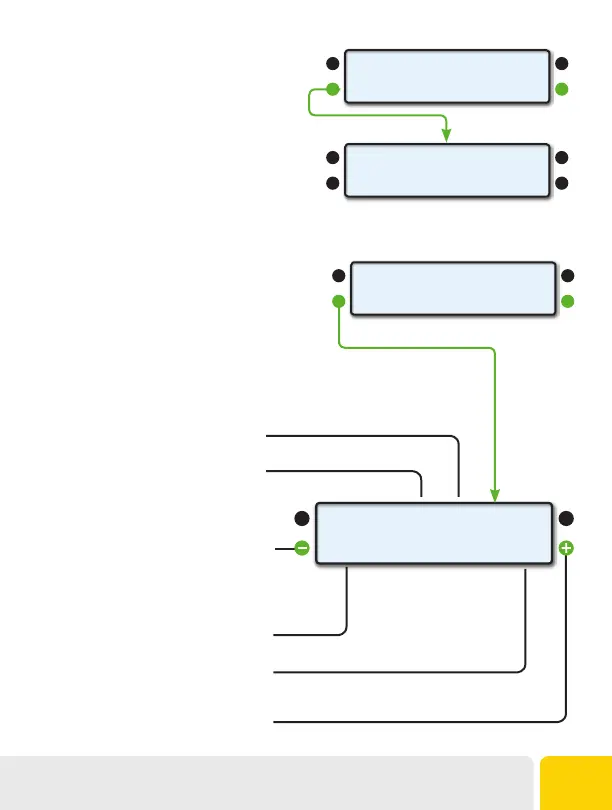
0 STORED CODES
<CODES CLEAR>
No Codes Found
Displays the Error Code ID Number
Displays the Failure Mode ID. See page 38 for
list of standard modes
Displays the number of times the DTC has
been detected (Max 127)
Displays the number of the currently selected
trouble code
Push to step back through detected
trouble codes
Push to step forward through detected
trouble codes
ID
100
FM
1
#
<1
CNT
42>
2 STORED CODES
<CODES CLEAR>
Operating Your ScanGaugeD
37


 To Next Page