The Commands Home Screen
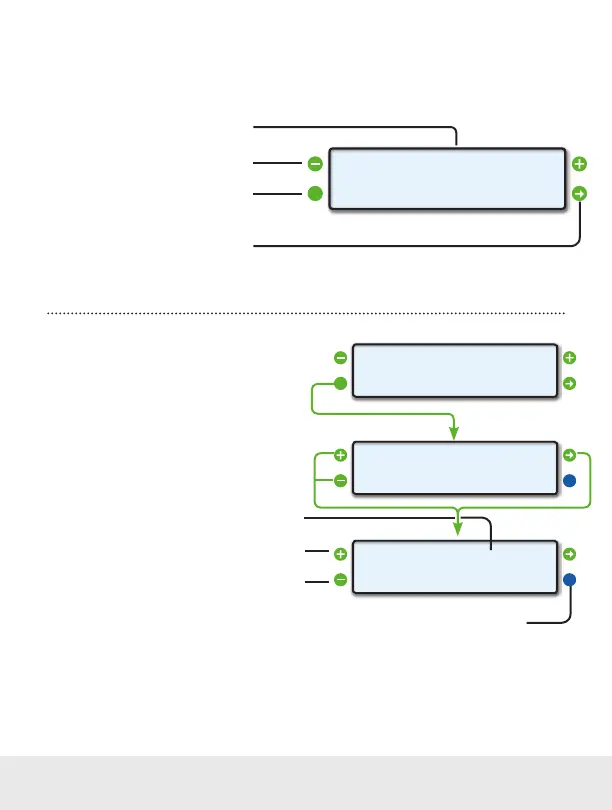
From the Commands Home Screen, pushing the upper left and upper right buttons allows you
to cycle through available memory slots. Each memory slot can store an individual command.
Push to send the command saved at the
currently selected memory slot
Displays the currently selected memory slot
An asterisk (*) indicates the current slot is in use
Push the upper left or right function buttons to
cycle through the available memory slots
Push the lower left function button to edit
the currently selected memory slot
Commands Home Screen
<EDIT
<
SEND>
>MEMORY *0
Enter and Save a Command
To enter a command into your ScanGauge, you
will need to enter a hexadecimal string. The
command can be made up of numbers (0 to
9), characters (A to F) and spaces. ScanGauge
will allow you to enter the maximum number of
characters the currently selected protocol or
MODE allows for (see page 63).
Press the lower right function button to save the command
-
+686AF10105_
OK>
»
-
+_
OK>
»
<EDIT
<
SEND>
>MEMORY *0
Current cursor position
Push the upper left function button to increment
the character at the current cursor position up
Push the lower left function button to increment the
character at the current cursor position down
56 — www.ScanGauge.com


 To Next Page