Copying an X-GAUGE
To a Different Memory Slot
If you want to program a new X-GAUGE
that is very similar to one you have already
entered, you can copy the program
parameter data in one X-GAUGE memory
slot to another.
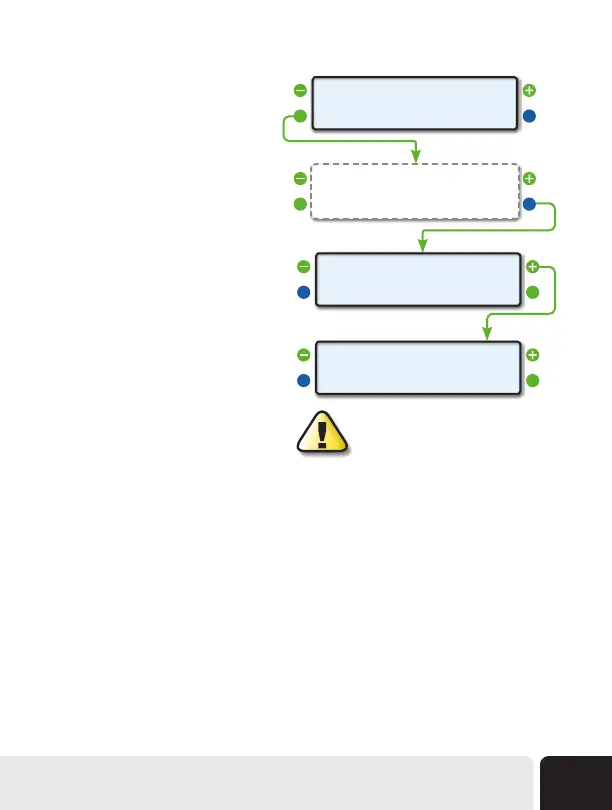
Step 1 - Select an X-GAUGE to Copy
Start by selecting the X-GAUGE you
would like to copy. Use the upper left and
right function buttons to cycle through the
X-GAUGE memory slots until you locate the
X-GAUGE you want to copy. Next press the
lower left function button next to EDIT.
Steps 2-6 - Edit The Program Parameters
Step through the settings and edit the
selected X-GAUGE’s program parameters
as needed for the new X-GAUGE.
Step 7 - Change Memory Slot and Save
Before pressing SAVE, use the upper left
and right function buttons to select a new
memory slot.
If an asterisk (*) is present in the top line
next to the new X-GAUGE name, then there is already an X-GAUGE saved in that memory slot. Saving
the new X-GAUGE in that particular slot will overwrite any X-GAUGE data already present in that
memory slot. Once you have the desired memory slot selected, press lower right function button next
to SAVE. All the data will be written to that X-GAUGE memory slot, leaving the previously selected
memory slot unchanged.
Disabling an X-GAUGE
To disable an X-GAUGE already in memory, start as if you were going to edit the gauge. In the TXD
Screen, change the first character to a space. Continue to step through the editing fields by pressing the
lower right function button next to OK and press SAVE to exit the screen. This will actually delete the
data to transmit, which tells the ScanGauge not to use this X-GAUGE. The name will not be displayed.
If you put transmit data back into this gauge, it will be reactivated.
<EDIT
<XGAUGE
EXIT>
1>
Step 1 (select an X-GAUGE)
Step 7
Step 7 (continued )
<CANCEL
<XGAUGE
SAVE>
* ABC 0>
<CANCEL
<XGAUGE
SAVE>
ABC 1>
Follow Steps 2 thru 6 of
Programing Your Own X-GAUGE
Saving an X-GAUGE in a particular memory
slot will overwrite any X-GAUGE data that may
already be saved in that memory slot.
Advanced Features
45


 To Next Page