22
Ground Control® 3.0
Aftermarket Manual
lci1.com (574) 537-8900 Rev: 04.19.18
CCD-0001307
Congure Remote to Touch Pad
1. Enter the Leveler app on the LINC Remote.
2. Turn the remote on by pressing and releasing the large silver
button at the bottom of the remote.
3. Press the “OK” button on the touch screen to access the
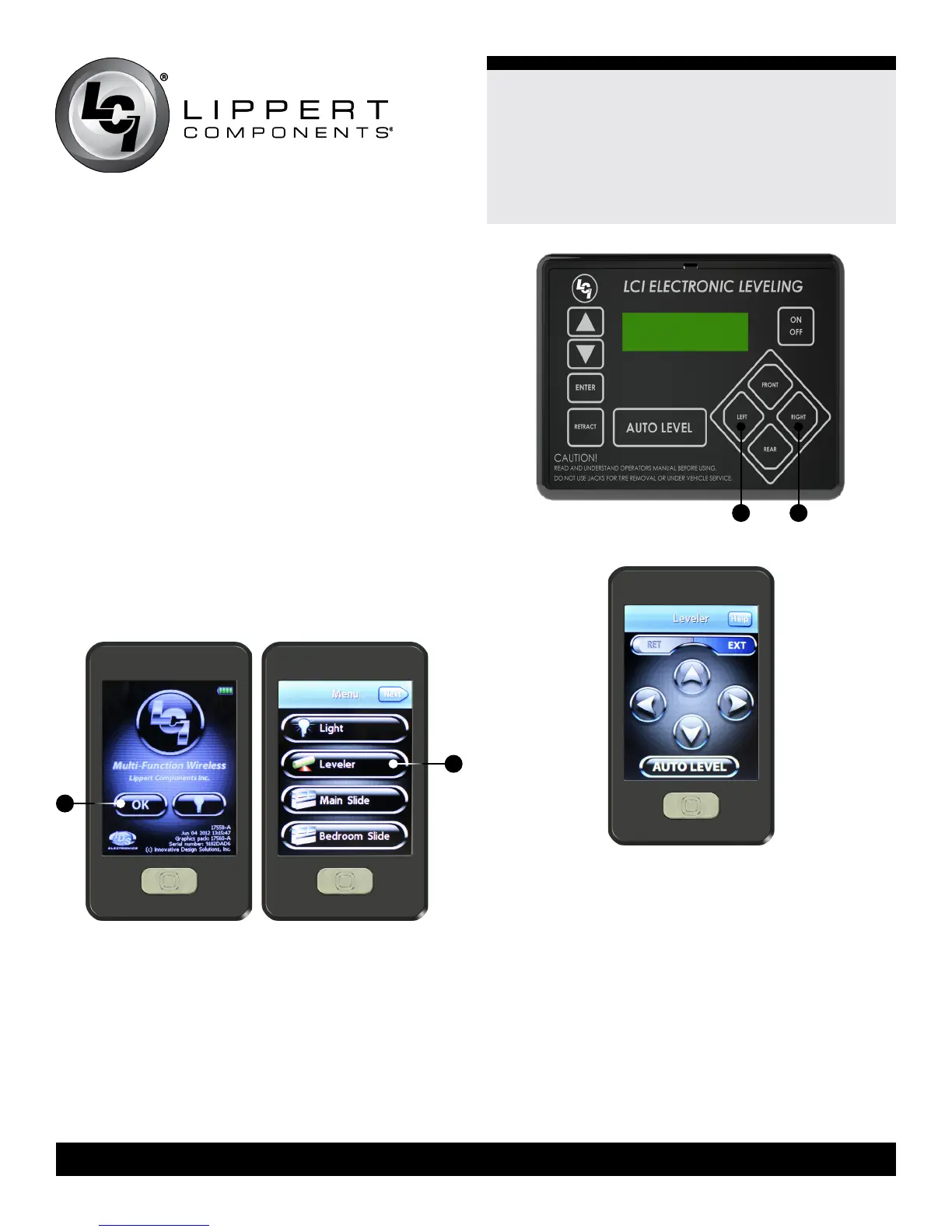
Function Menu (Fig. 47A).
4. Press the Leveler App button (Fig. 48A).
5. With the touch pad turned off, press LEFT ve (5)times
(Fig. 49A), and then RIGHT ve times (Fig. 49B).
6. The LCD on the touch pad should read “Wireless
Conguration.”
7. Click any button on the LINC remote in the Leveler
App (Fig. 50).
8. The LCD on the touch pad should read “Successful!” Your
wireless Ground Control® system is now ready to use.
A
A
A B
Fig.47 Fig.48
Fig.49
Fig.50






 To Next Page