EasyManua.ls Logo

Longtec TR700 - Display Panel

Default Icon
71 pages
Print Icon
To Next Page IconTo Next Page
To Previous Page IconTo Previous Page
Loading...
TR700 Instruction Manual
6
The amount of load cells of
350Ω connected together
Wire of
NO.24m
Wire of
NO.20m
Wire of
NO.16m
1 240 600 1200
3
60
180
300
8
maximum
40 120 200
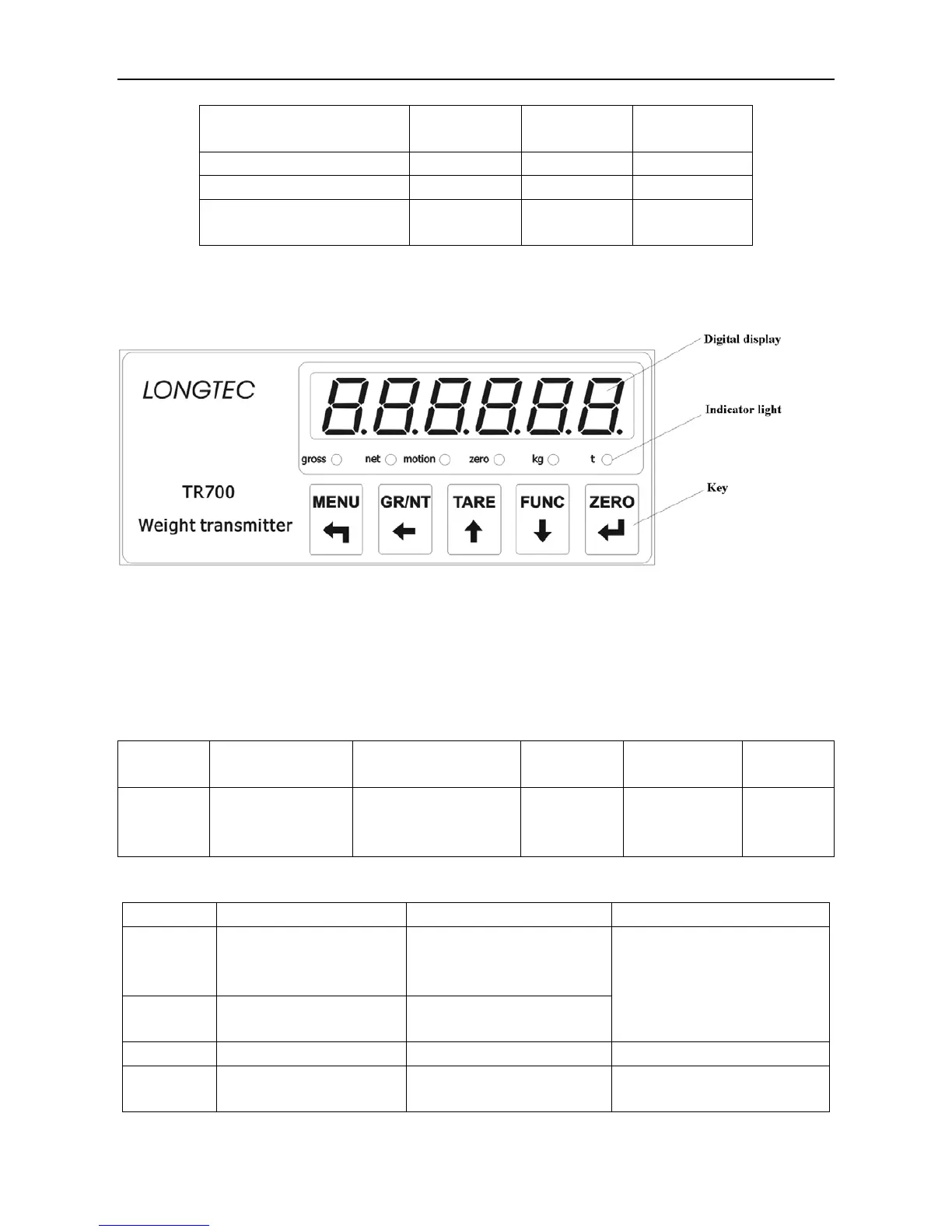
3.4 Display panel
1,
Display Window
It is six-bit LED display, mainly used to display weight data or the other functional parameters. After
it is connected to the power supply, it displays ‘8.8.8.8.8.8.’for about 5 seconds, and then
automatically enters the weighing status.
The details are as follows.
Table 3-3
Display
status
Weighing display
Function setting Calibration
Higher/lower
limit setting
Diagnosis
Display
contents
Weighing value Functional parameter
Calibration
parameter
Higher/lower
limit
parameter
Diagnosis
parameter
2, Status Lamp
Light
ON
OFF
Note
Gross
Display the gross
weight of the front
panel.
Only one light of Gross or
Net is on in the weighing
display state.
Net
Display the net weight
of the front panel.
Motion Scale on motion Scale on the stable state
Zero
The gross weight is
zero.
The gross weight is not
zero.

Table of Contents