EasyManua.ls Logo

Longtec TR700 - Function Table

Default Icon
71 pages
Print Icon
To Next Page IconTo Next Page
To Previous Page IconTo Previous Page
Loading...
TR700 Instruction Manual
12
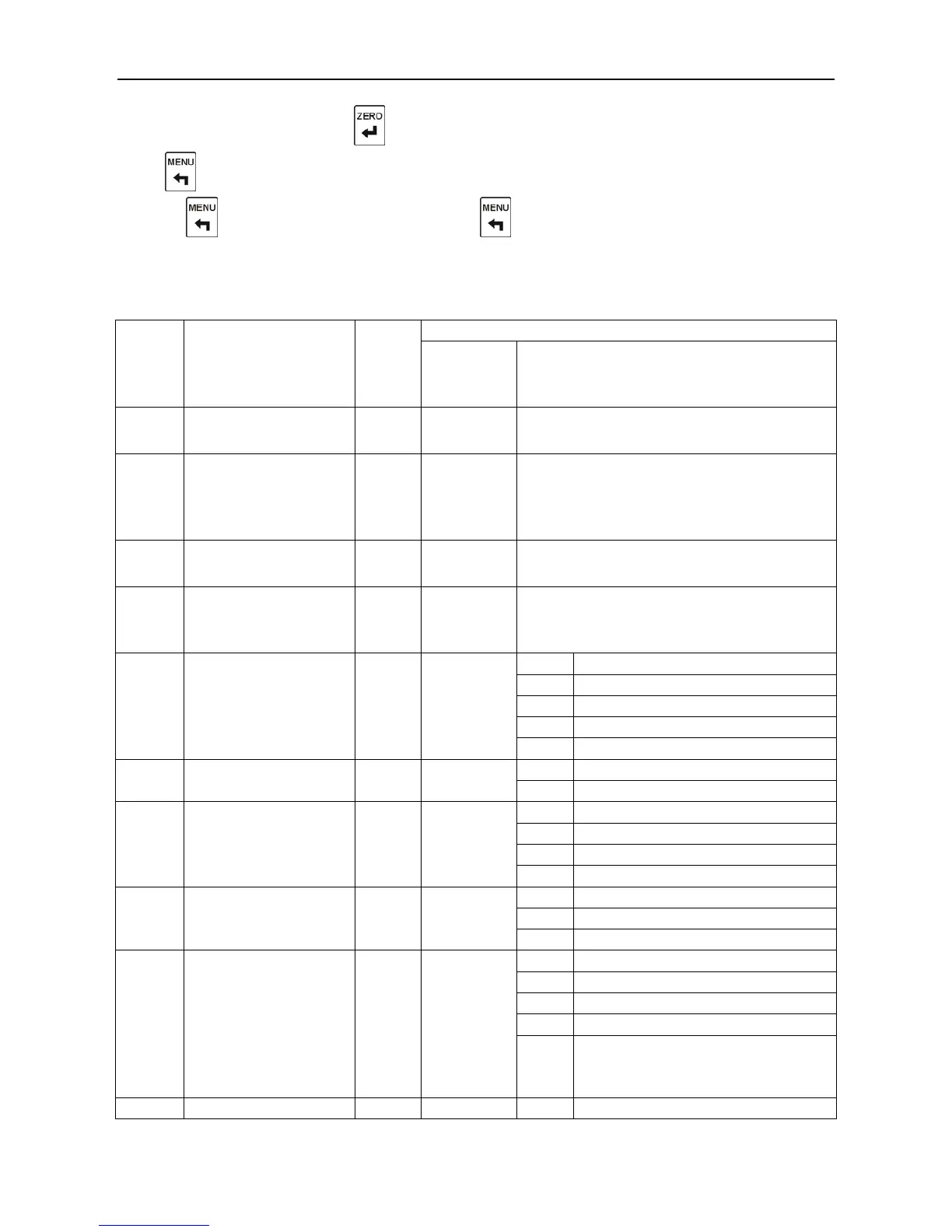
to input parametersand press to save the parameters and enter the next function setting,.
Press to get back to the former function setting without saving the parameters, and then go on
pressing to get back to “FUNC”, and press again to get back to normal display.
5.2. Function Table
Numbe
r
F
XX
Name
Defaul
t
Setting
Parameters
Range
Description
00
Zero range
3
0-10
0 Zero function off;
1-10 It is 1-10 of the capacity.
01
Zero tracking range
0
0-10
The display must be in zero tracking range
in 2s, and later it goes back to zero.
0 Do not perform zero tracking;
1-10
Display division.
02
Motion detection
range
3
0-10
0 Motion detection is off;
1-10 Display division.
03
Filter coefficient
3
0-9
0 No filtering;
1-9 The larger the figure is, the
greater the filter is.
04
Display updating rate
3
0-4
0
1 times per second
1
4 times per second
2
8 times per second
3
16 times per second
4
30 times per second
05
Unit conversion
0
0-1
0
kg
1
t
06
Sampling rate
0
0-3
0
25 times per second
1
50 times per second
2
100 times per second
3
200 times per second
07
Conditions of
comparison output
0
0-2
0
Gross weight
1
Net weight
2
Display value
08
Distribution of
external control input
1
3
0-8
0
Gross/net
1
Tare
2
Clear zero
3-7
Extended Functions
8
Keyboard lock
only lock the “zero, tare, gr/nt”
keys

0
Gross/net

Table of Contents