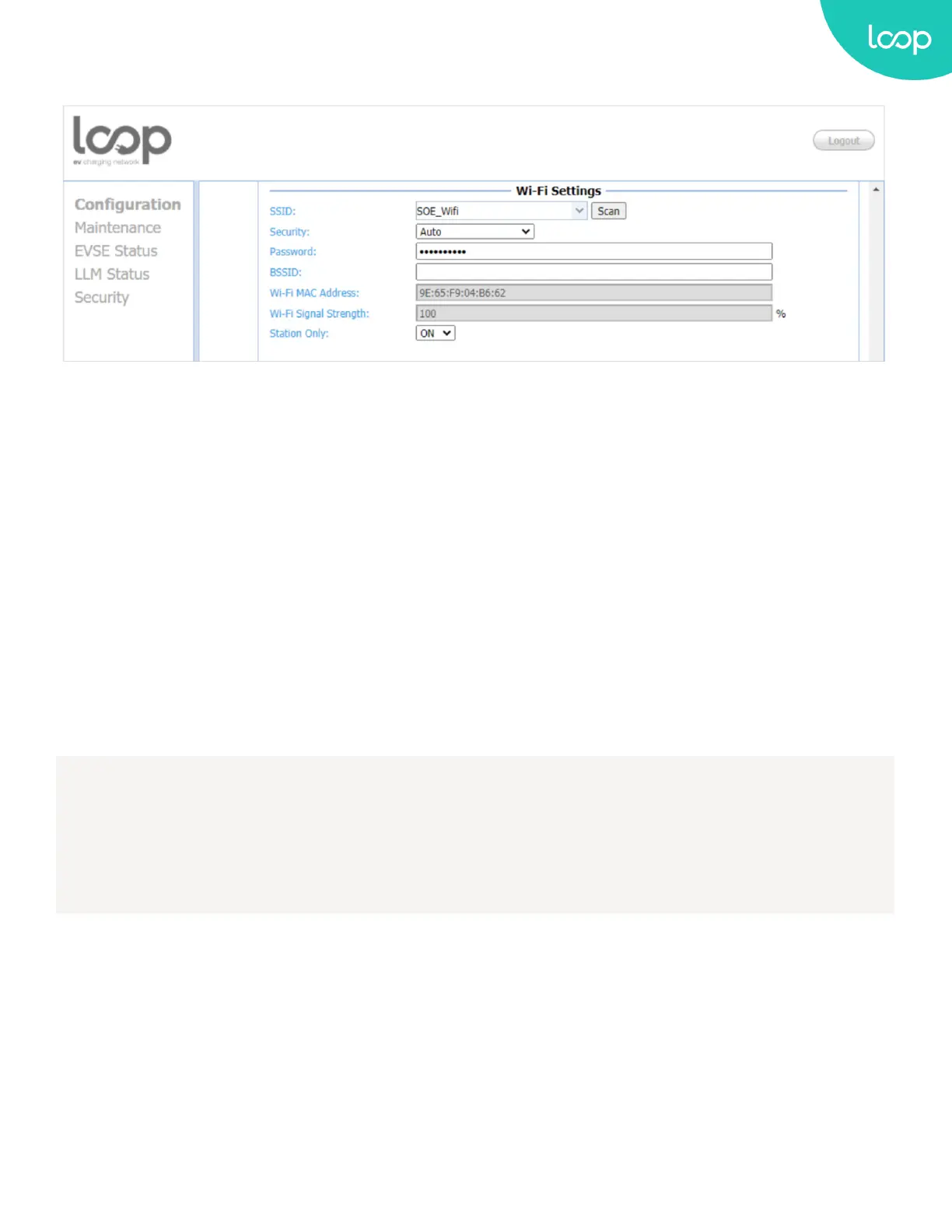
WiFi Settings
SSID: The SSID name of Wi-Fi Access Point. Press Scan button to scan and receive current detectable Wi-Fi signal.
Security: The encryption of Wi-Fi Access Point. Options are None, WEP, WPA-PSK, WPA2-PSK, WPA-PSK+WPA2-PSK
and Auto.
Password: The password of Wi-Fi Access Point.
BSSID: The MAC Address of Wi-Fi Access Point. If your Access Point is hidden SSID, please enter this address.
Wi-Fi MAC Address: Display Wi-Fi device hardware MAC address.
Wi-Fi Signal Strength: Display the wireless signal strength of Wi-Fi in percentage (%).
Station Only: If “Station Only” is ON, the charger will stay in station mode always. If “Station Only” is OFF, it will go
into AP mode after 5 times retrying to connect the external Wi-Fi AP.
Note:
The Station Only option only work if remote control type is OCPP. If the remote control type is APP > it
keeps original behavior (retry 5 times and go to AP mode) no matter what Station Only option selected.
44
Loop EV-Flex
TM
EVSE
EVS-32A-L2-001 (R-Model)
v.20.9.4
www.evLoop.io


 To Next Page