16
PALESTRA CONFIGURATION
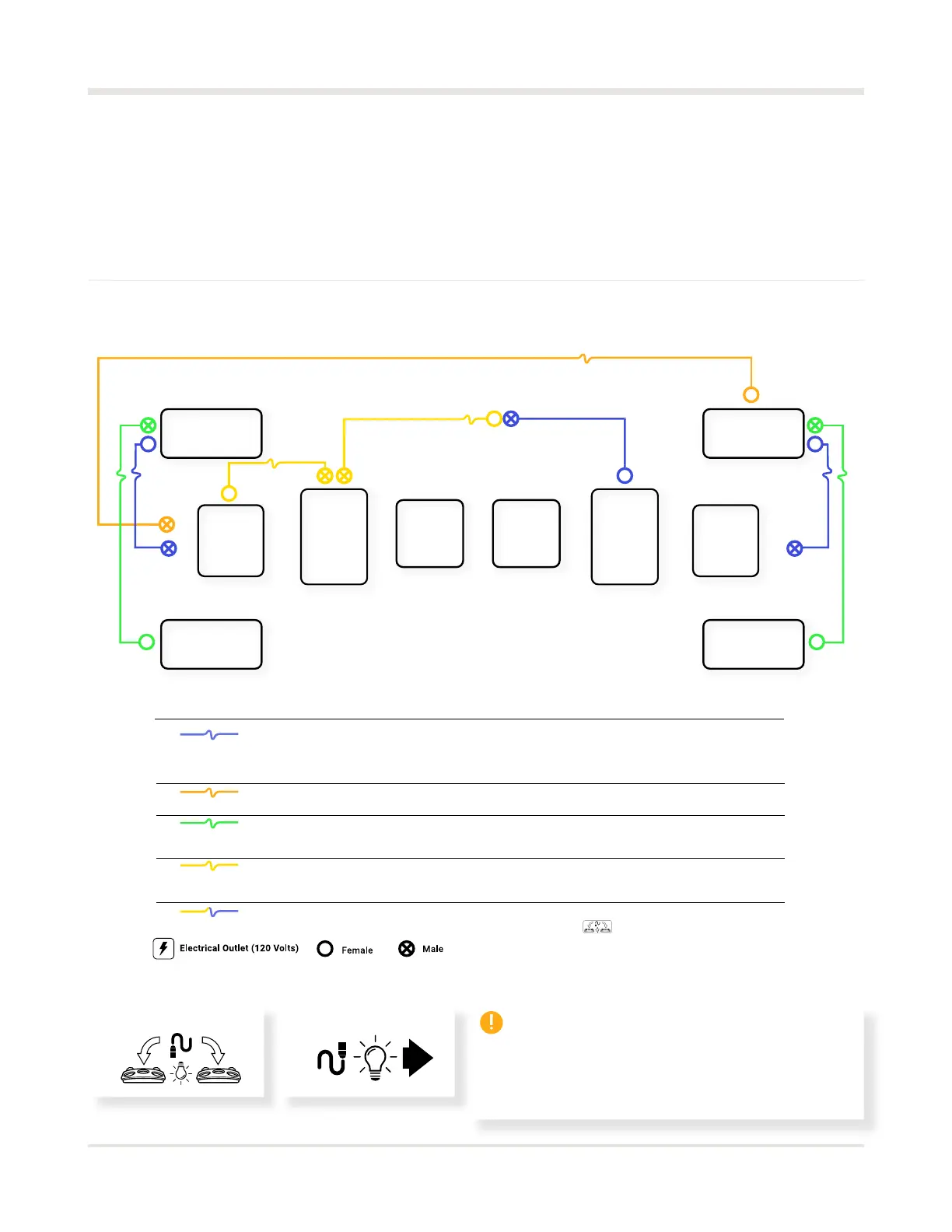
DÜO wiring diagram
Top view
Use the ÜNO wiring diagram to connect the projector, light and sound, camera,
and Heart modules.
Interconnect the two light modules following this diagram.
01
02
01
02
03
04
05
04
05
02
03
01
03
01
DMX 15’ (4,5 m) cable
XLR 50' (15,24 m) Sound cable
XLR 25’ (7,62 m) Sound cable
DMX 30’ (9,14 m) cable
DMX 30’ (9,14 m) cable + DMX 15’ (4,57 m) cable
Top view
Connect a 15′ DMX cable from SpeakerA to the adapter in the
audio out of the primary computer (marked with a red sticker).
Repeat on the other side with the secondary unit between
the Computer and SpeakerC.
Connect the 50′ XLR cable from the computer’s black audio OUT
port to the secondary unit’s free audio IN port.
Connect a 25′ XLR cable from SpeakerA’s audio OUT port
to SpeakerB’s audio IN port. Next, connect a 25′ XLR cable from
SpeakerC’s audio OUT port to SpeakerD’s audio IN port.
Connect the first 30′ DMX cable from the OUT port of the primary
unit’s Heart module to the in port of the primary unit’s light module.
Next, plug a 25′ XLR cable into the top OUT port.
Plug the second 30′ DMX cable into the OUT port of the primary
unit’s light module with the remaining 15′ DMX cable.
Once both DMX cables are connected (30′+15′), plug it into the IN
port of the secondary unit’s lighting module.
Secondary unit
Lighting
Secondary unit
Projector
Master unit
Projector
Master unit
Ligting
Secondary unit
Heart
Master unit
Heart
Speaker A
Speaker B Speaker D
Speaker C
IMPORTANT
Both computers must be connected to the same
network for the DÜO system to work. There
should be only one DÜO system per network.
Male Female



 To Next Page